A Frontend Web Developer’s Guide To Testing – Book Summary

In April 2022, I have published my 4th book which is 100% focused on how frontend web application developer’s can leverage the wide plethora of test automation frameworks that continuously evolve and provide more and more capabilities.

The book is available on Packt website (my publisher) as well as on Amazon and other book stores globally. I got great feedback so far from the community both on the importance of this book to practitioners, as well as the specific content. The book was reviewed by Bruno Bosshard with the foreword written by Gleb Bahmutov who’s one of the core leaders of Cypress in the marketplace.

Book Structure

The book consists of 3 main sections:

Section 1: Fundamentals of Web App Testing

This sections has the following main chapters and it offers structured approach to building a solid testing strategy across all methodologies – Exploratory, Functional, Performance, API, Accessibility, and more.

  1. Cross-Browser Testing Methodologies
  2. Challenges Faced by Frontend Web Application Developers
  3. Top Web Test Automation Frameworks
  4. Matching Personas and Use Cases to Testing Frameworks
  5. Introducing the Leading Frontend Web Development Frameworks

Section 2: Continuous Testing Strategy for Web App Developer’s

This section provides an overview of the criteria that frontend web application developers should look for when choosing a test automation framework, and specifically look into test coverage strategy for web apps.

  1. Map the Pillars of a Dev Testing Strategy for Web Applications
  2. Core Capabilities of the Leading JavaScript Test Automation Frameworks
  3. Measuring Test Coverage of the Web Application

Section 3: Frontend JavaScript Web Test Automation Framework Guides

The final section of the book dives deeper into the features and differences across the 4 leading web application testing frameworks, and concludes the section with an overview of some low-code testing tools that are derived from some of these testing frameworks.

  1. Working with the Selenium Framework
  2. Working with the Cypress Framework
  3. Working with the Playwright Framework
  4. Working with the Puppeteer Framework
  5. Complementing Code-Based Testing with Low-Code Test Automation

Overview of What’s Changing within Web Application Testing?

While writing the book i already became aware of few main trends that in my opinion will shape the future of the testing practice over the next few years.

  • Leveraging CDP to enhance test automation coverage, auditing of performance, network traffic and accessibility.
    • Selenium 4 added support for this rich protocol
    • Playwright and Puppeteer are build on top of CDP
    • Cypress integrates with CDP to benefit from its core features
  • Introduction of the modern concept of Component Testing!
    • Cypress version 10 officially supports Component Testing that allows isolation of a web application component for more rigor and focused testing.
    • Latest Playwright release also starts referring to component testing
Cypress Component Testing of React App (source: Cypress Blog)
  • Built-in low-code abilities within code-based testing frameworks
    1. Selenium 4 introduces a revamped version of the Selenium IDE
    2. Playwright offers its Code-Gen test recorder
    3. Cypress integrates with the Chrome browser recorder
  • Community contributions and Plugins!
    • Open source software can only grow through its communities and the level of engagement and support that such tools receive. With all of the above frameworks we see tremendous communities that provide real-time support through slack, gitter, Discord, GIT code sample, and a lot of customized plugins. With these plugins, test frameworks like Cypress, selenium, playwright and puppeteer enhances their features to cover visual testing, integrate with CI servers, accessibility testing, code coverage, API testing, CDP integration, and much more.

Bottom line

I do hope that this book will provide value to any frontend web application developers and test automation engineers, and serve them for the coming years. The digital transformation continues to evolve with modern web apps like progressive web apps (PWAs), responsive web (RWD), Flutter, and others. With such mature testing tools, practitioners are in a great place today to cover many of the sophisticated use cases, and eliminate bugs earlier in their software iterations.

Happy Testing!
Codeless Web Application Testing with Cypress Studio and Playwright CodeGen

While the code-based web application testing framework had significantly advanced over the past years, and both the competition between the leading frameworks as well as the richness of offering these frameworks provide grew, we have also experienced another interesting trend in this landscape – codeless capabilities.

Out of many solutions, I have decided to look into the rising Cypress Studio (Beta) and Playwright CodeGen tools to review their low-code abilities. Note that there are more mature commercial solutions in the market like Perfecto Codeless and Testim, however, here we will focus on the 2 open-source frameworks.

Before diving into these tools, here are few of the capabilities that I would expect to find in a complete low code/no-code test automation solution

  • Coverage of most testing types including functional, performance, accessibility, APIs, and more.
  • Parallel and scalable testing abilities like we have with Selenium Grid within cloud providers or in the open-source.
  • Ability to import code module into the codeless frameworks and export codeless created script into code like JavaScript.
  • Test reporting and analysis with rich artifacts and with abilities to slide and dice test data
  • Integrability into DevOps and CI/CD tools like Jenkins, GitHub Actions, and more
  • Ease of use and quick ramp up with the tool
  • Strong community, support, and documentation

Since both Cypress and Playwright are emerging frameworks, both cannot cover all of the above capabilities, however, they can provide some impressive test creation features. Note that the 2 frameworks are different by definition.

Cypress is a JavaScript only framework that runs inside the browsers with rich debugging and functionalities. Playwright is a chrome debugger protocol (CDP) framework that is led by Microsoft and through its architecture can support more language bindings and more browsers including WebKit Safari that isn’t supported yet by Cypress.

Playwright CodeGen (Test Generator)

Once you install Playwright Node library following the below commands, by definition you get the CodeGen library.

npm i -D @playwright/test

By running the following command from your local Playwright installation folder within your IDE terminal (in my case VS Code), you launch the test generator tool and can record any action on your web application that in parallel generates JavaScript test code.

npx playwright codegen http://continuoustesting.dev

npx playwright install

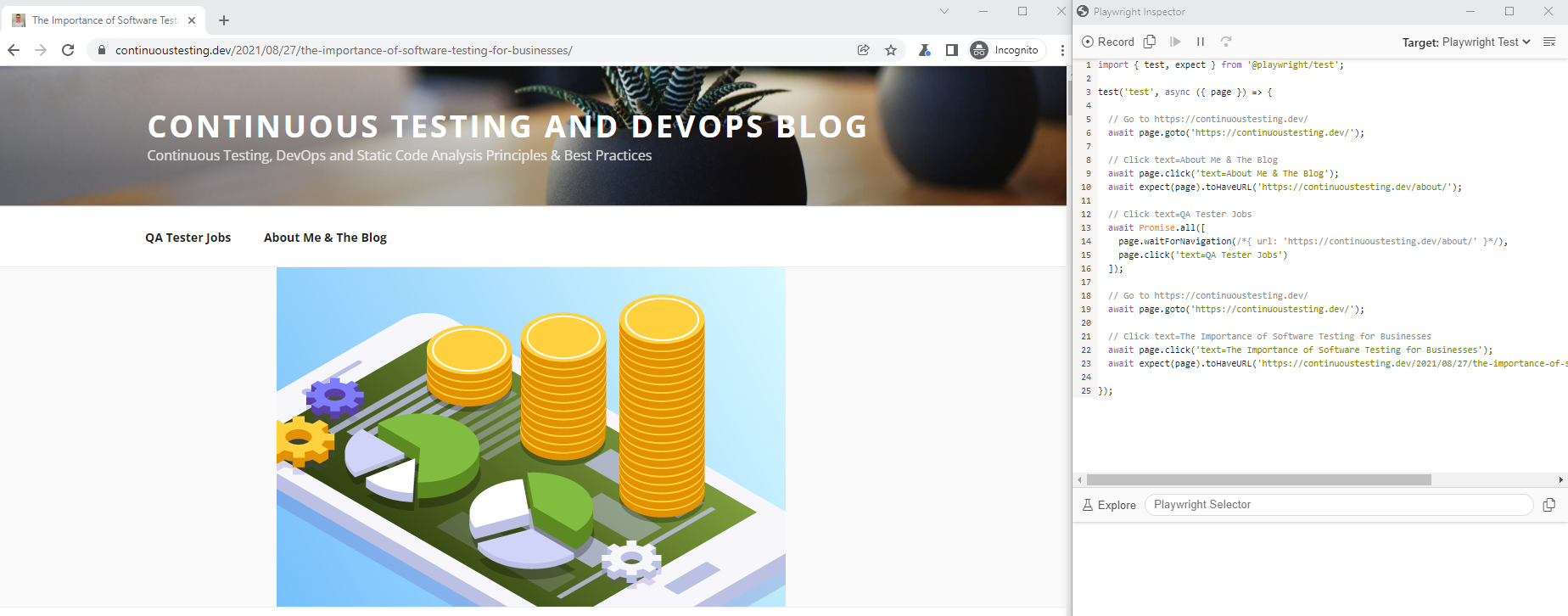
As you can see in the above recorded test code, it navigates to my blog webpage and performs some basic navigation and clicks on different links and menus. The generated code can than be exported and saved in different language bindings including the native Playwright Test, Java, JavaScript, Python, and C#.

Another cool feature of the Playwright CodeGen tool is the Explore button. This capability enables developers to mouse hover the web application under tests and inspect the elements via the Playwright Selector. When selecting an element from the tool you can than copy it into your IDE test code and proceed with your test creation. In addition, you can record, than stop, and continue recording few times as long as the tool is still running. Lastly, you can do basic debugging of your recorded test from the Playwright Inspector CodeGen tool through stepping over, execution stop and more.

Cypress Studio (Beta)

Like with Playwright, the codeless recorder tool is built into Cypress, but needs to be enabled through a command added to the cypress.json configuration file. Note again, this tool is still in an experimental stage and in beta as this blog is being written.

To start using the tool, simply enable it by adding the following line to your cypress.json file:

{ "experimentalStudio": true  }

From this moment, the tool is enabled, and when you run Cypress in GUI mode through

npx cypress open

You can than edit an existing JavaScript test spec file and click on the red recording button to inject recorded test code into your script, or build a whole new project. Cypress documentation recommends cloning their built-in GitHub repository and using the following JavaScript test spec as a ‘getting started’ project (https://github.com/cypress-io/cypress-realworld-app/blob/develop/cypress/tests/demo/cypress-studio.spec.ts)

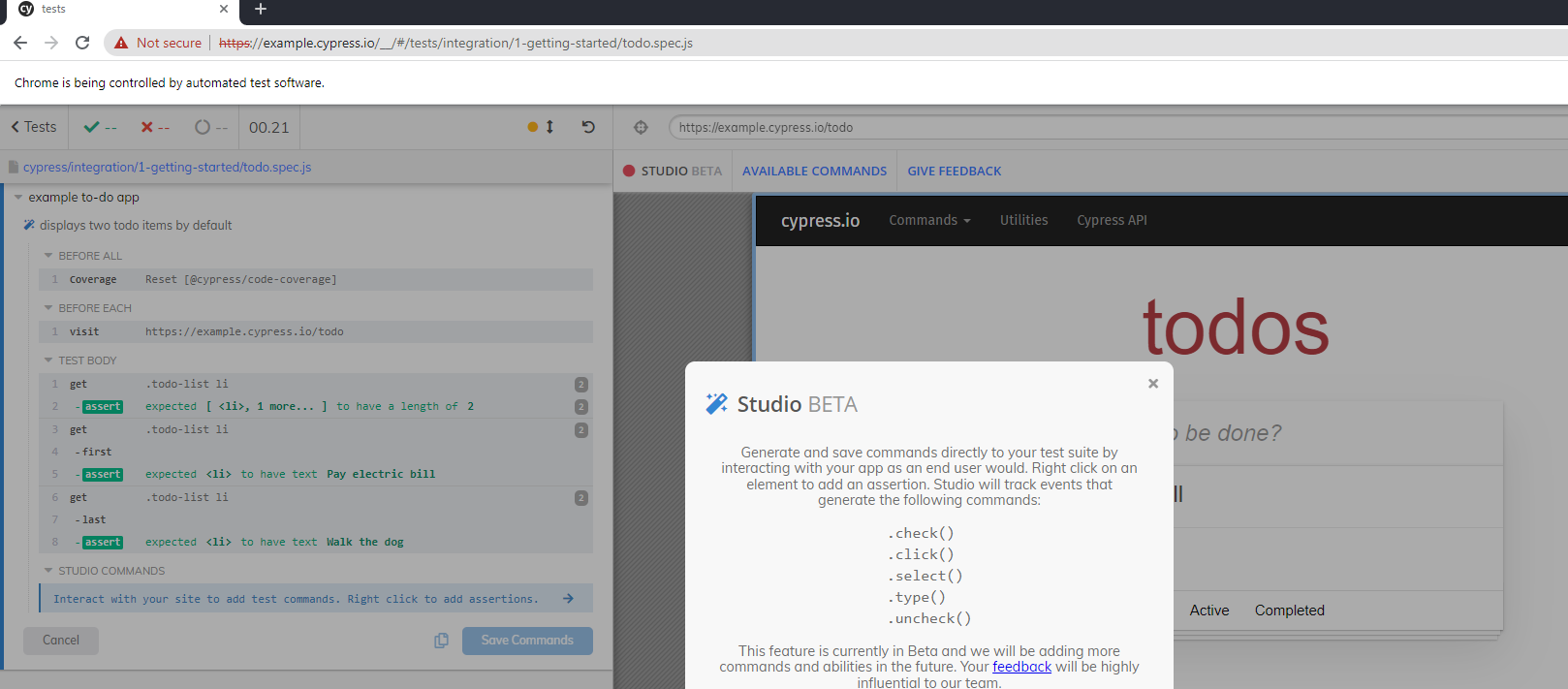
As you can see from the above screenshot, once the Cypress Studio is enabled, editing a test step triggers the Cypress Studio button where you can add new commands to you test. As of now, 5 main test commands are supported by the tool – Check, Click, Select, Type, and Uncheck.

As mentioned above, you can create a brand new test through the recorder or add new code into an existing spec file.

I ran the tool and added a simple exploratory test into the built-in test spec called todo.spec.js that comes with the Cypress open-source framework, below is the generated JavaScript code.

Key Takeaways

It is clear from my quick overview of both codeless tools that they are only in the beginning and that there is potential to grow and add more of the above core capabilities of a fully ready test automation framework. Since these two tools are provided for free and in early stages, we shouldn’t complain, but rather embrace, and provide feedback to the owners of these frameworks to improve.

Advantages of Playwright CodeGen:

  1. More language bindings to export the created code
  2. More browsers to run the tests on
  3. The Explore object spy is quite easy to use
  4. Tool is separated from the basic code-based GUI

Disadvantages of Playwright CodeGen:

  1. Hard to debug tests
  2. Limited test creation of the tool, no automated assertions
  3. No documentation and examples to get started with

Advantages of Cypress Studio

  1. Easy to use from the Cypress GUI tool
  2. Friendly debugging tool
  3. Richer test creation abilities
  4. Good documentation and sample project to help ramp up

Disadvantages of Cypress Studio

  1. Limited test creation and assertion within the tool
  2. Only exports to JavaScript
  3. No support for all browsers (Safari WebKit)

Bottom Line

The 2 tools are a great start and an optimistic horizon for codeless tools complementing code based tools. Both are still growing and there are many gaps to close before they can be self-served by front-end developers and SDETs, however, they provide a sing for the future of intelligent test automation and this is promising. We should continue following the evolution of these tools including the newly Selenium IDE within Selenium 4 and continuously provide feedback to the communities to grow and build these tools right.