DevOps Outsourcing Guide: How It Works, Challenges & Strategy

Guest Blog by : Harikrishna Kundariya, eSparkBiz Technologies

In today’s fast world of digitalization, constant pressure is put upon businesses to produce quality products at the right time and in the most efficient manner. Adopting DevOps would bring together both sides: development and IT operations for improved collaboration, automation, and eventually, efficiency in software delivery. However, outsourcing these DevOps functions can work well for most companies, particularly those that lack resources. This DevOps outsourcing guide will define how it works, the challenges involved, and finally, the strategy for a successful outsourcing partnership.

What is DevOps Outsourcing?

DevOps outsourcing is an agreement where a part of the functions or processes related to DevOps is outsourced to other third-party service providers, who are usually DevOps companies or teams specialized in this kind of management. This is the outsourcing of DevOps by the company, which would make the companies focus mainly on their core business activity without keeping an in-house team for DevOps but attains the latest tools and technologies.

Why DevOps Outsourcing?

Outsourcing DevOps gives various advantages to a business. The main advantages are that:

Economically Efficient: House-built DevOps teams often have a high cost for recruitment and building up the staff. Outsourced arrangements allow businesses to pay only for the service that they need them to offer and avoid overhead costs altogether.

Specialized Knowledge Access: DevOps is a space that demands knowledge in various tools, technologies, and best practices. Outsourcing will make available a readymade team of experts who keep themselves updated on trends and the latest technology in the market.

Scalability and Flexibility: Outsourcing is a very easy way to upscale or downscale according to needs. Be it for some short-term or any long-term collaboration, firms can upscale resources.

Faster Time-to-Market: DevOps practices include continuous integration and continuous delivery, which enable faster cycles of development. Outsource these and it is possible to deliver software in a much quicker time frame and time-to-market.

Focus on core competencies: Organizations can concentrate on their core business competencies, such as developing products, providing customer services, or marketing, and sending the technical complexities to professionals.

How Does DevOps Outsourcing Work?

The outsourced DevOps may be a shared relationship between the business and the service provider of the third party. The engagement process includes:

1. Appraisal and Planning

Both parties have to analyze the present DevOps practices, infrastructure, and goals of the organization before they begin the outsourcing engagement. The business has to decide what it wants to outsource, like continuous integration, infrastructure management, cloud computing, etc., and then communicate its requirements to the DevOps provider clearly.

In this stage, the provider also examines the current development and operation processes of the organization to understand its pain points and bottlenecks. Once they have done that, they can create a strategy for the adoption of DevOps practices.

2. Tool and technology selection

Outsourcing DevOps refers to the choice of a set of tools and technologies selected to meet the organization’s needs. The third-party service provider will propose the relevant tools for automation, continuous integration, monitoring, version control, containerization, etc. The choice may depend upon the complexity of the project so that the third-party vendor may suggest open-source options, commercial tools, or a combination of both options.

3. Implementation and Integration

After selecting the right tools, the outsourcing team starts the implementation and integration of DevOps practices into the existing business infrastructure. This may include the implementation of the CI/CD pipeline as well as automating previously manual processes or cloud services management, thus creating smooth and continuous processes of development and deployment where the organization can release its software faster and more securely.

4. Monitoring and Continuous Improvement

DevOps is the process through which the outsourcing provider always keeps monitoring the software and the infrastructure for optimal performance post the initial implementation. This would include tracking application performance, server health, and so on with monitoring tools. The provider improves and optimizes the system based on the insights obtained through the metrics by making constant improvements.

5. Team and communication

Good communication and collaboration are the secret of any outsourcing relationship’s secret. Both business and provider should remain in touch, with regular updates with meetings and feedback loops over the DevOps outsourcing to help in addressing all problems that come up and that also ensures that the teams keep in line with the goals and timelines of the project.

Challenges of DevOps Outsourcing

While outsourcing DevOps brings several benefits, the same thing comes with a set of challenges. With outsourcing, some issues should be addressed before businesses seek the services of an outsourcing partner.

1. Quality Control and Accountability

The most critical issue with outsourcing DevOps is loss of quality control. Since the set of processes and tools is infinitely complex, it becomes too challenging to check if the outsourced team upholds the organization’s standards. A clear need for this exists, and then implementation should be done with consistent follow-through, like regular monitoring of the provider’s work, to uphold the quality.

2. Security Threats

Outsourcing DevOps means the third party gets sensitive data and systems, which raises serious security and data privacy issues. Thus, a good outsourcing partner who practices best security practices and complies with appropriate data-protection regulations, such as GDPR, HIPAA, etc., must be selected.

3. Cultural and Communication Barriers

An external team working from another time zone or region introduces cultural and communication barriers, which can influence the team’s collaboration on the project and delay timelines. Business needs to develop clear communication channels, have frequent check-ins, and ensure that both teams are on the same page concerning the project goals and timelines.

4. Loss of Control

Sometimes, the most obvious risk of outsourcing is loss of control over development. With the business now depending on an external team for most of its essential operations, it may get disoriented from the grass-roots work. As such, businesses should not only ensure open lines of communication and regular feedback, but the provider should be aligned with the organization’s vision as well.

5. Integration into existing systems

Integrating outsourced DevOps practices into the organization’s existing infrastructure is rather difficult when legacy systems are involved. Businesses have to collaborate closely with the provider to integrate them as seamlessly as possible and minimize disruption to existing workflows.

Strategies for Successful DevOps Outsourcing

Despite all such challenges, business companies should maximize DevOps outsourcing while at the same time taking full steps to minimize any difficulty involved.

1. Goals and expectations should be clearly defined

The first step of any outsourcing relationship is clear objectives. Businesses should define well what they expect to see from DevOps outsourcing or how fast the software delivery shall be, quality improvement, or cost reduction. These shall be communicated to the outsourced service provider to be matched with them.

2. Choosing the Ideal Partner

The right DevOps outsourcing partner can make or break a project. Ideally, choose a provider who has implemented DevOps solutions to other organizations and specializes in the industry where your business is present. A provider will be able to express better how they have handled technically proficient solutions that integrate DevOps practices as well as experience in similar business conditions.

3. Establish Strong Communication Networks 

One effective principal key into outsourcing is communication that remains opened through an update and by calls done within regular meetings shared by various parties. And here might be the route for exploitations through using services offered by Slack and even a Microsoft Team alongside many of the project apps in conducting communications from other time zones across continents leading to widespread connectivity.

4. Security and compliance based on principles

Outsourced DevOps should not compromise security issues. All the requirements related to security should be discussed with the outsourcing provider and the user, which will be established in advance. Outsourcing providers must have the industry best practices for the protection of data so should not breach data confidentiality and may face non-compliance cases.

5. Measure performance and set metrics tracking 

There would also be a monitoring requirement from the outsourced DevOps team to keep the project on track. There will be clear KPIs and metrics set to gauge the success of the engagement. The metrics would often be reviewed to establish any grounds of improvement and changes will thus be implemented. 

Conclusion

Outsourcing is a valuable option for any organization seeking to streamline its software development processes, reduce costs, and gain access to specialized expertise. As a result, this outsourced model enables organizations to hire DevOps engineers who are masters at automation, continuous integration, continuous delivery, infrastructure as code, monitoring, and other key DevOps practices. If one knows how it works, is aware of the challenges, and uses the right strategies, then businesses will successfully use DevOps outsourcing in the delivery of software faster and more efficiently. The key to success would be finding the right outsourcing partner, keeping clear communication, and keeping long-term goals and continuous improvement in mind.

Written By :  Harikrishna Kundariya 

Harikrishna Kundariya, a marketer, developer, IoT, Cloud & AWS savvy, co-founder, Director of eSparkBiz Technologies. His 14+ years of experience enables him to provide digital solutions to new start-ups based on IoT and SaaS applications.

Cutting-Edge Automation Testing Techniques for Web Platforms

Guest Blog by : Mit Thakkar, KiwiQA

Introduction

Software testing is an integral process of the software development lifecycle. The online business landscape is evolving continuously, and software developers cannot compromise on speed. Developers and software development firms must focus on consistent and fast release of products to the market.

At the same time, the software testing process has to be repeated multiple times to ensure quality of software solutions. In such cases, automation testing comes to the rescue by helping developers maintain pace with the emerging trends for agile development.

Automation testing focuses on using software tools and scripts for executing pre-defined test cases and automatic verification of outcomes in specific use cases. The importance of automation testing revolves around improving the speed, efficiency, and accuracy of the software development process through the automation of repetitive and time-intensive manual testing processes.

During the 1990s, the web browser concept gained attention. Software testing was primarily a manual task that involved the use of ad-hoc methods for checking errors. Test automation became a reality only in the 2000s, with the rising prominence of Selenium and WebDriver projects for tackling multi-device and cross-browser testing challenges. The two projects became one in 2011 with the creation of Selenium WebDriver, which subsequently turned into a W3C standard in 2018.

One of the earliest practical implementations of automation testing techniques can be traced to the Automated Test Engineer or ATE system by IBM in the 1970s. Over the years, automation testing techniques have evolved from the traditional record and playback models to AI and ML. The evolution of automation testing techniques started with the introduction of functional and regression testing.

It also focused on data-driven and keyword-focused training alongside test automation frameworks. The recent stage in the development of automation testing points to the growing preference for agile and DevOps. AI and ML have also emerged as promising tools for revolutionizing automation testing.

Why Automation Testing for Web Platforms is Crucial?

Automated software testing services is an integral necessity for web platforms as it could help in adapting to the dynamic nature of web technologies. The evolution of web technologies calls for radical shifts in the quality and usability of software solutions for the target audience. Therefore, automation testing could help in the accurate and efficient evaluation of errors before deploying web platforms.

  • Increased Need for Speed in Software Development Cycles

Software development is no longer a unique initiative restricted to a few elite companies. Every business wants to make an impact in the continuously changing dynamics of the online business environment. Automated testing could help in increasing the speed of software development cycles alongside ensuring accurate identification of errors.

  • Delivering a Seamless User Experience

The most important value advantage of automated software testing is the potential for improving software quality by expanding the range of tests. Automated testing could help in running multiple use case scenarios simultaneously, which helps in identifying errors that could be unnoticed in manual testing. As a result, automated testing could help in creating solutions that offer a seamless user experience.

Traditional vs. Cutting-Edge Automation Testing Techniques

The journey of traditional automation testing techniques started with recording and playback tools. Subsequently, functional and regression testing evolved to check the functionality of the software and the impact of new changes on existing functions. Then, data-driven and keyword-based testing showcased the benefits of using scripts for creating tests. Gradually, the traditional methods gave way to the rise of test automation frameworks and AI and ML-based testing tools.

Why The Shift to Cutting-Edge Techniques Is Essential?

The shift to cutting-edge automation testing techniques is essential for adapting to the emerging changes in the technology landscape. New web technologies and emerging trends in consumer behavior have spurred massive modifications in the world of technology. As the demand for seamless user experiences continues building up, it is reasonable to think of cutting-edge automation testing techniques that can keep pace with emerging trends.

Latest Automation Testing Techniques

The automation testing market could achieve an impressive annual growth rate of 15% over the period from 2023 to 2032. With a market capitalization of more than $20 billion USD, it is clearly evident that the global automation testing market has been expanding at an impressive pace.

Latest automation testing techniques, such as scriptless automation testing, blockchain testing, unified test management platforms, platform engineering, and API simulation, have gained considerable popularity in recent times. Let us take a look at some of the prominent automation testing techniques that have made a formidable impact now.

1. Visual Validation Testing

Visual validation testing or visual regression testing is a process of checking whether specific visual aspects of the user interface of an application are suitable for the users. The primary aim of visual validation testing is the verification of the correctness of content and data displayed on the front end of an application. Furthermore, visual validation also verifies the layout, appearance, and presence of visual elements on the user interface as well as the whole UI.

  • Tools And Technologies for Visual Validation

Some of the popular tools used for visual validation include Kobiton, Lambda Test, Applitools, Chromatic, Percy (Browser Stack), and SMARTBEAR. Apart from these premium tools, you can also explore free, open-source tools such as BackstopJS, Depicted, Viff, and CSS Critic.

  • Benefits and Challenges

The most promising advantages of visual validation testing include faster detection of bugs, code reduction, faster implementation, and lower workload for testers. In addition, designers would find valuable feedback which can help in improving UI quality. However, visual validation testing also comes with certain challenges, such as inconsistencies among different testers. On top of it, the need for maintaining the automated test cases can impose a formidable challenge for visual validation.

2. AI and Machine Learning in Test Automation

AI could help in producing automated tests with more precision. The most important role of AI in improving test automation is the training phase. During the training phase, machine learning models would go through training on a particular organizational dataset. In addition, some tools also feature pre-trained models updated on a frequent basis by utilizing continuous improvement for specific applications. The advantage of AI-powered test generation is that it helps in developing a test plan according to the desired use cases and strategy.

  • Predictive Analytics in Testing

Artificial intelligence and machine learning could utilize predictive analytics to identify different features for testing. In addition, it also helps in creating specific test plans without human intervention. On top of it, automation testing teams could leverage ML and AI to improve their testing strategies. Predictive analytics could offer insights for optimizing test suites through the removal of unwanted test cases and emphasizing optimal test coverage.

  • Adaptive Test Maintenance

AI and machine learning also offer the advantage of adaptive test maintenance, as developers and testers could find faster feedback reports on the working of test cases. Machine learning or AI could help in increasing the overall depth and scope of tests without affecting overall improvements in software quality. Artificial intelligence helps in improving test automation by removing the need for continuously tracking the changes. AI could support the auto-correction of tests to an extent, thereby ensuring the maintenance of all tests in one click.

3. Containerization and Test Automation

Docker is a popular software platform for building, testing, and deploying applications at a fast pace. It can help in packaging software into different standardized units, such as containers, which have all the components, such as libraries, runtime, system tools, and code. Containers are highly customizable software-defined environments that could host applications or services and have a formidable influence on software testing. For example, Docker can help in leveraging a combination of parallelization and automation to solve the problems emerging due to a lack of time and resources.

How Containerization Enhances Test Consistency?

Containerization helps in making software testing more consistent and predictable. It focuses on using the same environment, in the form of a container, for hosting your software during the testing process. The consistent application environment for software testing ensures consistency as the tests would show exactly how the application would run in production. You can find small differences between the container-based testing environment and the deployment environment. However, containerization helps in restricting the differences to a minimum level.

Containerization in automation testing could help in packaging all the dependencies and variables of an application in a single container. In addition, containers can also promote scalability by offering the flexibility for maintaining multiple test branches. Docker allows you to scale automated testing setups by spinning up or removing containers according to the requirements. Scalability serves as an essential factor for evaluating the performance of an application under different load scenarios.

4. Parallel and Distributed Testing

Parallel testing is the process that involves concurrent testing of multiple applications or different components of one application. The distinct highlight of parallel tests is that they contain two or multiple parts for checking separate features of applications. The different parts of parallel tests are executed simultaneously on independent computers. Furthermore, parallel testing could support a significant reduction in test time alongside increasing the efficiency of the testing process.

  • Tools for Distributed Test Execution

The popular testing tools for distributed testing include Selenium Grid and Apache JMeter. Selenium Grid is a powerful automated testing tool that supports distributed test execution alongside increasing the pace of the testing process. On the other hand, JMeter supports distributed testing with flexibility for running test plans across different systems and servers concurrently.

  • Speeding Up Test Cycles

Parallel testing could help speed up test cycles by ensuring easier management of workload and execution of test cases across different systems. In addition, distributed testing also removes the concerns of traditional testing methodologies by offering freedom from dependency on a single machine. Most important of all, parallel testing allows interaction between multiple test cases, which could lower the overall testing time.

5. Behavior-Driven Development (BDD) and Testing

Gherkin is a plain-text programming language with a simple structure that provides ease of learning even to non-programmers. However, the structure of Gherkin also enables a brief description of test scenarios alongside examples for highlighting business use cases in real-world domains.

It helps Cucumber developers define tests that could help product teams describe the requirements for new products. All the features in Gherkin are specified in a file and follow strict syntax. The syntax for the Gherkin language provides the foundation for Behavior-Driven Development or BDD.

  • Tools For Behavior-Driven Development

Cucumber is one of the popular tools in the domain of software testing, which supports Behavior-Driven Development or BDD. It can ensure promising improvements in software quality alongside reducing maintenance costs. On the other hand, SpecFlow works for defining, managing, and executing human-readable performance tests for .NET projects. It also supports BDD by creating comprehensible documentation for the software development lifecycle.

  • Collaborative benefits of BDD

BDD testing focuses on developing software that could address the requirements of all stakeholders alongside ensuring the highest quality standards. It encourages a collaborative approach, which is essential for modern software development methodologies. BDD testing could support collaboration between developers, testers, and business stakeholders. As a result, everyone in the development lifecycle could follow the business goals for creating an ideal solution.

How To Choose the Right Web Platforms For Automation Testing?

  • Factors to Consider

As the software market evolves with new demands, industry players should adapt to the emerging demands of quality. However, you should choose the right web platforms and tools for automation testing according to different factors. You must pay attention to different factors, such as compatibility of the platform and scalability.

  • Platform Compatibility

First of all, you must look for a web platform or testing tool that is compatible with different types of platforms and devices. You should find a testing tool or platform that helps you check the functionality and performance of an application on different platforms.

  • Scalability

You should look for a web platform for automation testing that offers the advantage of scalability. Automation testing platforms should offer the flexibility for adding or reducing resources required for testing according to your requirements. For example, Docker can support containerization, which allows easier modification of resources.

  • Community Support

One of the most distinctive highlights of a reliable web platform for automated testing is the assurance of community support. You must choose a platform that has an extensive community of developers and testers ready to share their knowledge with you. The availability of community support ensures that you don’t have to deal with every challenge in automated testing on your own.

  • Cost-effectiveness

Above everything else, you should pay attention to the cost of using the web platform for automated testing. You should check whether the web platform offers the desired functionalities for automated testing within your budget. On top of that, you should look for free trial versions to check the functionalities of an automated testing platform before choosing it for your development lifecycle.

Challenges in Implementing Cutting-Edge Techniques

  • Initial Setup and Learning Curve

The biggest challenge in the implementation of cutting-edge techniques for automated testing is the initial setup. Without any prior experience with a specific platform or tool for automation testing, you are likely to face confusion in setting up the tool. At the same time, your development and testing team would have to learn about the functionalities and settings of the tools and platforms before using them. Therefore, awareness and seamless onboarding could help in overcoming the initial friction for implementing cutting-edge techniques.

  • Integrating With Existing Systems

Another problem in the adoption of cutting-edge techniques for automated testing is the integration with existing systems. It is important to choose automation testing tools and platforms that offer compatibility advantages. On top of it, comprehensive training could also help in overcoming the barriers to integrating automated testing tools with existing systems.

Conclusion

Developers and testers should stay updated with the latest automation testing techniques to capitalize on the benefits of improved testing mechanisms. For example, new automation testing techniques could provide scalability and better scope for test coverage. In addition, automation testing techniques also boost software testing with new approaches like parallel or distributed testing. At the same time, you can also notice the impact of new technologies, such as AI and ML, on improvements in automation testing.

As the demand for automation testing techniques continues gaining momentum, you should prepare for the challenges that lie ahead. You can invest in continuous learning by exploring new tools and techniques for automation testing. If you want to prepare for the future of software testing, you should start learning more about automated testing right now.

Written By:

Mit Thakkar, Marketing Head at KiwiQA, offering Automation testing company. He drives the industry forward with his passion for excellence, crafting marketing strategies that effectively communicate the value of reliable software testing to businesses worldwide.

A Frontend Web Developer’s Guide To Testing – Book Summary

In April 2022, I have published my 4th book which is 100% focused on how frontend web application developer’s can leverage the wide plethora of test automation frameworks that continuously evolve and provide more and more capabilities.

The book is available on Packt website (my publisher) as well as on Amazon and other book stores globally. I got great feedback so far from the community both on the importance of this book to practitioners, as well as the specific content. The book was reviewed by Bruno Bosshard with the foreword written by Gleb Bahmutov who’s one of the core leaders of Cypress in the marketplace.

Book Structure

The book consists of 3 main sections:

Section 1: Fundamentals of Web App Testing

This sections has the following main chapters and it offers structured approach to building a solid testing strategy across all methodologies – Exploratory, Functional, Performance, API, Accessibility, and more.

  1. Cross-Browser Testing Methodologies
  2. Challenges Faced by Frontend Web Application Developers
  3. Top Web Test Automation Frameworks
  4. Matching Personas and Use Cases to Testing Frameworks
  5. Introducing the Leading Frontend Web Development Frameworks

Section 2: Continuous Testing Strategy for Web App Developer’s

This section provides an overview of the criteria that frontend web application developers should look for when choosing a test automation framework, and specifically look into test coverage strategy for web apps.

  1. Map the Pillars of a Dev Testing Strategy for Web Applications
  2. Core Capabilities of the Leading JavaScript Test Automation Frameworks
  3. Measuring Test Coverage of the Web Application

Section 3: Frontend JavaScript Web Test Automation Framework Guides

The final section of the book dives deeper into the features and differences across the 4 leading web application testing frameworks, and concludes the section with an overview of some low-code testing tools that are derived from some of these testing frameworks.

  1. Working with the Selenium Framework
  2. Working with the Cypress Framework
  3. Working with the Playwright Framework
  4. Working with the Puppeteer Framework
  5. Complementing Code-Based Testing with Low-Code Test Automation

Overview of What’s Changing within Web Application Testing?

While writing the book i already became aware of few main trends that in my opinion will shape the future of the testing practice over the next few years.

  • Leveraging CDP to enhance test automation coverage, auditing of performance, network traffic and accessibility.
    • Selenium 4 added support for this rich protocol
    • Playwright and Puppeteer are build on top of CDP
    • Cypress integrates with CDP to benefit from its core features
  • Introduction of the modern concept of Component Testing!
    • Cypress version 10 officially supports Component Testing that allows isolation of a web application component for more rigor and focused testing.
    • Latest Playwright release also starts referring to component testing
Cypress Component Testing of React App (source: Cypress Blog)
  • Built-in low-code abilities within code-based testing frameworks
    1. Selenium 4 introduces a revamped version of the Selenium IDE
    2. Playwright offers its Code-Gen test recorder
    3. Cypress integrates with the Chrome browser recorder
  • Community contributions and Plugins!
    • Open source software can only grow through its communities and the level of engagement and support that such tools receive. With all of the above frameworks we see tremendous communities that provide real-time support through slack, gitter, Discord, GIT code sample, and a lot of customized plugins. With these plugins, test frameworks like Cypress, selenium, playwright and puppeteer enhances their features to cover visual testing, integrate with CI servers, accessibility testing, code coverage, API testing, CDP integration, and much more.

Bottom line

I do hope that this book will provide value to any frontend web application developers and test automation engineers, and serve them for the coming years. The digital transformation continues to evolve with modern web apps like progressive web apps (PWAs), responsive web (RWD), Flutter, and others. With such mature testing tools, practitioners are in a great place today to cover many of the sophisticated use cases, and eliminate bugs earlier in their software iterations.

Happy Testing!

Codeless Web Application Testing with Cypress Studio and Playwright CodeGen

While the code-based web application testing framework had significantly advanced over the past years, and both the competition between the leading frameworks as well as the richness of offering these frameworks provide grew, we have also experienced another interesting trend in this landscape – codeless capabilities.

Out of many solutions, I have decided to look into the rising Cypress Studio (Beta) and Playwright CodeGen tools to review their low-code abilities. Note that there are more mature commercial solutions in the market like Perfecto Codeless and Testim, however, here we will focus on the 2 open-source frameworks.

Before diving into these tools, here are few of the capabilities that I would expect to find in a complete low code/no-code test automation solution

  • Coverage of most testing types including functional, performance, accessibility, APIs, and more.
  • Parallel and scalable testing abilities like we have with Selenium Grid within cloud providers or in the open-source.
  • Ability to import code module into the codeless frameworks and export codeless created script into code like JavaScript.
  • Test reporting and analysis with rich artifacts and with abilities to slide and dice test data
  • Integrability into DevOps and CI/CD tools like Jenkins, GitHub Actions, and more
  • Ease of use and quick ramp up with the tool
  • Strong community, support, and documentation

Since both Cypress and Playwright are emerging frameworks, both cannot cover all of the above capabilities, however, they can provide some impressive test creation features. Note that the 2 frameworks are different by definition.

Cypress is a JavaScript only framework that runs inside the browsers with rich debugging and functionalities. Playwright is a chrome debugger protocol (CDP) framework that is led by Microsoft and through its architecture can support more language bindings and more browsers including WebKit Safari that isn’t supported yet by Cypress.

Playwright CodeGen (Test Generator)

Once you install Playwright Node library following the below commands, by definition you get the CodeGen library.

npm i -D @playwright/test

By running the following command from your local Playwright installation folder within your IDE terminal (in my case VS Code), you launch the test generator tool and can record any action on your web application that in parallel generates JavaScript test code.

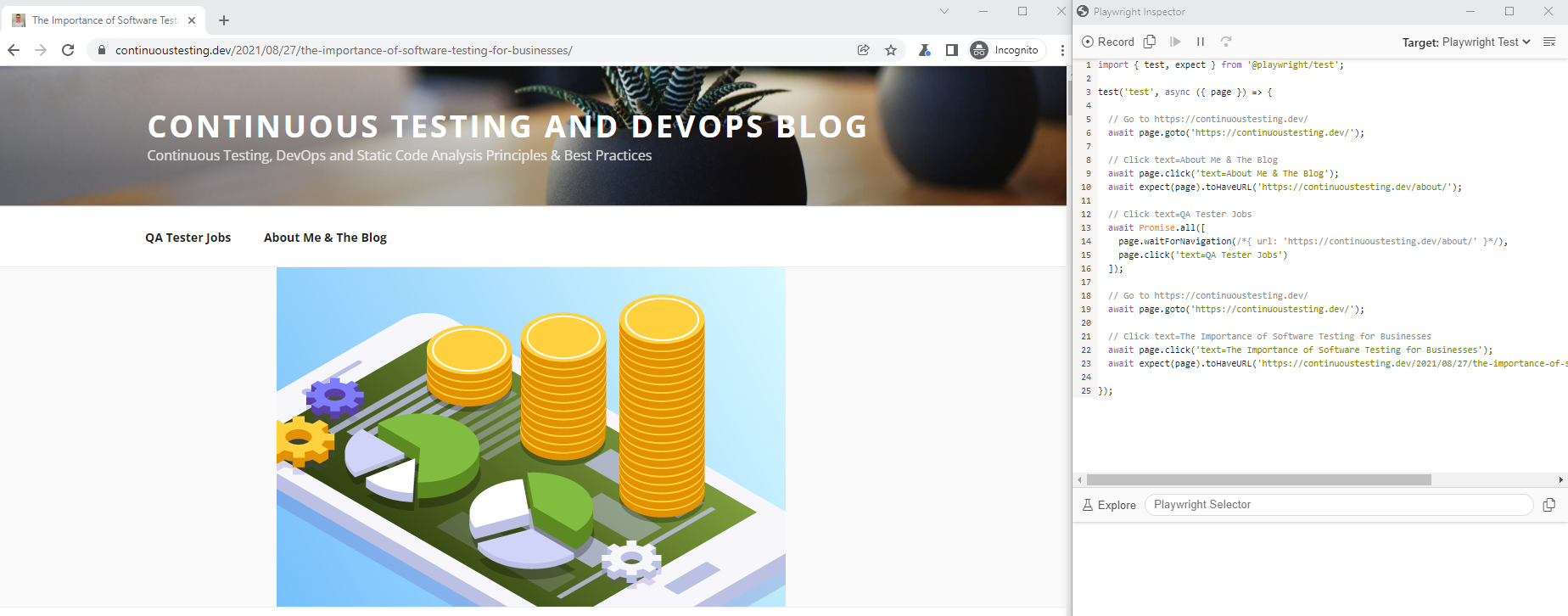
npx playwright codegen http://continuoustesting.dev

npx playwright install

As you can see in the above recorded test code, it navigates to my blog webpage and performs some basic navigation and clicks on different links and menus. The generated code can than be exported and saved in different language bindings including the native Playwright Test, Java, JavaScript, Python, and C#.

Another cool feature of the Playwright CodeGen tool is the Explore button. This capability enables developers to mouse hover the web application under tests and inspect the elements via the Playwright Selector. When selecting an element from the tool you can than copy it into your IDE test code and proceed with your test creation. In addition, you can record, than stop, and continue recording few times as long as the tool is still running. Lastly, you can do basic debugging of your recorded test from the Playwright Inspector CodeGen tool through stepping over, execution stop and more.

Cypress Studio (Beta)

Like with Playwright, the codeless recorder tool is built into Cypress, but needs to be enabled through a command added to the cypress.json configuration file. Note again, this tool is still in an experimental stage and in beta as this blog is being written.

To start using the tool, simply enable it by adding the following line to your cypress.json file:

{ "experimentalStudio": true  }

From this moment, the tool is enabled, and when you run Cypress in GUI mode through

npx cypress open

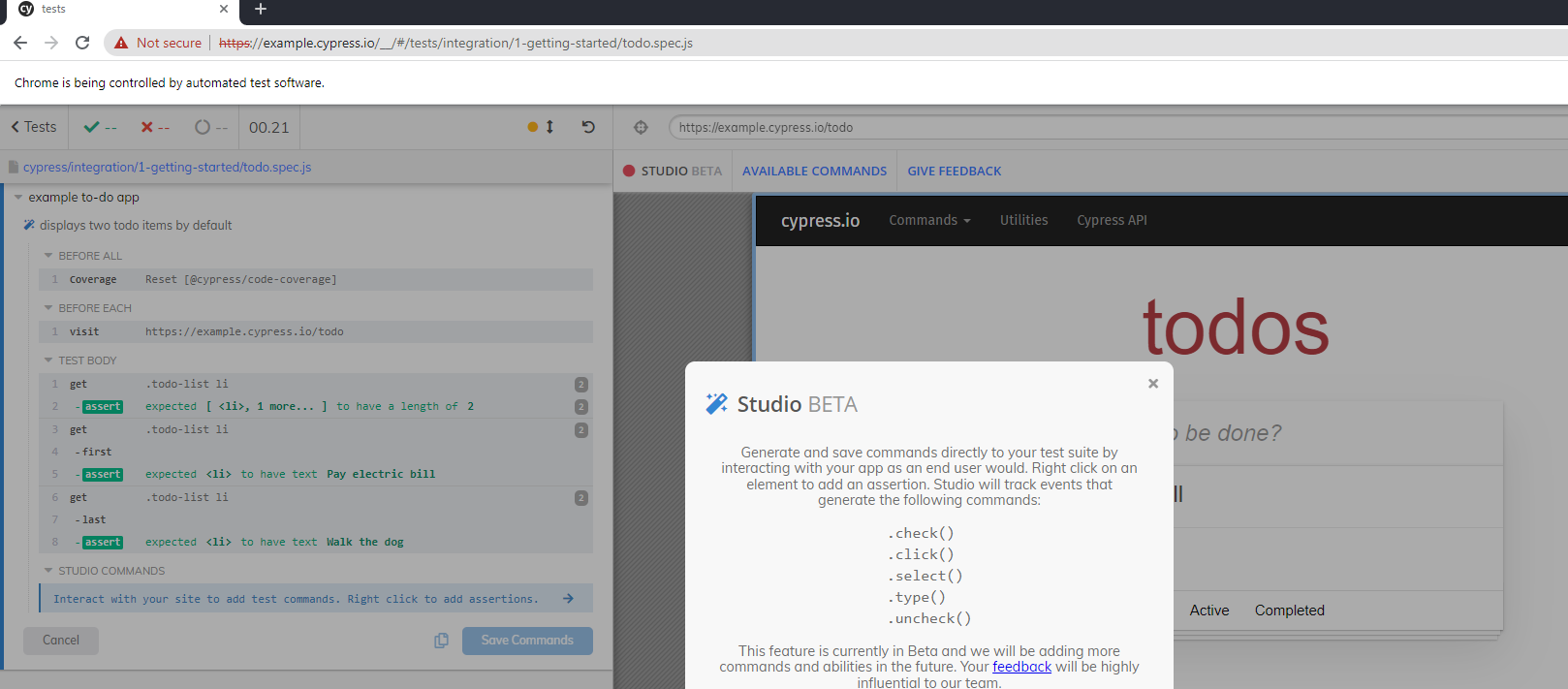
You can than edit an existing JavaScript test spec file and click on the red recording button to inject recorded test code into your script, or build a whole new project. Cypress documentation recommends cloning their built-in GitHub repository and using the following JavaScript test spec as a ‘getting started’ project (https://github.com/cypress-io/cypress-realworld-app/blob/develop/cypress/tests/demo/cypress-studio.spec.ts)

As you can see from the above screenshot, once the Cypress Studio is enabled, editing a test step triggers the Cypress Studio button where you can add new commands to you test. As of now, 5 main test commands are supported by the tool – Check, Click, Select, Type, and Uncheck.

As mentioned above, you can create a brand new test through the recorder or add new code into an existing spec file.

I ran the tool and added a simple exploratory test into the built-in test spec called todo.spec.js that comes with the Cypress open-source framework, below is the generated JavaScript code.

Key Takeaways

It is clear from my quick overview of both codeless tools that they are only in the beginning and that there is potential to grow and add more of the above core capabilities of a fully ready test automation framework. Since these two tools are provided for free and in early stages, we shouldn’t complain, but rather embrace, and provide feedback to the owners of these frameworks to improve.

Advantages of Playwright CodeGen:

  1. More language bindings to export the created code
  2. More browsers to run the tests on
  3. The Explore object spy is quite easy to use
  4. Tool is separated from the basic code-based GUI

Disadvantages of Playwright CodeGen:

  1. Hard to debug tests
  2. Limited test creation of the tool, no automated assertions
  3. No documentation and examples to get started with

Advantages of Cypress Studio

  1. Easy to use from the Cypress GUI tool
  2. Friendly debugging tool
  3. Richer test creation abilities
  4. Good documentation and sample project to help ramp up

Disadvantages of Cypress Studio

  1. Limited test creation and assertion within the tool
  2. Only exports to JavaScript
  3. No support for all browsers (Safari WebKit)

Bottom Line

The 2 tools are a great start and an optimistic horizon for codeless tools complementing code based tools. Both are still growing and there are many gaps to close before they can be self-served by front-end developers and SDETs, however, they provide a sing for the future of intelligent test automation and this is promising. We should continue following the evolution of these tools including the newly Selenium IDE within Selenium 4 and continuously provide feedback to the communities to grow and build these tools right.

The Importance of Software Testing for Businesses

Guest Blog from: Maverick Jones
Maverick Jones is a full-time geek and tech enthusiast. He likes to share his bylines and loves to gain audience attention.

Table of Contents

  • Introduction
  • What is Software Testing?
  • Types of Software Testing
  • 7 Reasons of Software Testing Being Important for Businesses
  • Conclusion

In this digital world, software is the one thing that influences a far bigger audience these days. It enhances the business prospects, contributes to upscale life standards, offers services to large audiences in less time, and evolves a smart world. Besides this, the software offers an industrial impact and plays an important role around all the walkways of people. But for this, it requires a fail-proof and smooth functioning of the software. And the main reason behind it is that software failures can shatter the business. Therefore, testing any software is a must.

Software testing ensures that the software performs adequately and offers user satisfaction. Testers make sure that the performance of the software is not sacrificed and for that, they run various tests using both manual and automated testing approaches.

In this blog, we will learn more about software testing and see how this concept enables business software to work smoothly.

What is Software Testing?

Software testing is a very critical process that offers an analysis that enables the testers to identify and evaluate the application. It determines whether the newly developed app meets the Business Requirement Specifications. It is a continuous process and is popularly known as Software Testing Life Cycle. This process works along with the life cycle of software development.

Software testing verifies each functionality at every stage and validates the app performance with the need. Besides, when it comes to checking software perfectly and delivering bug-free software, the approach of software testing can help in improvising the functionalities and usability of apps. With different types of testing approaches, software development companies test applications and make them safer for their clients.

Types of Software Testing

Software applications can be validated and verified in two ways. By applying two different types of testing – Automation and Manual Testing.

Automation testing is an approach where the testers write different scripts and then they rely on external software to perform software tests. Besides, when the testers want to double-check the product’s quality, even the manually tested software has to go through the automation tools. And this is the type of testing that assures great accuracy level and cost-efficiency. Besides, it also saves a lot of time.

Besides, manual testing is quite different. And as the name suggests, it is a very simple process of testing the software manually. It doesn’t require any type of automated testing tool that enables the testers to check the software automatically. Instead, the tester can work on the software and perform the testing process. The manual tester can easily detect errors and bugs by following through with different levels.

7 Reasons of Software Testing Being Important for Businesses

Here are some of the top reasons that show the importance of software testing –

1.   Security

Security is one of the most important reasons for software testing. And to consider it can be the smartest choice of it all. Security is considered a very crucial, sensitive, and vulnerable part of software testing. Besides, there are situations in which all the important details and information of the company gets stolen away. Therefore, security is considered the most reliable reason to make people believe in the quality of the software. Security is one thing that ensures that the product is safer to use.

2.   Customer Satisfaction

The main objective of the business owners of the products is to provide the best services and better customer satisfaction. In order to offer quality and customer satisfaction, adopting a software testing process is essential as it provides the perfect user experience. As the software development company tries to develop the best software for their clients with a testing approach, they will earn a reputation for reliable clients.

Therefore, to get praise from the clients and offer them a system that enables long-term benefits, having a perfect software testing approach is very important. A properly tested and secured system earns the client’s trust easily and also becomes safer to make transactions.

3.   Product Quality

To ensure that some of the products come to life in a secured manner, following the requirements of the product is necessary. The product you offer to the clients must be such that it serves them in one or another way. Besides, it must always bring out value as promised. And to make sure that it functions correctly by offering an effective customer experience, testing the products before their launch is necessary.

Every testing team must check the compatibility of the device before launching the product or application. For example, when you are planning to launch a software, checking that it is compatible with different devices and operating systems is a must. This shows the quality of the software.

4.   Saves Money

Software testing comes with various benefits and one of them is cost-effectiveness. This is the main reason why organizations go for software testing services. The software testing comprises a bunch of projects. When the testers find bugs in the early stage, fixing those bugs doesn’t cost much. Therefore, it has become a prerequisite.

Every business owner hires a tester or quality analyst who has great experience and thorough knowledge of the projects.

5.   Determines Software Performance

When an application or software has low performance, it brings down the app’s reputation in the market. The users no more prefer to use that application and even stop trusting the company that offers such products. And eventually, the company’s reputation also suffers. Therefore, every application or software must never be introduced in the market without software testing.

Once the software is tested and its performance is perfect, it must be launched in the market. And even after the launch, to keep the reputation of the product intact, continuous testing becomes necessary. Basically, if the performance of the software goes down, everything goes to waste. Therefore, considering software testing is the best option in determining the software performance is a must.

6.   Easy to Add New Features

When the code is old and interconnected, it becomes more difficult to update. And this is why tests are performed that counteract this calcification tendency and enable the developers to add new features to the software. But when the software developer is new, changing older parts of the code becomes horrifying for him. And this is where test results come in to offer every detailed information about the broken parts of the code.

This process enables the business owners to make their products stand out in the market.

7.   Enhances Development Process

With the help of Quality Assurance, the software testing services providers can find an array of errors and scenarios. And once they get a hold of the information about bugs, the developers can easily help in fixing them in very little time. the same in no time. To have such a smooth development process, the software testers should work with the development team parallelly in order to accelerate the procedure.

Conclusion

As seen in this blog, the importance of software testing is of high value in the world of software development. Software testing is a fine whole process that ensures the perfect quality of the product. Besides, testing also offers better usability, enhanced functionality, and reduces maintenance costs. Therefore, whenever you hire a software development company for your project, make sure to hire a team that has expert software testers who can use the latest tools and techniques to secure your product.

This Blog was provided by: Maverick Jones
Maverick Jones is a full-time geek and tech enthusiast. He likes to share his bylines and loves to gain audience attention.

Buy the Best Software for Your Business with These 5 Steps

Guest blog post by Gloria Martinez.

Too many entrepreneurs have purchased software after watching a slick demo only to experience buyer’s remorse soon after. As a business owner, you want to buy software that delivers the value it promises, whether you buy it off the shelf or on a subscription basis.

This article shows you five crucial steps to buying software that fits your budget and needs:

  1. Assess your needs
  2. Seek buy-in
  3. Compare multiple options
  4. Mind the cost
  5. Pick a solution

Continuous Testing Blog from Eran Kinsbruner invites you to read on to find out more.

Assess Your Needs

Buying decisions that take into account all the facts result in satisfactory software purchases. Assess your needs before you make a substantial investment in software for your business. For example, if you’re looking to register your business as an LLC, then you may want to work with an online formation service that can help you correctly file the paperwork. You can call the Zen Business phone number to learn more about the process.

It’s important to break down which software and/or services will best serve your business before you consider purchasing anything, especially when you’re operating on a very tight budget.

Get Buy-In From Stakeholders

As the owner of the business, you may have the authority to make a unilateral decision on what software to buy. Still, it’s important to get buy-in from your employees, managers, IT team, and customers. Carrying out a comprehensive needs assessment helps achieve buy-in from all these stakeholders.

Take into account how implementing new software or replacing your current system will affect your processes, habits, hardware, and work culture. Purchasing new software often leads to significant changes in your operations. Let your employees know how these changes will affect them so they’re well-prepared to adjust.

Compare Prospective Software Solutions

Once you get stakeholder buy-in, start reviewing prospective software solutions. Narrow down to a few top-tier software providers. Your exclusion process should rely on questions based on the needs you identified in your needs assessment.

Here are a few examples of questions to guide you:

  • What are your must-have and nice-to-have features?
  • How much data storage do you require?
  • How much customer support will you need?
  • Do you want an on-site or cloud-based solution?
  • How scalable is the software?

Your budget also determines the software solutions you consider. A feature such as live chat support may drive up the price but may be worth the investment.

Consider the Cost

Research all the costs involved in purchasing and implementing the software to ensure you’re prepared. Here are a few considerations to make.

  • Is the software available as a one-time purchase or SaaS solution?
  • For SaaS solutions, does the provider offer a discount for annual billing?
  • Does the contract, if any, include an early cancellation penalty?
  • How much will it cost to scale up?
  • Is support billed separately?

Getting answers to these and other salient questions ensures you purchase software that fits your needs and budget.

Choose a Solution

You’ve whittled down your shortlist to one or two suitable software solutions. Take a multi-pronged approach to ensure you get the solution all stakeholders will find satisfactory.

  • Use a trial period to test the software.
  • Research the vendor by reading customer reviews.
  • Ask your industry peers who use the software their thoughts on it.

Again, consult your needs assessment to determine what trade-offs you’re willing to make.

As a business owner, your bottom line is an essential KPI. You want to optimize the returns on your software investment. The steps outlined in this article will help you buy the best software for your business.

This is a guest blog post by Gloria Martinez.

Gloria loves sharing her business expertise and hopes to inspire other women to start their own businesses and seek promotions in the workplace. She created WomenLed.org to spotlight and celebrate women’s achievements

Understanding The Role Of Software Testing In Cyber Security

Gust Blog by: Kanika Vatsyayan is Vice-President – Delivery and Operations at BugRaptors 

Over the years, Cyber Security has become a highly sensitive and significant aspect of the IT industry. And it is very natural with hackers leaning on some more advanced approaches to breach public and private networks inspecting the personal information of various organizations.   

Most importantly, these cyber-attacks have the potential to feed on business data from any small or large organization using high-end technology to attack digital systems. As per the reports by weforum, approximately $5.2 trillion worth of data would be put at stake because of cyber-attacks from 2019 to 2023.   

However, software testing has emerged to be a practice that has helped streamline the cybersecurity factor restricting hacking and diminishing the chances of any threat to data. In other words, software security testing services has turned to be a trusted shield against cyber-attacks and therefore has gained extensive popularity amongst the IT sector.   

Importance of Software Testing  

With past incidences like the WannaCry ransomware attack of 2017 and the Yahoo breach of 2013, organizations are at constant threat of cyber breaches, deploying a perfect software testing strategy should be an ideal agenda to keep things protected. However, the limited propagation has made security testing an even more complex process to understand.   

Above all, there exists a significant irony in the current approach towards software testing for cybersecurity as the present focus of the development enthusiasts is centered around the new development practices. This cuts the scope of improvement for already released technologies and makes them more vulnerable to hacking due to major security gaps.  

Thus, there is an immediate need to realize the current circumstances and make continuous software testing and DevOps an essential part of the organization’s development practices to improve the entire working propaganda. However, the process needs companies to immediately locate software testing professionals to help with planning the cybersecurity initiatives while driving quality throughout the project pipeline.   

Also, the adoption of security testing services would not only aid the security process against unexpected cyber-attacks to industries like healthcare, finance, banking, etc. while improving the entire development design. In a nutshell, the right approach towards software testing could help drive a mature security practice that will run through different stages of the development lifecycle while aligning with cybersecurity objectives.  

Penetration Testing & Its Importance For Cyber Security  

Over the years, different surveys have revealed that 75 percent of cyber-attacks happen due to insecure code that makes the application unstable. Also, the shift of all the operational processes, as well as day to day tasks to third party applications that have access to global user data, have become the prime spot for cyber attackers.   

Therefore, it is necessary that your developers, as well as security testing service provider in India, both aim at improving the source code quality for any tasks that involve the use of data. However, the process to overcome any such code issues require correct implementation of the techniques like penetration testing as it works on how the code connects with the application.  

Penetration testing is a technique that highly resembles a cyber-attack or actually an intentional cyber-attack made on the application to identify all the system vulnerabilities. Moreover, penetration testing is a highly effective practice that helps meet the goals related to web application security as it helps to improve the Web Application Firewall or WAF protection.  

Intelligent System Security Checks  

Penetration testing is more of a test design arrangement made to work on security against any attempt made on hacking. Even the tools used during penetration testing are made to replicate the cyber-attacks with the objective of getting over any system vulnerabilities.  

Underline Weak Segments  

Another significant aspect of using the penetration testing approach is to identify weak links within the software code. The practice improves the scope for protecting the personal user data, card details, or any transactional record that might be at threat. In short, penetration testing works by analyzing the security vulnerabilities of the system and use them in strengthening the system structure against possible cyber threats.  

Added Network Security  

Penetration testing is a powerful technique that could help developers and software testers to work on improving the high-speed internet like 5G network security as well as applications running on the network. When implemented through a dynamic approach, penetration testing could help the users to identify any potential vulnerabilities related to the system for preventing any chances of attack. Also, the security-related information can be used to work on compliance goals and plan the security response time to make system protection more definite.   

The Crux: Planning Cyber Security With Software Testing  

Though penetration testing is a highly efficient software testing practice that is made to simplify the test operations related to cybersecurity, running through other dimensions of testing could help make things better.   

For instance, pen testers could consider escalating their cybersecurity initiatives by using advanced cyber penetration techniques. This would not only help make the system more secure but have a complete idea of the likely cyber-attacks that could be planned in the near future. Such arrangement allows tracking of methods that can be imposed by attackers and therefore can be used to prevent any hacking incidents.  

All in all, working on the cybersecurity component of software testing is a sophisticated practice that needs testers to analyze all the aspects of the technical landscape. It is not only made to expose potential attacks before they occur but rather uses a similar set of tools and approaches that can be used by hackers. Furthermore, it cuts off the chances of any security compromises that may happen with devices running on public networks.   

In a nutshell, software testing has redefined the entire concept of cybersecurity, offering solid protection to the user data as well as development companies. Thus, it is crucial that development firms should start recognizing the importance of software security testing services in the organization when they need to put off any prospective threats as it will not only help users to experience the best of the web but development companies to enjoy sustainable growth.   

All the best!  

 Author Bio:  Kanika Vatsyayan is Vice-President – Delivery and Operations at BugRaptors who oversees all the quality control and assurance strategies for client engagements. She loves to share her knowledge with others through blogging. Being a voracious blogger, she published countless informative blogs to educate audience about automation and manual testing. 

Expediting Web Testing with Puppeteer and Instant Test Automation Technology

The digital landscape has significantly advanced over the past 1-2 years. The new normal in web applications include a shift toward progressive web apps (PWAs), advanced responsive websites, and Flutter apps.

Ensuring both functional as well as API testing of such advance web applications is becoming harder and harder. While there are valid test automation frameworks like Selenium and Cypress, these are covering only a subset of what is needed to complete the entire quality aspects across multiple environments.

New Normal: Instant Test Automation

To address the testing challenge over time, across multiple environments, and with big and dynamic data, tools need to be more intelligent, and utilize AI/ML to really track trends, predict issues prior to them becoming more serious, and guide the developers and testers in real-time.

An instant test automation technology that can leverage a standard test automation framework such as Puppeteer to auto generate both functional as well as API tests on the fly and as things change is a game changer for app developers. This provides alerts and insights in real time that the team can act upon and move much faster.

The way sch solution works is through modeling the website under test, auto generate based on traffic and AI proper tests and runs them to provide the proper insights.

Setting up such solution is easy and needs to be done only once. Also, such tool fits systems that are built atop cloud-native, containers and Amazon ECS.

Benefits of Shifting into Instant and Intelligent Test Automation

With the need to shift left, release faster with confidence, and handle large and complex environment, teams can benefit from a self-generating testing solution that really covers more grounds that a typical code-based framework would. This does not mean that there are no benefits or need for such frameworks like Selenium and others, however, with tools like UP9, teams can complement the code related functional tests with an additional layer of quality validation that touches reliability, APIs, services, security and much more.

Case Study: Quick Tour of Puppeteer & UP9

I took the Google puppeteer framework and connected it with UP9 to try generating a nice model and test automation assets on my local machine.

After following the basic NPM installation instructions, it was easy to launch a local browser and record traffic using the tool.

From my terminal I would then run this command (‘my.new.workspace’ could be any name that the developer selects):

up9 tap:start my.new.workspace

Once I ran that command, using puppeteer, UP9 launches a chrome browser that I can start using to navigate to my website for recording all traffic, actions, API calls and other services. Upon closing the browser, the tool will process all of the flows and generate the model.

Here is the auto generated workspace that was created based on a quick tour I ran with UP9 on the Perforce and Perfecto websites:

The workspace consists of few views:

  1. The generic workspace with all the high-level services model (diagram),
  2. The contracts that were used in my recording,
  3. A detailed traffic analysis with the entire API calls,
  4. Tests that were created and mocks to be used across different environments.

These views were perceived and constructed based on service-traffic, following from the observers of UP9 that were assigned to my designated workspace.

As part of my journey, I landed on the Perfecto free-trial website, and the tool was able to generate the API calls (Request/Response) and allow me to validate that is was working as expected (see below)

If I wanted to also run my auto-generated tests, I have within the UP9 portal (fully SaaS and web-based) a tests area from where I could launch my tests as well.

Bottom Line

As the DevOps market mature towards more intelligent testing using AI and ML, and as the systems under tests (SUTs) are also progressing, there needs to be a realization within the teams that their processes could be improved dramatically using such technologies. Developers productivity together with consistent app quality were a CIO/IT manager top of mind for a long while, and with the recent advancements in the market, teams can really enjoy a new era of smarter ways of working.

Defect Detection and Security Prevention: How does Shift-Left Adoption Helps?

Dzuy Tran
Guest Blog by Dzuy Tran, Klocwork and Helix QAC Senior Sales Engineer, Perforce

Essentially, Shift-Left is the practice finding defects and preventing them early in software delivery process. This is done by shifting the scanning of defects to improve code quality process to the left of Software Development Life Cycle (SDLC), which is usually composed of four phases of activities:  design, develop, test, and release.

Shift-Left also applies to software security testing (SAST). The aspect of shifting left on security is one of a set of capabilities that is the result of higher software delivery and organization performance.  According to the 2020 state of DevOps Report published by Puppet Research, high-performing teams spend about 50% less time remediating the security issues than low-performing teams.  By better integrating information security (InfoSec) objectives into daily work, teams can achieve higher levels of software delivery performance and build more secure systems with approved compliance standard library and compliance scannable SCA tools.

Production Defects are Costly.

How Does Shift-Left Help Reduce Product Costs?

Production defects are costly, as an identified defect costs about 30 times more than the same defect fixed in development and takes about 5 times longer to resolve. What is more, certain industries — such as embedded software, medical devices, and high-value transactions — experience even higher costs and reputation damage from bugs.

In addition, fixing defects in testing costs about 10 times more than development and takes only about twice the time it would have taken before checking in the code. In waterfall development, it would not present a substantial difference. However, in the continuous integration assembly line methodology, defects found in testing still break the build.

Shifting Left Effectiveness

Shifting left defect detection — from testing and production to developers — is not a new concept. Rather, it becomes more and more critical as software is integrated into more mission-critical systems, IoT devices, and backend enterprise operations. As a result, the cost and impact of production defects increases as well.

When defects are discovered, developers must then find the contributing factors and fix them. In complex production systems, it is not usually caused by a single issue. Instead, it is often a series of factors that interact with one another to cause a defect. This goes for the defects that are found involving security, performance, and availability — all of which are expensive and time-consuming to remedy, and often require some architectural changes. The time required to find the defect, develop a solution, and fully test the fixes are unpredictable — causing delivery dates to be pushed back.

How Effective is Shift Left for Defect Detection and Prevention
The shift left process, optimizes continuous delivery workflows by reducing build pipeline

breakage. It also allows developers to spend less of their time on diagnosing problems and more time on preventing them during development. 

In addition, shift left should help enforce more discipline and create awareness of software quality. However, there are also other tools and techniques that can shift-left the defect detection responsibility to the individual developer:

  • Desktop Static Code Analysis (SCA)

Static code analysis automatically finds potential defects or security vulnerabilities in the source code prior to running the application. SCA tools — such as Klocwork or Helix QAC — can be light and look primarily at code syntax, or more sophisticated and examine the complex application execution paths. Industries such as automotive, healthcare, and aerospace mandate the use of such tools in the testing and validation phase.

Integrating SCA at the build or CI process improves quality and security. True shift-left requires wide adoption of SCA at the developer’s desktop, scanning and cleaning the code prior to checking in rather than waiting for the build to fail.

  • Use Code Frameworks

By using code frameworks, code components, or libraries, both commercial and open source reduces the volume of custom code developed and therefore eliminate defects making their way into the build. Standard “plumbing” tasks – such as complex UI elements, math and analytics algorithms, data mapping, networking, and so on – can be handled by code libraries while developers focus on true business logic code.  Properly tested frameworks that are supported commercially or by a vibrant community, proactively shift-left problem detection by not introducing “plumbing” code defects to begin with.

  • Developer Side Application Performance Management (APM)

Application performance management solutions provide production performance and failure alerting, which includes analytics designed primarily for production. It’s unusual not to have comprehensive monitoring in place for production applications. Plenty of commercial and open-source solutions are available for different cloud and on-premises environments.

However, they are not built with developers in mind. Lightweight APM tools designed specifically for developers shift-left performance problems and error detection to the developer desktop. Desktop APM — such as XRebel APM for Java and Zend Server developer edition or ZendPHP for PHP – allows developers to proactively optimize code before it enters the integration phase.

  • Standardize Environments

Adopting a standard, automatically generated application stack and virtualization or containerization that matches the production environments is another shift-left practice. It shifts a class of errors to the developers’ responsibility by not introducing them to begin with. In the cloud or on-premises, standard application stacks reduce chances of configuration and environment mismatch issues from making their way into the build.

Shifting-Left for Security Prevention

Security should be everyone’s responsibility. So, by shifting the security review process to the “left” or earlier in the SDLC phases requires several changes from traditional information security methods with additionally scanning for security vulnerability. However, that is not a significant deviation from traditional software development methods on closer inspection:

  • Get InfoSec Involved in Software Design

The InfoSec team should get involved in the design phase for all projects. When a project design begins, a security review can be added as a gating factor for releasing the design to the development stage. This review process might represent a fundamental change in the development process. However, this change may require developer training.

  • Develop Security-Approved Tools

Providing developers with preapproved libraries and toolchains that include input from the InfoSec team can help standardize developer code, and the tools should include a SCA tool — such as Klocwork or Helix QAC — to scan for any security vulnerabilities in the code, such as tainted-data, cross-site scripting, etc.

Using standard code makes it easier for the InfoSec team to help with reviewing it. Standard code also allows automated testing to check that developer is using preapproved libraries. This can help scale the input and influence from InfoSec teams.

  • Develop Automated Testing

Building security tests into the automated testing process means that code can be continuously tested at scale without requiring a manual review. Automated testing can identify common security vulnerabilities, and it can be applied uniformly as a part of a continuous integration pipeline or build process. Automated testing does require you to design and develop automated security tests (pre- and post-software releases), both initially and as an on-going effort as new security tests are identified.

Blending Quality and Security to Create DevSecOps

The traditionally separate relationship of development and security is long overdue for evolution, which has culminated into a cultural shift known as DevSecOps. The name suggests a blending of development, security, and operations. The DevSecOps methodology is built upon the “shift-left” philosophy of integrating cyber-risk management into the architecture and development process from inception. Built-in, not bolted-on, as they say.

With DevSecOps, security is baked into the code from the start, during the early stages of development. Security is part of the architecture, and the application of automated testing throughout the development process drives a higher level of both product quality and DevOps security. Security issues present earlier, making life easier for developers and less costly for management.

This blog was Created by Dzuy Tran, Senior Sales Engineer, Perforce Software

Dzuy Tran has over 30 years of experience in designing and development of Hardware and Software Embedded Systems, RTOS, Mobile Applications and Enterprise Systems. He helps customers when they have technical questions, assists with Proof of Concepts, and conducts demos of the Static Code Analysis tools and help guided customers on DevOps implementation processes and Continuous Integration deployment. Dzuy holds a master’s degree in Computer Science and Computer Engineering from National Technological University.

How to Achieve both Coding Standard and Security Coverage Together with Safety Compliance

Majority of organizations are already deep in their DevOps maturity. Most researches are showing over 40% that adopted the process, and are moving towards automated processes, shift-left, and fast delivery of value to customers.

With that in mind, these organizations that span across different verticals from automotive, financial industries, gaming industries, and many more, need to not only deliver high quality code, but also in many cases meet and comply with specific standards and regulations.
If to only focus on the above compliances, teams must bake into their CI/CD pipelines the scanning against such standards, and ensure that they keep up with modifications that are constantly happening across these.

In addition to the above, there are also very important and critical compliances like Autosar (automotive open system architecture), OWASP (top security vulnerabilities), CERT, CWE, PCI and others.

When dealing with smaller teams, managing the code safety and compliance might be easier, however, when you are 1 squad within a bigger DevOps organization, this requires better governance and control. Keeping up with code changes, merges into different branches, while running continuous testing suites, performing code reviews, and SCA (static code analysis) becomes quite challenging.

Building the Perfect Mix : Safety and Compliance together with Code Standards Adherence

To obtain the right mix, continuously, teams must strategically plan their pipeline in a way that democratizes both continuous functional testing, non-functional testing together with the entire sets of compliances and code standards quality assurance.

If to analyze the above famous DevOps lifecycle diagram, teams can put the proper activities in the right phases of their cycle to cover all of their required goals.

If to look into an example, using an open-source GPS tracing repository , this project has various modules, and quite a lot of Java classes. Ensuring that the code adheres to the proper Java coding standards, as well as does not violate any of the OWASP items, continuously and from CI is not an easy task.

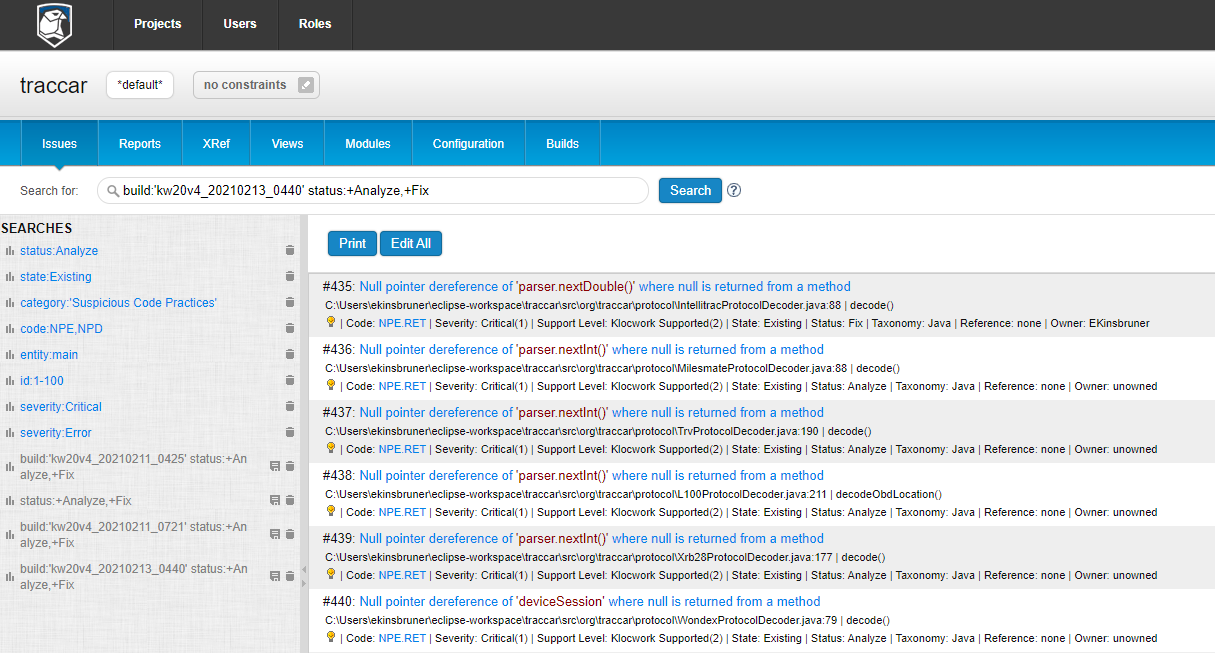
In the below screenshots, you can see that by running a simple Maven SCA job within CI as a batch project upon each code change, can easily generate a comprehensive report (In my case, I am using Klocwork SCA tool):

“kwmaven clean install compile -Dmaven.test.skip=true”

As soon as I run from the project folder the above command, a full build and scan are being performed on the entire code base, using specific compliance modules that I predefined. The developer receives at the end of his Jenkins job a detailed report and can also login to the KW dashboard to review each and every issue or violation (below is a snapshot of the post build report).

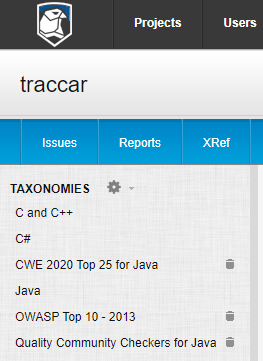
In the above case, I was using Java, and was configuring the below sets of compliance coverage to use for the scanning. Obviously, if I was to cover an app from the automotive or other embedded software industry, I could have added an additional taxonomy/ies.

From a process perspective, the developer should follow the process of per each code change, run a build (either using the team CI trigger, or his own local CI. Once he receives a clear report without critical issues surrounding safety, security, and other code quality standards, he can pass his changes toward the next phase of integration testing, functional regression testing and pre-production activities.

It is clear that such code scanning and quality activities, must be filtered properly to avoid redundant noise, false negatives, etc. This is why, relying on SCA tools that can grant the developers the option to filter by severity, modules, configurations and compliances, allows getting the job done while not overwhelming them with irrelevant feedback.

In the above Klocwork zone within Eclipse (or IntelliJ), users could filter through the relevant columns the issues by Severity and more.

To summarize this post: Teams especially within Agile and DevOps practices can enjoy both types of quality gates by employing SCA tools together with coding standards under the same source base, and once these activities generated Green lights, they can allow testing teams to run their jobs with higher confidence.

In most organizations, testing teams are requiring as a pre-requisite to starting their regression an SCA audit report showing that no major issues were detected within the build cycle.

Keep in mind that the above process and tools is 100% automated, and runs within CI which means, ever for large code bases, this is a few minutes of scanning to get to the quality gate with a peace of mind.