Shifting Mobile App Quality Into the Dev Build Cycles

It’s no doubt that quality is becoming a joint feature team responsibility, and with that in mind – it is not enough for traditional QA engineers to develop and execute test automation post a successful build, but actually the growing expectations now are from the Dev team to also take part and include as many tests as they can in their build cycles per each code commit.

Tests can be either unit, functional, UI or even small scale performance tests.

With that in mind, Dev team need a convenient environment that allows them to perform these quality related activities so they deliver better code faster!

Developers today are specifically challenged with the following:

  1. Solving issues that come from production or from their QA teams that require a specific device or/and environment that’s usually not available for the dev team
  2. Validation of newly developed apps or features within apps across different environments and devices as part of their dev process
  3. Lack of shared assets for the entire dev team
  4. Ability to get a “long USB cable” that enables full remote device capabilities & debugging

Perfecto just made available as part of its continuous quality lab in the cloud a set of new tools and capabilities that addresses these requirements and enable Dev team to accomplish their goals.

Perfecto’s DevTunnel solution for Android that is part of the recent 9.4 release is the 1st significant step toward helping developers accomplish more tests as part of the build cycle.

dt

With the above challenges and requirements in mind, Perfecto has developed a unique solution called the “DevTunnel” which enables developers to get enhanced remote access to mobile devices in the cloud and perform any operation that they could have done with these devices if they were locally connected – things like debugging, running unit tests, testing UI at scale from within the IDE and more.
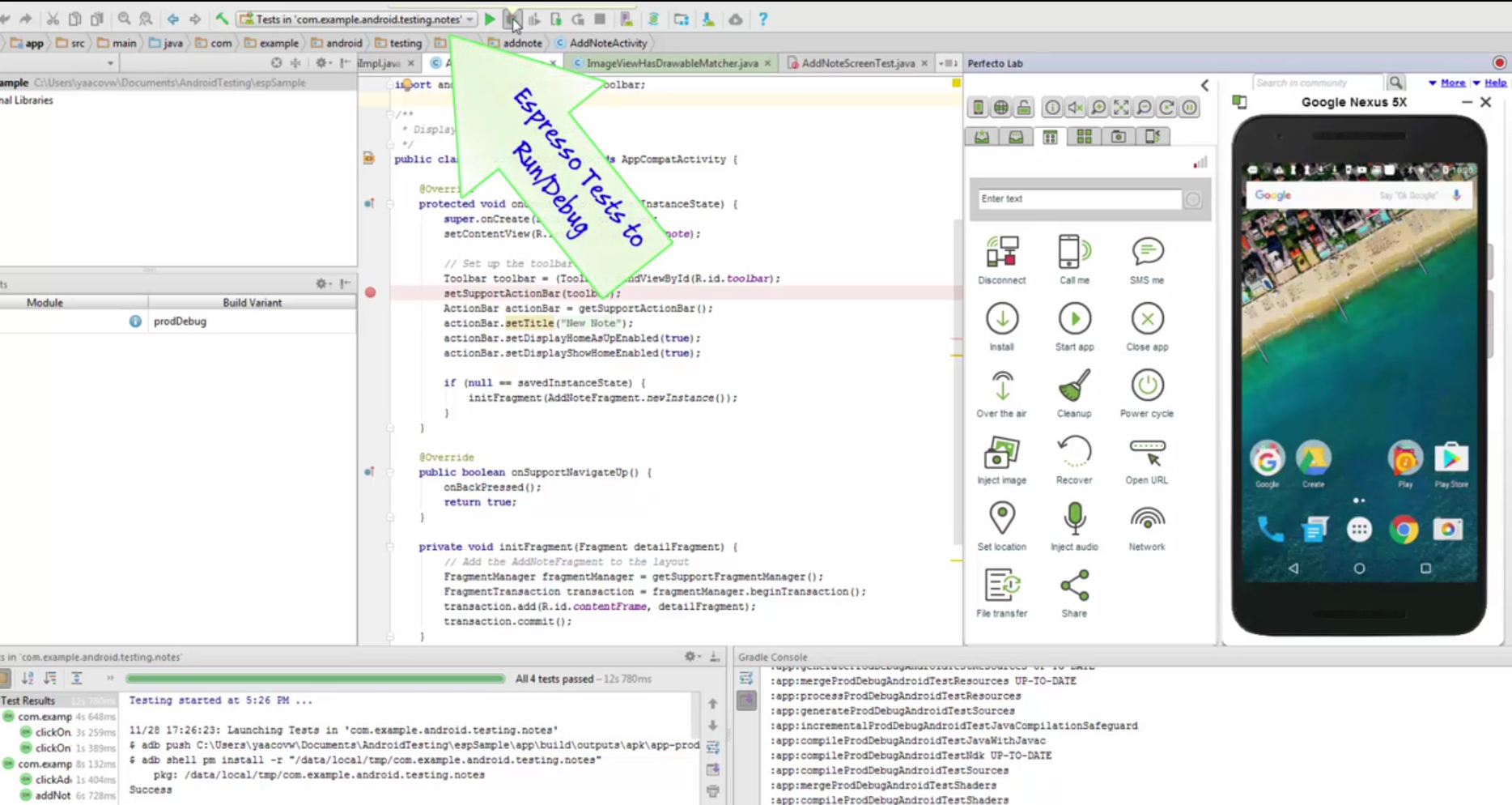
espredebug

In addition, when referring to Android Dev activities, it’s clear that Android Studio & IntelliJ IDEA are the leading IDE’s to operate in. For that, Perfecto invested in developing a robust plugin that integrates nicely into the development workflow.

Espresso Framework

It’s no doubt that Espresso test automation framework is becoming more and more adopted across the developers for various reasons like:

  1. Embedded into Android Studio play an important role for Android developers.
  2. It’s very fast and easy to execute and receive feedback on Android devices

Espresso can be used within the Perfecto lab today in the following 2 modes

  • Locally – Execution through DevTunnel (see below)
  • Via Continuous Integration (CI) – using a command for Espresso test execution through Jenkins server

In the community series targeted to Dev Tunnel, you can learn more about the capabilities, use cases and get samples to get you started with the new capability.

To see this also in action, please refer to the video playlist that demonstrates how to get started and install DevTunnel, use Perfecto Lab within Android Studio with Espresso for testing and debugging purposes and more.


Good Luck!

4 Benefits of Using the Espresso Test Automation Tool

If you’re an Android developer, you’re probably familiar with Google’s Espresso test automation framework. As an open-source tool, it’s very easy for developers to use and extend within their working environment (Android Studio IDE).

But before discussing the benefits of Espresso, let’s understand the motivations and pains developers and test automation engineers face today while trying to validate their Android application (APK) throughout the build/dev/test workflow.

  • Each build needs to be validated after code changes are made.
  • Dependencies on remote servers and other workstations for testing slow down the process.
  • Unit and functional tests need to be easy to execute from both an IDE and continuous integration perspective.
  • Apps need to be tested using the latest Android OS APIs that support new platform features and OS versions.
  • Testing needs to occur on both emulators and real devices.

In light of these challenges, it’s clear why the adoption of the Espresso automation framework is high. Even though Espresso is an instrumentation-based test framework, it has many benefits to both developers and test automation engineers. It uses Junit underneath the hood, so Espresso is easy to use within leading IDEs and provides useful testing annotations and assertions. It’s also fully integrated within the leading Google Android IDE – Android Studio.

Here are four main benefits of using Espresso:

1. Espresso workflow is simple to use

The way Espresso works is by allowing developers to build a test suite as a stand-alone APK that can be installed on the target devices alongside the application under test and be executed very quickly.

2. Fast and reliable feedback to developers

As developers are trying to accelerate deployment, Espresso gives them fast feedback on their code changes so they can move on to the next feature or defect fix; having a robust and fast test framework plays a key role.

Espresso does not require any server (like Selenium Remote WebDriver) to communicate with; instead it runs side-by-side with the app and delivers very fast (minutes) test results to the developer.

3. Less mobile testing flakiness

Because Espresso offers a synchronized method of execution, the stability of the test cycle is very high. There’s a built-in mechanism in Espresso that, prior to moving to the next steps in the test, validates that the Element or Object is actually displayed on the screen. This eliminates test execution from breaking when confronted with “objects not detected” and other errors.

4. Developing Espresso test automation isn’t hard

Developing Espresso test automation is quite easy. It is based on Java and Junit, which is a core skillset for any Android app developer. Because Espresso works seamlessly within the Android Studio IDE, there’s no setup or ramping up and no “excuses” – to actually shift quality in the in-cycle stage of the app SDLC.

In addition to the above, there is of course the large community powered by Google that pushes the Espresso test automation framework and allow easy and fast ramp up for newcomers.

Learn more using the Espresso Cheat sheet below:

Espresso Test Automation Framework

Perfecto is offering support for both Android Studio IDE as well as the ability to install and launch an Espresso test suite (APK) on real devices in the cloud across various locations and user conditions. For more information, please refer to the Perfecto Community and search for “Android Studio” or “Espresso.”

7 Mobile Test Automation Best Practices

Developing a mobile test automation scenario isn’t that complicated. Developers and testers use a variety of commercial test automation frameworks or open source tools such as Selenium and Appium to do automation. However, when trying to execute these tests on real devices or integrate them into an Agile or CI (continuous integration) workflow, things get a little complicated.

The major challenges around mobile test automation

The essence of developing test automation is to be able to use and re-use scripts many times, across platforms and environments. Test automation should be as maintainable as possible, especially as new platforms and product features are released. Many organizations that develop test automation for their mobile apps face the following challenges:

  1. Executing the tests against a variety of real mobile devices
  2. Executing these tests in parallel
  3. Leveraging existing test code (re-usability) for new tests
  4. Including real end-user environments/conditions (changing network conditions, low battery) in the tests
  5. Overcoming unexpected interruptions (incoming call, apps running in background)
  6. Running these tests unattended — over night, as part of a Jenkins CI job

These are just few of the challenges organizations confront when trying to progress from older SDLC processes and meet faster releases and enhanced Dev–>Build–>Deploy–>Test–>Deploy cycles.

7 practical test automation tips

Overcoming these challenges starts with few changes in the overall mobile app dev and test processes.

Consider these seven recommendations for building sustainable unattended automation.

Test automation

The key to mobile test automation is to start with a small number of test cases, automate them, and assure that they are robust enough and can be executed in parallel and unattended. Only then should you invest more and grow the test suite.

An important question to ask at the start is: What should I be automating? Organization often do not choose the right tests to automate, resulting in lost development time, weak ROI, and an over-reliance on manual testing.

To learn more about the 7 Ways to Overcome Test Automation Obstacles, please join us next week for a webinar hosted by myself, automation expert and author Daniel Knott, and Perfecto’s Director of Technology Uzi Eilon.

Tests to Include Within Automation Suite

When developing a mobile or desktop test automation plan organization often struggle with the right scope and coverage for the project.

In previous post, i covered the test coverage recommendations in a mobile project and now, i would like to also expand on the topic of which tests to automate.

Achieving release agility with high quality is fully dependent today more than ever on continuous testing which is gained through proper test automation, however automating every test scenario is not feasible and not necessary to meet this goal.

In the below table  we can see some very practical examples of test cases with various parameters with a Y/N recommendation whether to automate or no.

As shown below, and as a rule for both Mobile, Web and other projects the key tests by definition which should be added to an automation suite (from ROI perspective and TTM) are the ones who are:

  • Required to be executed against various data sets
  • Tests which ought to run against multiple environments (Devices, Browsers, Locations)
  • Complex test scenario’s (these are time consuming and error prone when done manually)
  • Tedious and repetitive test cases are a must to automate
  • Tests which are dependent on various aspects (can be other tests, other environments etc.)

Picture1

Bottom line: Automation is key in today’s digital world, but doing it right and wisely can shorten time to market, redundant resources and a lot of wasted R&D time chasing unimportant defects coming from irrelevant tests

Happy Testing!


Few Best Practices Around Mobile Testing and Agility

When looking at some key blockers for Dev and Test team which are trying to either increase their existing test coverage, release more frequently without compromising quality we see some common pitfalls which with some planning in advance can be unblocked.

Let’s look first at the core mobile testing pillars:

MobileTestPillars-3

The above boxes represent either a full or a subset of a mobile app testing plan. Some of the above can fit into a functional test cycle, some regression or unit and some can be pre-release acceptance tests.

The importance of planning the test coverage and the contents of each iteration in the cycle can be a critical task to the overall app life cycle velocity.

In order to meet both Quality and Velocity goals, Dev/test/QE teams ought to include portions of tests in a model which is based on tests stability.

Let me explain – When trying to include in a CI acceptance test cycle or a functional test cycle more tests than needed, without really debugging each of the tests on few devices, there is a high risks of few tests to fail due to unexpected pop ups, bugs in the tests, specific device issues etc. – such tests will obviously damage and block the entire test cycle.

In order to have a fluent CI/Automation cycle, the recommended practice is to start with a small but robust subset which was already executed few times in the past on more than 1 real device, and were debugged with high probability of not getting stuck etc. Only once this suite was “certified” as stable, it would make sense to increase with the right dependencies and validation points the scope of your cycle, and add more automation tests in order to increase the CI cycle scope.

Such a paced approach which may seem trivial does not happen in many organizations, therefore as soon as a new device is introduced, or a new test is added to cover new features or screen, or simply when a new device unexpected pop up comes up – the CI process breaks.

This results in slow down of the process, delays in release and development tasks and frustration.

To summarize:

  • Construct your CI and automation cycle and “certify” each test case and only once it is stable and can run unattended – add it to the acceptance test suite
  • continuously debug your entire relevant test suite whenever a new feature, OS, device are introduced to assure nothing breaks your process
    • Also assess the tests efficiency in detecting bugs – the ones who keep running and doesn’t add value might be candidates for elimination, making room for newer and more efficient tests
  • Less == More –> Assess the most valuable tests which are candidates to identify more bugs than others and include them in the cycle, redundant tests just consume time, resources, and can put your entire cycle in danger
  • Make sure you can gain access to all of your devices under tests (DUT) at all time for development, debugging, and continuous testing
  • Include sufficient debugging artifacts in your test code either through Try’s and Catches, visual screen/scenario’s validation or other debugging logs, outputs, vitals.

Happy unattended testing!