DevOps Outsourcing Guide: How It Works, Challenges & Strategy

Guest Blog by : Harikrishna Kundariya, eSparkBiz Technologies

In today’s fast world of digitalization, constant pressure is put upon businesses to produce quality products at the right time and in the most efficient manner. Adopting DevOps would bring together both sides: development and IT operations for improved collaboration, automation, and eventually, efficiency in software delivery. However, outsourcing these DevOps functions can work well for most companies, particularly those that lack resources. This DevOps outsourcing guide will define how it works, the challenges involved, and finally, the strategy for a successful outsourcing partnership.

What is DevOps Outsourcing?

DevOps outsourcing is an agreement where a part of the functions or processes related to DevOps is outsourced to other third-party service providers, who are usually DevOps companies or teams specialized in this kind of management. This is the outsourcing of DevOps by the company, which would make the companies focus mainly on their core business activity without keeping an in-house team for DevOps but attains the latest tools and technologies.

Why DevOps Outsourcing?

Outsourcing DevOps gives various advantages to a business. The main advantages are that:

Economically Efficient: House-built DevOps teams often have a high cost for recruitment and building up the staff. Outsourced arrangements allow businesses to pay only for the service that they need them to offer and avoid overhead costs altogether.

Specialized Knowledge Access: DevOps is a space that demands knowledge in various tools, technologies, and best practices. Outsourcing will make available a readymade team of experts who keep themselves updated on trends and the latest technology in the market.

Scalability and Flexibility: Outsourcing is a very easy way to upscale or downscale according to needs. Be it for some short-term or any long-term collaboration, firms can upscale resources.

Faster Time-to-Market: DevOps practices include continuous integration and continuous delivery, which enable faster cycles of development. Outsource these and it is possible to deliver software in a much quicker time frame and time-to-market.

Focus on core competencies: Organizations can concentrate on their core business competencies, such as developing products, providing customer services, or marketing, and sending the technical complexities to professionals.

How Does DevOps Outsourcing Work?

The outsourced DevOps may be a shared relationship between the business and the service provider of the third party. The engagement process includes:

1. Appraisal and Planning

Both parties have to analyze the present DevOps practices, infrastructure, and goals of the organization before they begin the outsourcing engagement. The business has to decide what it wants to outsource, like continuous integration, infrastructure management, cloud computing, etc., and then communicate its requirements to the DevOps provider clearly.

In this stage, the provider also examines the current development and operation processes of the organization to understand its pain points and bottlenecks. Once they have done that, they can create a strategy for the adoption of DevOps practices.

2. Tool and technology selection

Outsourcing DevOps refers to the choice of a set of tools and technologies selected to meet the organization’s needs. The third-party service provider will propose the relevant tools for automation, continuous integration, monitoring, version control, containerization, etc. The choice may depend upon the complexity of the project so that the third-party vendor may suggest open-source options, commercial tools, or a combination of both options.

3. Implementation and Integration

After selecting the right tools, the outsourcing team starts the implementation and integration of DevOps practices into the existing business infrastructure. This may include the implementation of the CI/CD pipeline as well as automating previously manual processes or cloud services management, thus creating smooth and continuous processes of development and deployment where the organization can release its software faster and more securely.

4. Monitoring and Continuous Improvement

DevOps is the process through which the outsourcing provider always keeps monitoring the software and the infrastructure for optimal performance post the initial implementation. This would include tracking application performance, server health, and so on with monitoring tools. The provider improves and optimizes the system based on the insights obtained through the metrics by making constant improvements.

5. Team and communication

Good communication and collaboration are the secret of any outsourcing relationship’s secret. Both business and provider should remain in touch, with regular updates with meetings and feedback loops over the DevOps outsourcing to help in addressing all problems that come up and that also ensures that the teams keep in line with the goals and timelines of the project.

Challenges of DevOps Outsourcing

While outsourcing DevOps brings several benefits, the same thing comes with a set of challenges. With outsourcing, some issues should be addressed before businesses seek the services of an outsourcing partner.

1. Quality Control and Accountability

The most critical issue with outsourcing DevOps is loss of quality control. Since the set of processes and tools is infinitely complex, it becomes too challenging to check if the outsourced team upholds the organization’s standards. A clear need for this exists, and then implementation should be done with consistent follow-through, like regular monitoring of the provider’s work, to uphold the quality.

2. Security Threats

Outsourcing DevOps means the third party gets sensitive data and systems, which raises serious security and data privacy issues. Thus, a good outsourcing partner who practices best security practices and complies with appropriate data-protection regulations, such as GDPR, HIPAA, etc., must be selected.

3. Cultural and Communication Barriers

An external team working from another time zone or region introduces cultural and communication barriers, which can influence the team’s collaboration on the project and delay timelines. Business needs to develop clear communication channels, have frequent check-ins, and ensure that both teams are on the same page concerning the project goals and timelines.

4. Loss of Control

Sometimes, the most obvious risk of outsourcing is loss of control over development. With the business now depending on an external team for most of its essential operations, it may get disoriented from the grass-roots work. As such, businesses should not only ensure open lines of communication and regular feedback, but the provider should be aligned with the organization’s vision as well.

5. Integration into existing systems

Integrating outsourced DevOps practices into the organization’s existing infrastructure is rather difficult when legacy systems are involved. Businesses have to collaborate closely with the provider to integrate them as seamlessly as possible and minimize disruption to existing workflows.

Strategies for Successful DevOps Outsourcing

Despite all such challenges, business companies should maximize DevOps outsourcing while at the same time taking full steps to minimize any difficulty involved.

1. Goals and expectations should be clearly defined

The first step of any outsourcing relationship is clear objectives. Businesses should define well what they expect to see from DevOps outsourcing or how fast the software delivery shall be, quality improvement, or cost reduction. These shall be communicated to the outsourced service provider to be matched with them.

2. Choosing the Ideal Partner

The right DevOps outsourcing partner can make or break a project. Ideally, choose a provider who has implemented DevOps solutions to other organizations and specializes in the industry where your business is present. A provider will be able to express better how they have handled technically proficient solutions that integrate DevOps practices as well as experience in similar business conditions.

3. Establish Strong Communication Networks 

One effective principal key into outsourcing is communication that remains opened through an update and by calls done within regular meetings shared by various parties. And here might be the route for exploitations through using services offered by Slack and even a Microsoft Team alongside many of the project apps in conducting communications from other time zones across continents leading to widespread connectivity.

4. Security and compliance based on principles

Outsourced DevOps should not compromise security issues. All the requirements related to security should be discussed with the outsourcing provider and the user, which will be established in advance. Outsourcing providers must have the industry best practices for the protection of data so should not breach data confidentiality and may face non-compliance cases.

5. Measure performance and set metrics tracking 

There would also be a monitoring requirement from the outsourced DevOps team to keep the project on track. There will be clear KPIs and metrics set to gauge the success of the engagement. The metrics would often be reviewed to establish any grounds of improvement and changes will thus be implemented. 

Conclusion

Outsourcing is a valuable option for any organization seeking to streamline its software development processes, reduce costs, and gain access to specialized expertise. As a result, this outsourced model enables organizations to hire DevOps engineers who are masters at automation, continuous integration, continuous delivery, infrastructure as code, monitoring, and other key DevOps practices. If one knows how it works, is aware of the challenges, and uses the right strategies, then businesses will successfully use DevOps outsourcing in the delivery of software faster and more efficiently. The key to success would be finding the right outsourcing partner, keeping clear communication, and keeping long-term goals and continuous improvement in mind.

Written By :  Harikrishna Kundariya 

Harikrishna Kundariya, a marketer, developer, IoT, Cloud & AWS savvy, co-founder, Director of eSparkBiz Technologies. His 14+ years of experience enables him to provide digital solutions to new start-ups based on IoT and SaaS applications.

Cutting-Edge Automation Testing Techniques for Web Platforms

Guest Blog by : Mit Thakkar, KiwiQA

Introduction

Software testing is an integral process of the software development lifecycle. The online business landscape is evolving continuously, and software developers cannot compromise on speed. Developers and software development firms must focus on consistent and fast release of products to the market.

At the same time, the software testing process has to be repeated multiple times to ensure quality of software solutions. In such cases, automation testing comes to the rescue by helping developers maintain pace with the emerging trends for agile development.

Automation testing focuses on using software tools and scripts for executing pre-defined test cases and automatic verification of outcomes in specific use cases. The importance of automation testing revolves around improving the speed, efficiency, and accuracy of the software development process through the automation of repetitive and time-intensive manual testing processes.

During the 1990s, the web browser concept gained attention. Software testing was primarily a manual task that involved the use of ad-hoc methods for checking errors. Test automation became a reality only in the 2000s, with the rising prominence of Selenium and WebDriver projects for tackling multi-device and cross-browser testing challenges. The two projects became one in 2011 with the creation of Selenium WebDriver, which subsequently turned into a W3C standard in 2018.

One of the earliest practical implementations of automation testing techniques can be traced to the Automated Test Engineer or ATE system by IBM in the 1970s. Over the years, automation testing techniques have evolved from the traditional record and playback models to AI and ML. The evolution of automation testing techniques started with the introduction of functional and regression testing.

It also focused on data-driven and keyword-focused training alongside test automation frameworks. The recent stage in the development of automation testing points to the growing preference for agile and DevOps. AI and ML have also emerged as promising tools for revolutionizing automation testing.

Why Automation Testing for Web Platforms is Crucial?

Automated software testing services is an integral necessity for web platforms as it could help in adapting to the dynamic nature of web technologies. The evolution of web technologies calls for radical shifts in the quality and usability of software solutions for the target audience. Therefore, automation testing could help in the accurate and efficient evaluation of errors before deploying web platforms.

  • Increased Need for Speed in Software Development Cycles

Software development is no longer a unique initiative restricted to a few elite companies. Every business wants to make an impact in the continuously changing dynamics of the online business environment. Automated testing could help in increasing the speed of software development cycles alongside ensuring accurate identification of errors.

  • Delivering a Seamless User Experience

The most important value advantage of automated software testing is the potential for improving software quality by expanding the range of tests. Automated testing could help in running multiple use case scenarios simultaneously, which helps in identifying errors that could be unnoticed in manual testing. As a result, automated testing could help in creating solutions that offer a seamless user experience.

Traditional vs. Cutting-Edge Automation Testing Techniques

The journey of traditional automation testing techniques started with recording and playback tools. Subsequently, functional and regression testing evolved to check the functionality of the software and the impact of new changes on existing functions. Then, data-driven and keyword-based testing showcased the benefits of using scripts for creating tests. Gradually, the traditional methods gave way to the rise of test automation frameworks and AI and ML-based testing tools.

Why The Shift to Cutting-Edge Techniques Is Essential?

The shift to cutting-edge automation testing techniques is essential for adapting to the emerging changes in the technology landscape. New web technologies and emerging trends in consumer behavior have spurred massive modifications in the world of technology. As the demand for seamless user experiences continues building up, it is reasonable to think of cutting-edge automation testing techniques that can keep pace with emerging trends.

Latest Automation Testing Techniques

The automation testing market could achieve an impressive annual growth rate of 15% over the period from 2023 to 2032. With a market capitalization of more than $20 billion USD, it is clearly evident that the global automation testing market has been expanding at an impressive pace.

Latest automation testing techniques, such as scriptless automation testing, blockchain testing, unified test management platforms, platform engineering, and API simulation, have gained considerable popularity in recent times. Let us take a look at some of the prominent automation testing techniques that have made a formidable impact now.

1. Visual Validation Testing

Visual validation testing or visual regression testing is a process of checking whether specific visual aspects of the user interface of an application are suitable for the users. The primary aim of visual validation testing is the verification of the correctness of content and data displayed on the front end of an application. Furthermore, visual validation also verifies the layout, appearance, and presence of visual elements on the user interface as well as the whole UI.

  • Tools And Technologies for Visual Validation

Some of the popular tools used for visual validation include Kobiton, Lambda Test, Applitools, Chromatic, Percy (Browser Stack), and SMARTBEAR. Apart from these premium tools, you can also explore free, open-source tools such as BackstopJS, Depicted, Viff, and CSS Critic.

  • Benefits and Challenges

The most promising advantages of visual validation testing include faster detection of bugs, code reduction, faster implementation, and lower workload for testers. In addition, designers would find valuable feedback which can help in improving UI quality. However, visual validation testing also comes with certain challenges, such as inconsistencies among different testers. On top of it, the need for maintaining the automated test cases can impose a formidable challenge for visual validation.

2. AI and Machine Learning in Test Automation

AI could help in producing automated tests with more precision. The most important role of AI in improving test automation is the training phase. During the training phase, machine learning models would go through training on a particular organizational dataset. In addition, some tools also feature pre-trained models updated on a frequent basis by utilizing continuous improvement for specific applications. The advantage of AI-powered test generation is that it helps in developing a test plan according to the desired use cases and strategy.

  • Predictive Analytics in Testing

Artificial intelligence and machine learning could utilize predictive analytics to identify different features for testing. In addition, it also helps in creating specific test plans without human intervention. On top of it, automation testing teams could leverage ML and AI to improve their testing strategies. Predictive analytics could offer insights for optimizing test suites through the removal of unwanted test cases and emphasizing optimal test coverage.

  • Adaptive Test Maintenance

AI and machine learning also offer the advantage of adaptive test maintenance, as developers and testers could find faster feedback reports on the working of test cases. Machine learning or AI could help in increasing the overall depth and scope of tests without affecting overall improvements in software quality. Artificial intelligence helps in improving test automation by removing the need for continuously tracking the changes. AI could support the auto-correction of tests to an extent, thereby ensuring the maintenance of all tests in one click.

3. Containerization and Test Automation

Docker is a popular software platform for building, testing, and deploying applications at a fast pace. It can help in packaging software into different standardized units, such as containers, which have all the components, such as libraries, runtime, system tools, and code. Containers are highly customizable software-defined environments that could host applications or services and have a formidable influence on software testing. For example, Docker can help in leveraging a combination of parallelization and automation to solve the problems emerging due to a lack of time and resources.

How Containerization Enhances Test Consistency?

Containerization helps in making software testing more consistent and predictable. It focuses on using the same environment, in the form of a container, for hosting your software during the testing process. The consistent application environment for software testing ensures consistency as the tests would show exactly how the application would run in production. You can find small differences between the container-based testing environment and the deployment environment. However, containerization helps in restricting the differences to a minimum level.

Containerization in automation testing could help in packaging all the dependencies and variables of an application in a single container. In addition, containers can also promote scalability by offering the flexibility for maintaining multiple test branches. Docker allows you to scale automated testing setups by spinning up or removing containers according to the requirements. Scalability serves as an essential factor for evaluating the performance of an application under different load scenarios.

4. Parallel and Distributed Testing

Parallel testing is the process that involves concurrent testing of multiple applications or different components of one application. The distinct highlight of parallel tests is that they contain two or multiple parts for checking separate features of applications. The different parts of parallel tests are executed simultaneously on independent computers. Furthermore, parallel testing could support a significant reduction in test time alongside increasing the efficiency of the testing process.

  • Tools for Distributed Test Execution

The popular testing tools for distributed testing include Selenium Grid and Apache JMeter. Selenium Grid is a powerful automated testing tool that supports distributed test execution alongside increasing the pace of the testing process. On the other hand, JMeter supports distributed testing with flexibility for running test plans across different systems and servers concurrently.

  • Speeding Up Test Cycles

Parallel testing could help speed up test cycles by ensuring easier management of workload and execution of test cases across different systems. In addition, distributed testing also removes the concerns of traditional testing methodologies by offering freedom from dependency on a single machine. Most important of all, parallel testing allows interaction between multiple test cases, which could lower the overall testing time.

5. Behavior-Driven Development (BDD) and Testing

Gherkin is a plain-text programming language with a simple structure that provides ease of learning even to non-programmers. However, the structure of Gherkin also enables a brief description of test scenarios alongside examples for highlighting business use cases in real-world domains.

It helps Cucumber developers define tests that could help product teams describe the requirements for new products. All the features in Gherkin are specified in a file and follow strict syntax. The syntax for the Gherkin language provides the foundation for Behavior-Driven Development or BDD.

  • Tools For Behavior-Driven Development

Cucumber is one of the popular tools in the domain of software testing, which supports Behavior-Driven Development or BDD. It can ensure promising improvements in software quality alongside reducing maintenance costs. On the other hand, SpecFlow works for defining, managing, and executing human-readable performance tests for .NET projects. It also supports BDD by creating comprehensible documentation for the software development lifecycle.

  • Collaborative benefits of BDD

BDD testing focuses on developing software that could address the requirements of all stakeholders alongside ensuring the highest quality standards. It encourages a collaborative approach, which is essential for modern software development methodologies. BDD testing could support collaboration between developers, testers, and business stakeholders. As a result, everyone in the development lifecycle could follow the business goals for creating an ideal solution.

How To Choose the Right Web Platforms For Automation Testing?

  • Factors to Consider

As the software market evolves with new demands, industry players should adapt to the emerging demands of quality. However, you should choose the right web platforms and tools for automation testing according to different factors. You must pay attention to different factors, such as compatibility of the platform and scalability.

  • Platform Compatibility

First of all, you must look for a web platform or testing tool that is compatible with different types of platforms and devices. You should find a testing tool or platform that helps you check the functionality and performance of an application on different platforms.

  • Scalability

You should look for a web platform for automation testing that offers the advantage of scalability. Automation testing platforms should offer the flexibility for adding or reducing resources required for testing according to your requirements. For example, Docker can support containerization, which allows easier modification of resources.

  • Community Support

One of the most distinctive highlights of a reliable web platform for automated testing is the assurance of community support. You must choose a platform that has an extensive community of developers and testers ready to share their knowledge with you. The availability of community support ensures that you don’t have to deal with every challenge in automated testing on your own.

  • Cost-effectiveness

Above everything else, you should pay attention to the cost of using the web platform for automated testing. You should check whether the web platform offers the desired functionalities for automated testing within your budget. On top of that, you should look for free trial versions to check the functionalities of an automated testing platform before choosing it for your development lifecycle.

Challenges in Implementing Cutting-Edge Techniques

  • Initial Setup and Learning Curve

The biggest challenge in the implementation of cutting-edge techniques for automated testing is the initial setup. Without any prior experience with a specific platform or tool for automation testing, you are likely to face confusion in setting up the tool. At the same time, your development and testing team would have to learn about the functionalities and settings of the tools and platforms before using them. Therefore, awareness and seamless onboarding could help in overcoming the initial friction for implementing cutting-edge techniques.

  • Integrating With Existing Systems

Another problem in the adoption of cutting-edge techniques for automated testing is the integration with existing systems. It is important to choose automation testing tools and platforms that offer compatibility advantages. On top of it, comprehensive training could also help in overcoming the barriers to integrating automated testing tools with existing systems.

Conclusion

Developers and testers should stay updated with the latest automation testing techniques to capitalize on the benefits of improved testing mechanisms. For example, new automation testing techniques could provide scalability and better scope for test coverage. In addition, automation testing techniques also boost software testing with new approaches like parallel or distributed testing. At the same time, you can also notice the impact of new technologies, such as AI and ML, on improvements in automation testing.

As the demand for automation testing techniques continues gaining momentum, you should prepare for the challenges that lie ahead. You can invest in continuous learning by exploring new tools and techniques for automation testing. If you want to prepare for the future of software testing, you should start learning more about automated testing right now.

Written By:

Mit Thakkar, Marketing Head at KiwiQA, offering Automation testing company. He drives the industry forward with his passion for excellence, crafting marketing strategies that effectively communicate the value of reliable software testing to businesses worldwide.

Codeless Web Application Testing with Cypress Studio and Playwright CodeGen

While the code-based web application testing framework had significantly advanced over the past years, and both the competition between the leading frameworks as well as the richness of offering these frameworks provide grew, we have also experienced another interesting trend in this landscape – codeless capabilities.

Out of many solutions, I have decided to look into the rising Cypress Studio (Beta) and Playwright CodeGen tools to review their low-code abilities. Note that there are more mature commercial solutions in the market like Perfecto Codeless and Testim, however, here we will focus on the 2 open-source frameworks.

Before diving into these tools, here are few of the capabilities that I would expect to find in a complete low code/no-code test automation solution

  • Coverage of most testing types including functional, performance, accessibility, APIs, and more.
  • Parallel and scalable testing abilities like we have with Selenium Grid within cloud providers or in the open-source.
  • Ability to import code module into the codeless frameworks and export codeless created script into code like JavaScript.
  • Test reporting and analysis with rich artifacts and with abilities to slide and dice test data
  • Integrability into DevOps and CI/CD tools like Jenkins, GitHub Actions, and more
  • Ease of use and quick ramp up with the tool
  • Strong community, support, and documentation

Since both Cypress and Playwright are emerging frameworks, both cannot cover all of the above capabilities, however, they can provide some impressive test creation features. Note that the 2 frameworks are different by definition.

Cypress is a JavaScript only framework that runs inside the browsers with rich debugging and functionalities. Playwright is a chrome debugger protocol (CDP) framework that is led by Microsoft and through its architecture can support more language bindings and more browsers including WebKit Safari that isn’t supported yet by Cypress.

Playwright CodeGen (Test Generator)

Once you install Playwright Node library following the below commands, by definition you get the CodeGen library.

npm i -D @playwright/test

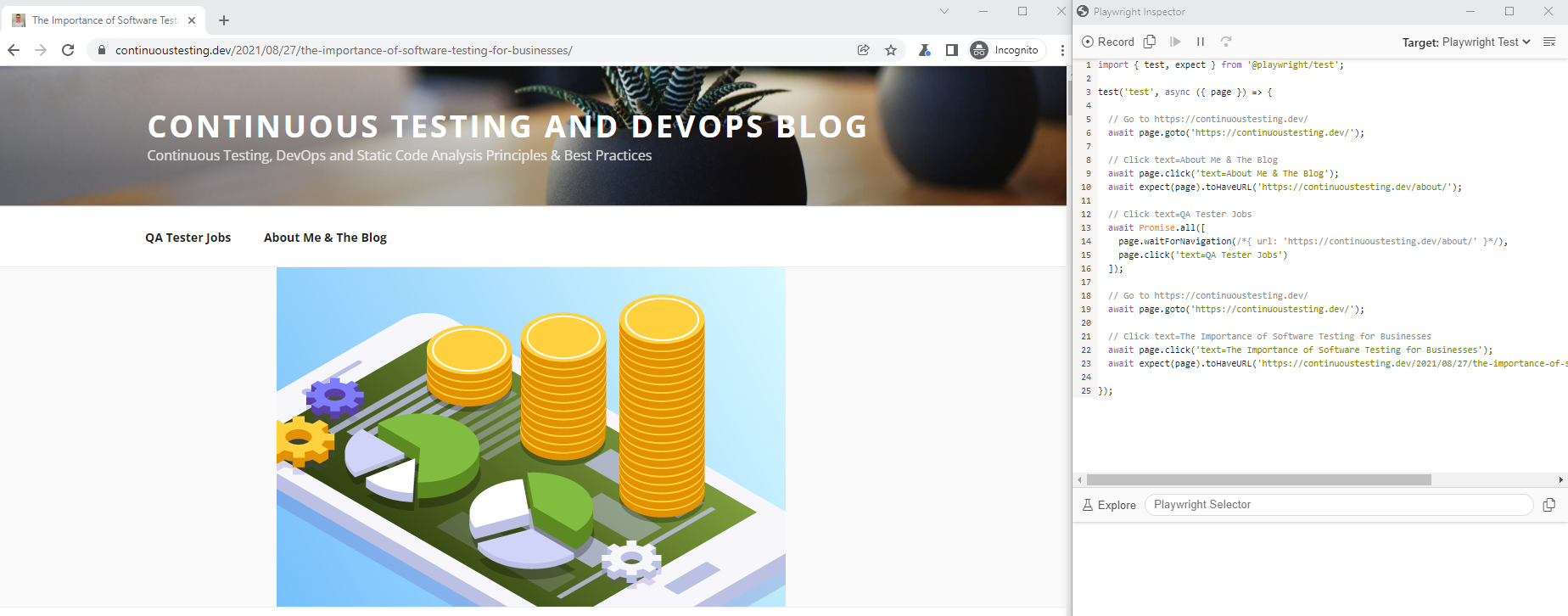
By running the following command from your local Playwright installation folder within your IDE terminal (in my case VS Code), you launch the test generator tool and can record any action on your web application that in parallel generates JavaScript test code.

npx playwright codegen http://continuoustesting.dev

npx playwright install

As you can see in the above recorded test code, it navigates to my blog webpage and performs some basic navigation and clicks on different links and menus. The generated code can than be exported and saved in different language bindings including the native Playwright Test, Java, JavaScript, Python, and C#.

Another cool feature of the Playwright CodeGen tool is the Explore button. This capability enables developers to mouse hover the web application under tests and inspect the elements via the Playwright Selector. When selecting an element from the tool you can than copy it into your IDE test code and proceed with your test creation. In addition, you can record, than stop, and continue recording few times as long as the tool is still running. Lastly, you can do basic debugging of your recorded test from the Playwright Inspector CodeGen tool through stepping over, execution stop and more.

Cypress Studio (Beta)

Like with Playwright, the codeless recorder tool is built into Cypress, but needs to be enabled through a command added to the cypress.json configuration file. Note again, this tool is still in an experimental stage and in beta as this blog is being written.

To start using the tool, simply enable it by adding the following line to your cypress.json file:

{ "experimentalStudio": true  }

From this moment, the tool is enabled, and when you run Cypress in GUI mode through

npx cypress open

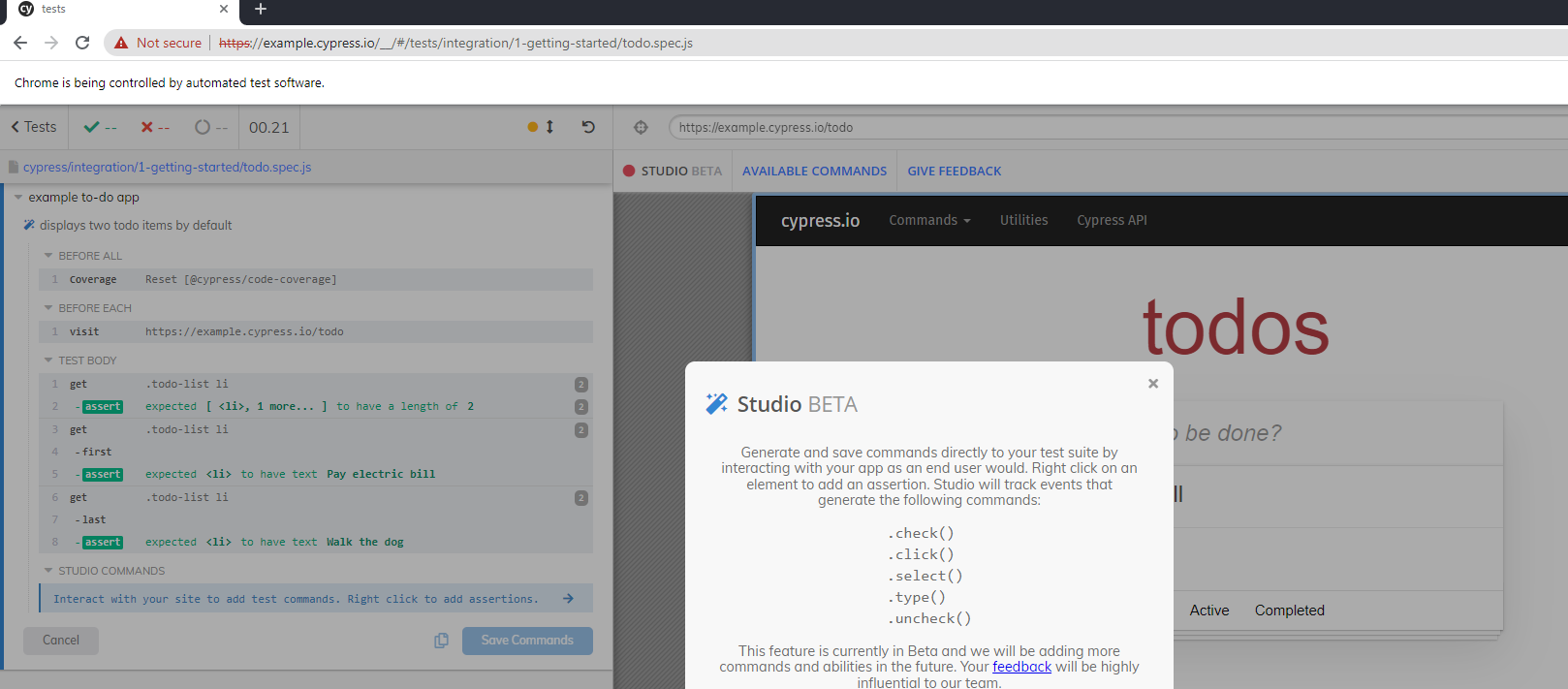
You can than edit an existing JavaScript test spec file and click on the red recording button to inject recorded test code into your script, or build a whole new project. Cypress documentation recommends cloning their built-in GitHub repository and using the following JavaScript test spec as a ‘getting started’ project (https://github.com/cypress-io/cypress-realworld-app/blob/develop/cypress/tests/demo/cypress-studio.spec.ts)

As you can see from the above screenshot, once the Cypress Studio is enabled, editing a test step triggers the Cypress Studio button where you can add new commands to you test. As of now, 5 main test commands are supported by the tool – Check, Click, Select, Type, and Uncheck.

As mentioned above, you can create a brand new test through the recorder or add new code into an existing spec file.

I ran the tool and added a simple exploratory test into the built-in test spec called todo.spec.js that comes with the Cypress open-source framework, below is the generated JavaScript code.

Key Takeaways

It is clear from my quick overview of both codeless tools that they are only in the beginning and that there is potential to grow and add more of the above core capabilities of a fully ready test automation framework. Since these two tools are provided for free and in early stages, we shouldn’t complain, but rather embrace, and provide feedback to the owners of these frameworks to improve.

Advantages of Playwright CodeGen:

  1. More language bindings to export the created code
  2. More browsers to run the tests on
  3. The Explore object spy is quite easy to use
  4. Tool is separated from the basic code-based GUI

Disadvantages of Playwright CodeGen:

  1. Hard to debug tests
  2. Limited test creation of the tool, no automated assertions
  3. No documentation and examples to get started with

Advantages of Cypress Studio

  1. Easy to use from the Cypress GUI tool
  2. Friendly debugging tool
  3. Richer test creation abilities
  4. Good documentation and sample project to help ramp up

Disadvantages of Cypress Studio

  1. Limited test creation and assertion within the tool
  2. Only exports to JavaScript
  3. No support for all browsers (Safari WebKit)

Bottom Line

The 2 tools are a great start and an optimistic horizon for codeless tools complementing code based tools. Both are still growing and there are many gaps to close before they can be self-served by front-end developers and SDETs, however, they provide a sing for the future of intelligent test automation and this is promising. We should continue following the evolution of these tools including the newly Selenium IDE within Selenium 4 and continuously provide feedback to the communities to grow and build these tools right.

The Future of Test Automation Must Be Intelligent

A decade of Agile, DevOps and Continuous Testing is behind us. I heard this week in a conference I was presenting the phrase “Agile is Dead” and other claims about testing being inefficient in many ways.

While many tools have evolved over the past years, and test automation practices and lessons learned have been communicated to practitioners, it is IMHO not enough to move the needle on the efficiency of test automation and continuous testing – especially in the demanding and ever changing digital space.

To have a better DevOps pipeline, and to minimize both the waste as well as the level of escaped defects, testing and especially test automation must become smarter.

In this post I would list the opportunities for test automation to be more intelligent.

WHAT?

Test automation intelligence should guide engineers on which test automation scenarios to execute, automate if missing, and continuously maintain. This is one of the most complex debates within each automation team – WHAT TO AUTOMATE?

Answering this question is never easy, requires risk management, tradeoffs, and often guessing. In addition, it does not always align with the sprint time frames, hence, being thrown out of the software iteration.

With more intelligent solutions that are based on production data, business driven decision making, code analysis, teams will be in a better position to make such decisions.

I love the below visual that Ingo Philipp and originally, Michal Bolton drew around testing is always sampling. This shows that test automation usually addresses what we know about risks and the product out of the entire ocean of risks and features that we either don’t know, cannot assess, or things that were addressed in the past and there isn’t sufficient data to advise whether we should continue using.

New tools that are rising such as Launchable, SeaLights and others aim to help answer some of the above questions, and to help form a continuously relevant regression suite that matches the most recent product code changes, history of defects and more.

WHEN?

The second question that needs to be answered in a more intelligent way is – When to automate and execute my test scenarios? Some say – everything , everyday, some say – everything shifts left, and some are breaking the tests based on personas, skills, and naïve objectives.

Scheduling and deciding which tests to run when must be smarter, and needs to be tied to the overall process, the feedback loops, and the ability of the developers to act upon such execution feedback. If testers throws on the developers to late or to early the results, it makes it unrealistic for them to prioritize, resolve and fix.

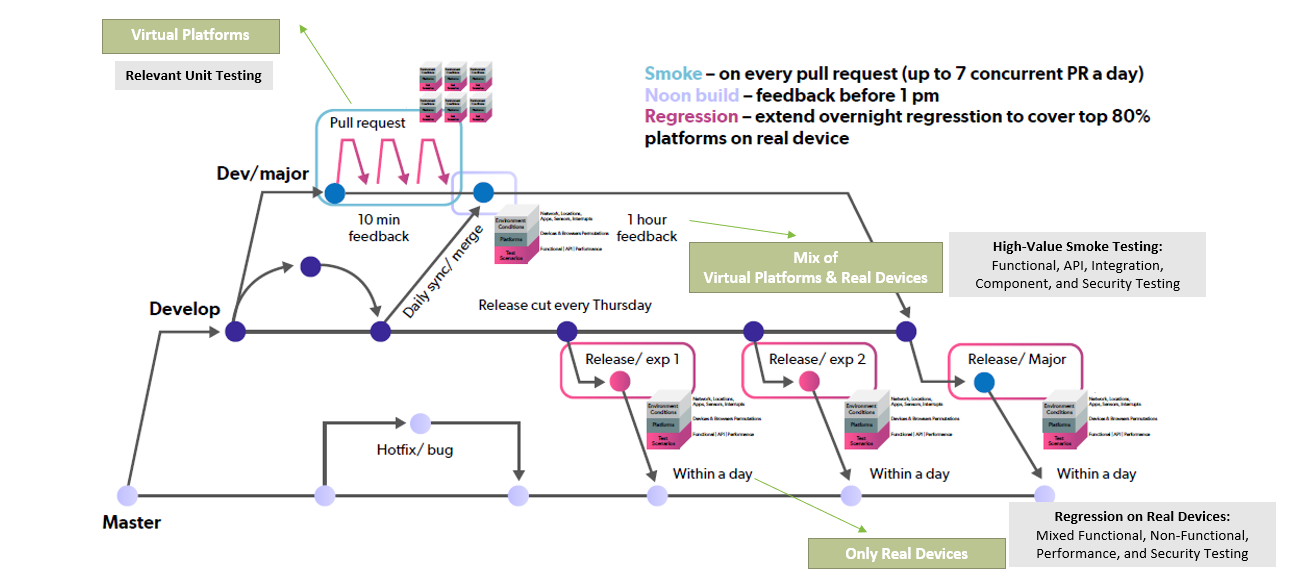
Intelligent systems, must be able to determine based on the above WHAT section, which test scenarios, types, and cadence, such should be executed. In an ideal world, an intelligent system would be able to split between CI, BAT (build acceptance testing), integration, regression, NFT and production synthetic monitoring the entire test suites.

As the above diagram suggest, the pipeline has a pre-defined set of quality gates, phases, and milestones to manage and mitigate risks. An intelligent testing system should effectively place all the right test scenarios –CONTINUOUSLY– in the right phases. Keep in mind, the right test cases change from one release to the next.

WHICH?

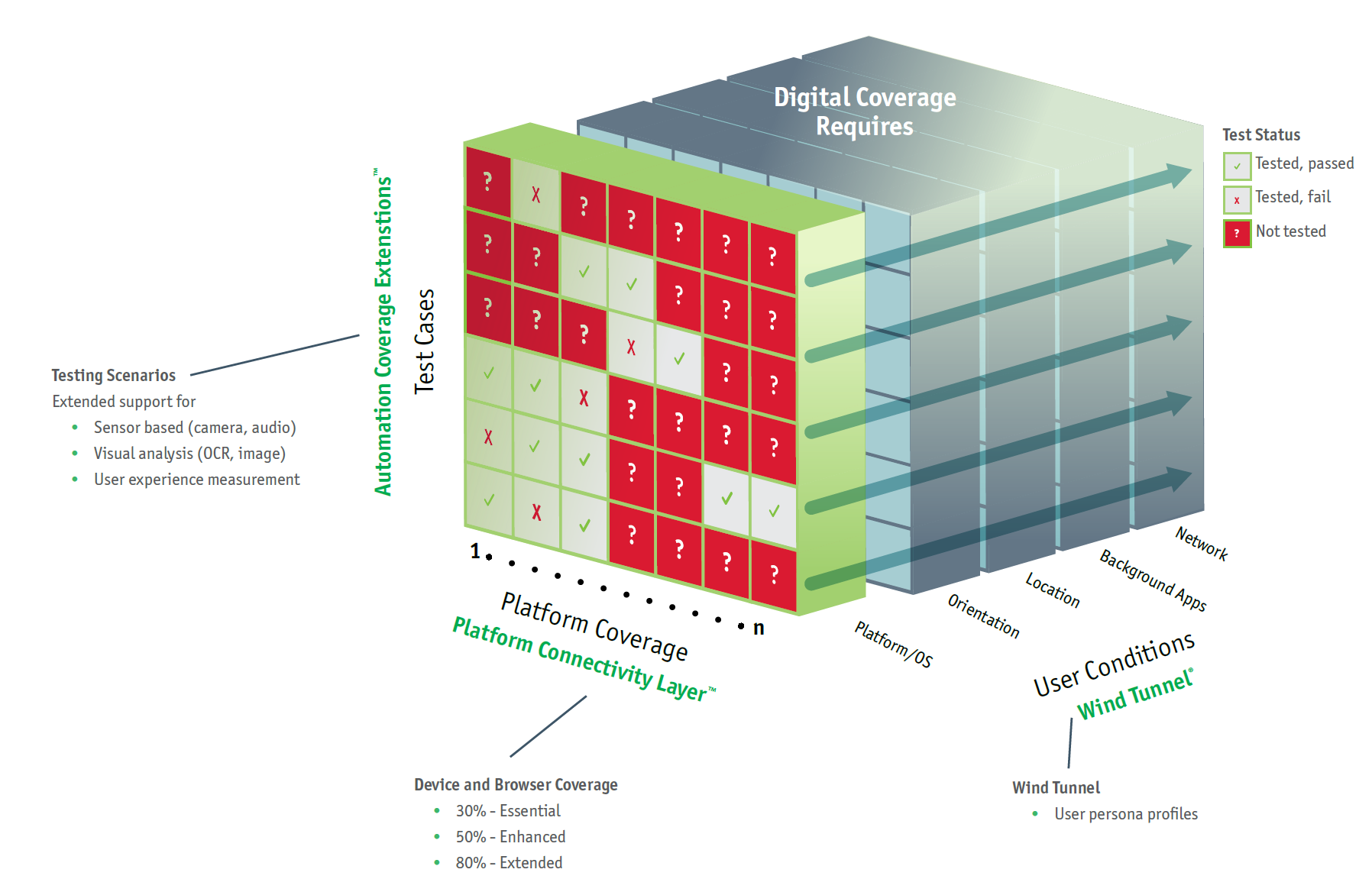
Now that WHAT and WHEN questions are addressed, it is important to have a smarter approach into test automation coverage – on WHICH platforms and environments should my test automation scenarios be running constantly? Which mobile devices, which desktop browsers? which backend configurations are important? which data-driven scenarios should be plugged into the test cases? Which load and KPIs should be applied so I get the proper user experience feedback from my testing? and more.

Determining the WHICH in test automation is an art, and require data analytics, market research, customers validation, production monitoring, AIOps systems and more, but it is an imperative for success.

WHY?

After determining few WHs questions in test automation above, it is time for the analysis part of test automation intelligence – We defined what to automate, when to run, and on which platforms and environments, but once executing the tests, can we efficiently determine WHY tests are failing? What is the root cause per each failure so we lower the time for resolution (MTTR)?

Here, intelligent reporting platforms are critical in minimizing the feedback loop, the future decision making on which tests are of higher value, which platforms are more flaky then others and much more.

Without a solid test automation analysis platform, a great chunk of teams investment in testing can be of waste.

It is not that complicated to realize why tests are constantly failing, and put them into buckets of failure reasons. Perfecto is doing that in an automated fashion through its smart reporting SDK, and allows teams to filter a lot of the test noise post a regression cycle completion.

HOW?

Test creation has always been one of the hardest and most challenging task for SDETs and business testers. It includes great technical skills, meeting short time windows for automation, and requires deep understanding of the product requirements to really automate what’s expected. While many test automation frameworks evolved over the past years, Including Selenium, Appium, Espresso, XCUITest, and Cypress, these are all code based frameworks that even when coming on top of a BDD platform, they are hard to maintain over time, and analyze when they result in a failure.

New and more intelligent test automation frameworks that are codeless or low-code have grown and are becoming a new reality of test engineers. Such tools can really help address few key challenges that are prominent. Time to automate, time to maintain, flakiness and skillset gap. Intelligent test creation that is plugged with a TIA can be the future of smarter test automation, and enable practitioners to create the most relevant test scenarios with minimal maintenance and shorter amount of time. As I am writing this blog, such tools are still growing and have a lot to prove to the world prior to being widely adopted, but this in my mind should be the future of test automation, and once this is in place, connecting these tools to the cloud for parallel and scaled testing will be the ultimate solution for continuous testing.

BOTTOM LINE

A lot of what is written in this blog already exists to some extent, some if being developed these days and will be available in 2021. It is important to start drawing within each DevOps team the future of test automation goals and objectives and learn how such solutions will fit the process from test automation creation, execution, maintenance, analysis, TIA, defect management, quality governance and more.

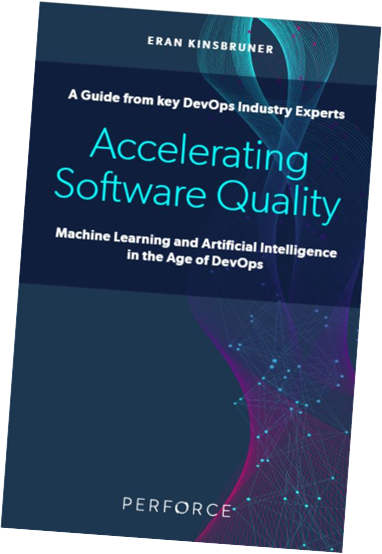
This year, I launched my 3rd book that focuses on “Accelerating Software Quality: AI and ML in the Age of DevOps“. This book looks at the modern DevOps and explores how using AI and ML and smarter algorithms, teams can maximize their productivity and deliver more quality functionality faster.

There is a lot to get excited for in 2021, and especially around test automation in DevOps – Happy New Year and Good Luck in your Future of Test Automation

Code-Based Test Automation vs. Codeless Automation


As more advanced technologies are entering the continuous testing landscape powered by AI/ML, organizations and especially, practitioners, are debating which is better, and why if any should they adopt codeless test authoring solutions?

In this blog, I will be providing the various considerations to switch, and/or combine between the 2 test automation methods.

TL,DR –> There isn’t a magic answer to this debate, and there isn’t a method that is good vs. bad.

Top Considerations

To better address the question on when and why to use either methods, here are the top items to consider, not listed by importance, since each team might relate to different objectives and priorities:

  • What are the application use cases and flows to automate?
  • Which persona is going to create and maintain these scenarios?
  • What are the skill-set within the team/individuals for the job?
  • Is the app under test Mobile/web/responsive/desktop?
  • What are the time constrains for the project, and what are the release cadence going forward (weekly/monthly)?
  • Is the test suite meant to be integrated to other tools (CI/CD/Frameworks)?
  • Are there any advanced automation scenarios (chatbots, IOT, location, audio, etc.)?
  • What are the cost boundaries (tools, project, lab, etc.)
  • Is the test suite meant to be executed at large scale?
  • Is the project a new one, or an additional layer of coverage on top of existing code-based suite? (Selenium/Appium, etc.)

Diving Deeper

Now that we’ve listed some important consideration, let’s explain them a bit deeper.

For teams that are already working on a project (web/Mobile), and have implemented a good working amount of code-based test scenario that are embedded into processes, CI/CD, and other triggers, such consideration should be heavily considered – what is the incentive to change? are there coverage gap in the code-based suite? is there too much noise and flakiness attached to the existing test code? etc. Only if there is a good incentive like the ones mentioned, teams should consider adding codeless test scenarios into their pipeline.

On the other hand, for teams that are just starting a new project, that’s a perfect timing to look into the entire team skills, and decide based on the technology the project is built on, what tools to use – if might make sense for example, for a newly created website to combine a Selenium framework that SDETs that are Java/JavaScript developers would lead together with business testers that can remove some of the load from them via ML-Driven codeless selenium tools.

After covering use cases, quality of existing test suite, new vs. existing projects, lets also consider the time-frames and budget allocated to the project. It is clear that recording codeless scripts takes on average 6-10 times faster than coding the same scenario in Java or other development language. It involves setting up the platform and test environment, coding, debugging, executing at scale, assertions, and more. This obviously also translate into $$ savings. On the other hand, not all test scenarios can be easily recorded, since, for some advanced flows, coding might be a better approach and an easier one to maintain over time. This is why, sometimes it is better to look at the job-to-be-done, prior to rushing into scripting.

Code and Codeless Creation is Key for High Test Automation Coverage

Next in the overall debate is the Eco-system and tools landscape within the organization. Including a new technology is not easy, often not well-accepted, and also not always justified. In today’s reality when squad teams are working together and consists of a variety of resources with varying skills, objectives, and preferences, integrating a new technology should be done with proper consideration, and with proper validation that it “plays” nice within the other existing tools. Codeless tools in that context, should fill in an important gap within the team, integrate well into existing CI/CD and other processes, and not cause duplication of effort, or additional overhead.

Lastly for this blog (not for the entire debate), I would touch the cost of maintenance of test automation scripts. This is perhaps one of the problematic items for any test automation team. Writing a script once, making it run across platforms over time is an easier said than done task. Applications are constantly changing, and so does the platforms under test (mobile devices/OS versions, Browsers), therefore, scripts needs to be properly maintained to ensure clean and noise-free pipeline. Codeless in many ways addresses such challenge through self-healing of elements, test steps, and more. It can be also achieved within code-based projects through advanced reporting and analysis, with automated root-cause analysis and other methods, but codeless does shine the most in such cases.

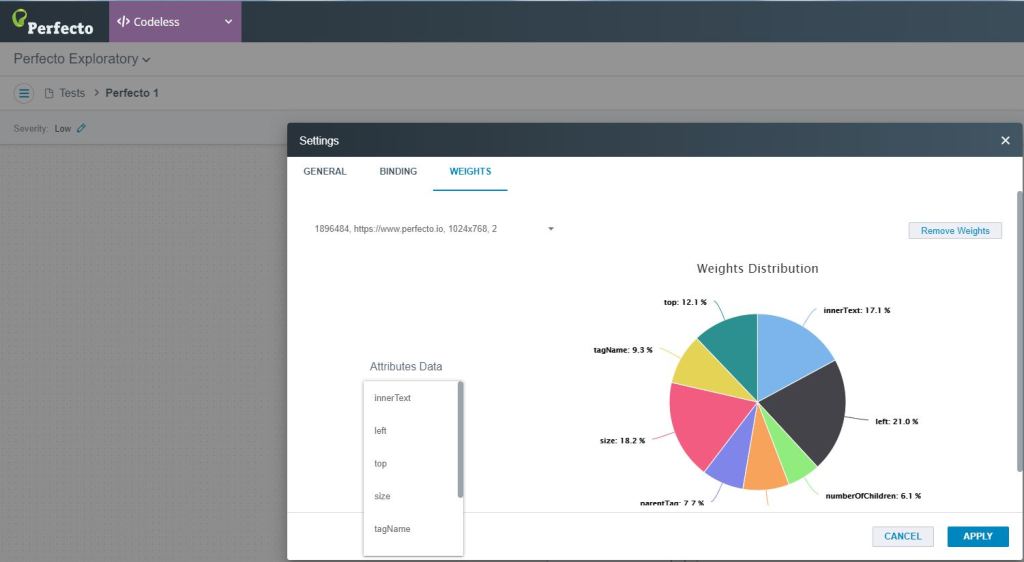
Perfecto/TestCraft Object Self-Healing and Weight Mechanism (ML)

Bottom Line

I tried to keep this blog short and to the point, and leave the practitioners the decision-making across the 2 methods. As written in this post, there are plenty of questions to address prior to adopting a codeless tool, and how to combine it within existing code-based suites. Combining both methods in my honest opinion is the way to go in the future, and the way to maximize the overall test automation coverage with greater efficiency across the teams. Make the right decision that fits the project now, and also in the long-run.

I will be running a live webinar covering the exact blog topic hosted by Shani Shoham from 21. Feel free to register here

Most Recommended Software Testing Books to Read in 2020 and Beyond

As we kick of a new decade of software development and testing, and as digital continuous to challenge test automation engineers that are trying to fit the testing within shorter then ever cycles, here are the top recommended software testing books to consider – the order isn’t the priority, they are all awesome books and equally recommended:

#1 Agile Testing – Lisa Crispin and Janet Gregory

Readers will come away from this book understanding

  • How to get testers engaged in agile development
  • Where testers and QA managers fit on an agile team
  • What to look for when hiring an agile tester
  • How to transition from a traditional cycle to agile development
  • How to complete testing activities in short iterations
  • How to use tests to successfully guide development
  • How to overcome barriers to test automation

#2 More Agile Testing – Lisa Crispin and Janet Gregory

Main learning objectives from the book:

  • How to clarify testing activities within the team
  • Ways to collaborate with business experts to identify valuable features and deliver the right capabilities
  • How to design automated tests for superior reliability and easier maintenance
  • How agile team members can improve and expand their testing skills
  • How to plan “just enough,” balancing small increments with larger feature sets and the entire system
  • How to use testing to identify and mitigate risks associated with your current agile processes and to prevent defects
  • How to address challenges within your product or organizational context
  • How to perform exploratory testing using “personas” and “tours”
  • Exploratory testing approaches that engage the whole team, using test charters with session- and thread-based techniques
  • How to bring new agile testers up to speed quickly–without overwhelming them

#3 Hands on Mobile App Testing – Daniel Knott

Readers will learn how to

  • Establish your optimal mobile test and launch strategy
  • Create tests that reflect your customers, data networks, devices, and business models
  • Choose and implement the best Android and iOS testing tools
  • Automate testing while ensuring comprehensive coverage
  • Master both functional and nonfunctional approaches to testing
  • Address mobile’s rapid release cycles
  • Test on emulators, simulators, and actual devices
  • Test native, hybrid, and Web mobile apps
  • Gain value from crowd and cloud testing (and understand their limitations)
  • Test database access and local storage
  • Drive value from testing throughout your app life-cycle
  • Start testing wearables, connected homes/cars, and Internet of Things devices

#4 Enterprise Continuous Testing – Wolfgang Platz

Enterprise Continuous Testing: Transforming Testing for Agile and DevOps introduces a Continuous Testing strategy that helps enterprises accelerate and prioritize testing to meet the needs of fast-paced Agile and DevOps initiatives. Software testing has traditionally been the enemy of speed and innovation—a slow, costly process that delays releases while delivering questionable business value. This new strategy helps you test smarter, so testing provides rapid insight into what matters most to the business.

#5 Continuous Testing for DevOps Professionals – Eran Kinsbruner and Leading Market Experts

Continuous Testing for DevOps Professionals is the definitive guide for DevOps teams and covers the best practices required to excel at Continuous Testing (CT) at each step of the DevOps pipeline. It was developed in collaboration with top industry experts from across the DevOps domain from leading companies such as CloudBees, Tricentis, Testim.io, Test.ai, Perfecto, and many more.The book is aimed at all DevOps practitioners, including software developers, testers, operations managers, and IT/business executives

#6 AccelerateThe Science of Lean Software and DevOps, Nicole Forsgren

How can we apply technology to drive business value? For years, we’ve been told that the performance of software delivery teams doesn’t matter―that it can’t provide a competitive advantage to our companies. Through four years of groundbreaking research to include data collected from the State of DevOps reports conducted with Puppet, Dr. Nicole Forsgren, Jez Humble, and Gene Kim set out to find a way to measure software delivery performance―and what drives it―using rigorous statistical methods. This book presents both the findings and the science behind that research, making the information accessible for readers to apply in their own organizations.

#7 Complete Guide to Test Automation, Arnon Axelrod

  • Know the real value to be expected from test automation
  • Discover the key traits that will make your test automation project succeed
  • Be aware of the different considerations to take into account when planning automated tests vs. manual tests
  • Determine who should implement the tests and the implications of this decision
  • Architect the test project and fit it to the architecture of the tested application
  • Design and implement highly reliable automated tests
  • Begin gaining value from test automation earlier
  • Integrate test automation into the business processes of the development team
  • Leverage test automation to improve your organization’s performance and quality, even without formal authority
  • Understand how different types of automated tests will fit into your testing strategy, including unit testing, load and performance testing, visual testing, and more

#8 The DevOps Handbook, Gene Kim, Jez Humble, Patrick Debois, John Willis

More than ever, the effective management of technology is critical for business competitiveness. For decades, technology leaders have struggled to balance agility, reliability, and security. The consequences of failure have never been greater―whether it’s the healthcare.gov debacle, cardholder data breaches, or missing the boat with Big Data in the cloud. And yet, high performers using DevOps principles, such as Google, Amazon, Facebook, Etsy, and Netflix, are routinely and reliably deploying code into production hundreds, or even thousands, of times per day. Following in the footsteps of The Phoenix Project, The DevOps Handbook shows leaders how to replicate these incredible outcomes, by showing how to integrate Product Management, Development, QA, IT Operations, and Information Security to elevate your company and win in the marketplace

#9 The Digital Quality Handbook – Eran Kinsbruner and Industry Experts

As mobile and web technologies continue to expand and basically drives large organizational business in virtually every vertical or industry, it is critical to understand how to take existing release practices for mobile and web apps to the next level, including software development life cycle (SDLC), tools, quality, etc. Organizations which are already enjoying the power of digital are still struggling with various challenges that can be related to many factors, such as:

  • SDLC and processes maturity
  • Expanding test coverage to include more non-functional testing, user condition testing, etc.
  • Coping with existing limitations of open source tools and frameworks
  • Sustaining correctly sized and up-to-date mobile test labs
  • Getting proper quality insights upon each test cycle prior and post production
  • Branching wisely cross-platform and cross-feature test suites

#10 Specification by Example , How Successful Teams Deliver the Right Software, Gojko Adzic

Gojko has a list of great books, this is one of the great ones, but check out other of his books as well.

Specification by Example is an emerging practice for creating software based on realistic examples, bridging the communication gap between business stakeholders and the dev teams building the software. In this book, author Gojko Adzic distills interviews with successful teams worldwide, sharing how they specify, develop, and deliver software, without defects, in short iterative delivery cycles.

#11 Clean CodeA Handbook of Agile Software Craftsmanship, Robert C. Martin

Readers will come away from this book understanding

  • How to tell the difference between good and bad code
  • How to write good code and how to transform bad code into good code
  • How to create good names, good functions, good objects, and good classes
  • How to format code for maximum readability
  • How to implement complete error handling without obscuring code logic
  • How to unit test and practice test-driven development

#12 Continuous DeliveryReliable Software Releases through Build, Test, and Deployment Automation, Jez Humble and David Farley

The authors introduce state-of-the-art techniques, including automated infrastructure management and data migration, and the use of virtualization. For each, they review key issues, identify best practices, and demonstrate how to mitigate risks. Coverage includes

  • Automating all facets of building, integrating, testing, and deploying software
  • Implementing deployment pipelines at team and organizational levels
  • Improving collaboration between developers, testers, and operations
  • Developing features incrementally on large and distributed teams
  • Implementing an effective configuration management strategy
  • Automating acceptance testing, from analysis to implementation
  • Testing capacity and other non-functional requirements
  • Implementing continuous deployment and zero-downtime releases
  • Managing infrastructure, data, components and dependencies
  • Navigating risk management, compliance, and auditing

#13 The Guide to Software Testability, Ash Winter and Rob Meaney

Learn practical insights on how testability can help bring teams together to observe, control and understand the systems they build. Enabling them to better meet customer needs, achieve a transparent level of quality and predictability of delivery.

#14 A Practical Guide to Testing in DevOps, Katrina Clokie

A Practical Guide to Testing in DevOps offers direction and advice to anyone involved in testing in a DevOps environment

#15 Test Automation University, Angie Jones and Applitools

While not a book, a great shout out to my colleague, friend and co-author in one of my above mentioned books Angie Jones for launching, leading and building the Test Automation University. This is obviously an additional online resource that complements books and other written material.

Summary

I am sure that there are plenty of other great and practical books, but i went with this list as a start. If you feel that there must be an additional up to date book, reach out to me, and I will be more than happy to add to this list.

Happy Reading!


Eliminating Mobile Test Automation Flakiness and More

Mobile testing by definition is an unstable, flaky and unpredictable activity.

When you think you covered all corners and created a “stable” environment, still, your test cycle often get stuck due to 1 or few items.

In this post, I’ll try to identify some of the key root causes for test automation flakiness, and suggest some preventive actions to eliminate them.

What Can Block Your Test Automation Flow?

From an ongoing experience, the key items that often block test automation of mobile apps are the following:

  • Popups – security, available OS upgrades, login issues, etc.
  • Ready state of DUTs – test meets device in a wrong state
  • Environment – device battery level, network connectivity, etc.
  • Tools and Tets Framework fit – Are you using the right tool for the job?
  • Use of the “right” objects identifiers, POM, automation best practices
  • Automation at Scale – what to automate, on what platforms?

All of the above contribute in one way or the other to the end-to-end test automation execution.

We can divide the above 6 bullets into 2 sections:

  1. Environment
  2. Best Practices

Solving The Environment Factor in Mobile Test Automation

In order to address the test environment contribution to test flakiness, engineers need to have full control over the environment they operate in.

If the test environment and the devices under test (DUT) are not fully managed, controlled and secured the entire operation is at risk. In addition, when we state the term “Test Environment Readiness” it should reflect the following:

  1. Devices are always cleaned up prior to the test execution or are in a known “state”/baseline to the developers and testers
  2. If there are repetitive known popups such as security permissions, install/uninstall popups, OS upgrades, or other app-specific popups, they should be accounted for either in the pre-requisites of the test or should be prevented proactively prior to the execution.
  3. Network stability often is a key for unstable testing – engineers need to make sure that the devices are connected to WiFi or cellular network prior to testing execution start. This can be done either as a pre-requisite validation of the network or through a more generic environment monitoring.


Following Best Practices

In previous blogs, I addressed the importance of selecting the right testing frameworks, IDEs as well as leveraging the cloud as part of test automation at scale. After eliminating the risks of the test environment in the above section, it is important to make sure that both developers and test automation engineers follow proper guidelines and practices for their test automation workflow.

Since testing shifted left towards the development team, it is important that both dev and test align on few things:

  1. What to automate?
  2. On what platforms to test?
  3. How to automate (best practices)?
  4. Which tools should be used to automate?
  5. What goes into CI, and what is left outside?
  6. What is the role of Manual and Exploratory testing in the overall cycle?
  7. What is the role of Non-Functional testing in the cycle?

The above points (partial list)  covers some fundamental questions that each individual should be asking continuously to assure that his team is heading in the right direction.

Each of the above bullets can be attributed to at list one if not many best practices.

  1. To address the key question on what to automate, here’s a great tool (see screenshot below) provided by Angie Jones. In her suggested tool, each test scenario should be validated through some kind of metric that adds to a score. The highest scored test cases will be great candidates for automation, while the lowest ones obviously can be skipped.
  2. To address the 2nd question on platform selection, teams should monitor their web and mobile ongoing traffic, perform market research and learn from existing market reports/guides that addresses test coverage.
  3. Answering the question “How to automate” is a big one :). There is more than 1 thing to keep in mind, but in general – automation should be something repetitive, stable, time and cost efficient – if there is something preventing one or more of these objectives, it’s a sign that you’re not following best practices. Some best practices can be around using proper object identifiers, others can reflect building the automation framework with proper tags and catches so when something breaks it is easy to address, and more.
  4. The question around tools and test frameworks again is a big one. Answering it right depends on the project requirements and complexity, the application type (native, web, responsive, PWA), test types (functional, non-functional, unit). In the end, it is important to have a mix of tools that can “play” nicely together and provide unique value without stepping on each other.
  5. Tests that enter CI should be picked very carefully. Here, it is not about the quantity of the tests but about the quality, stability, and value these tests can bring focusing on fast feedback. If a test requires heavy env. setup is flaky by nature, takes too much time to run, it might not be wise to include it in the CI.
  6. Addressing the various testing types in Qs 6 and 7 – it depends on the project objectives, however, there is a clear value for each of the following tests in  mobile app quality assurance:
    1. Accessibility and performance provide key UX indicators about your app and should be automated as much as possible
    2. Security testing is a common oversight by many teams and should be covered through various code analysis, OWASP validations and more.
    3. Exploratory, manual and crowd testing provide another layer of test coverage and insights into your overall app quality, hence, should be in your test plan and divided throughout the DevOps cycle.

Happy Testing

Could The Galaxy Note Be The Gadget of the Year?

A Guest Blog Post by Alli Davis.

The Samsung Galaxy Note 8 is one of the best phones that the smartphone manufacturer has in its lineup. The Note 8 is revered for its large and gorgeous looking display, a fast performance, and improved S-Pen among other features. Despite its release in the latter half of 2017, the Samsung Galaxy Note has already received gadget of the year awards and other accolades. Here’s what the awarding bodies has to say about the Samsung Galaxy Note 8.

Exhibit Tech Awards

The Note 8 received the Flagship Smartphone of the Year Award at the Exhibit Tech Awards in India. It received the award for its screen size battery life as well as a great camera. The award is the most recent one for the Note 8, having come in late December of 2017.

Considering the place Samsung was with the Note 7, the Note 8 is nothing short of an amazing comeback. After the previous iteration’s battery issues, some reports suggested that the company might be considering ending the Galaxy line with the 7. But coming out with the next generation 8 proved to be the right move.

 India Mobile Congress

Just over one month after the Samsung Galaxy Note came out in August, the India Mobile Congress awarded the device with its Gadget of the Year honor. The inaugural event awards honor innovations and initiatives designed to better the ICT ecosystem. The ICT ecosystem refers to everything that goes into making a technological environment for a business or government. This includes things like policies, processes, applications, and of course technologies.

Samsung introduced the Galaxy Note 8 in the Indian marketplace as an effort to give consumers the opportunity to do more with their smartphones. Upon receiving the award, Asim Warsi, the Senior VP of Mobile Business at Samsung India confirmed the effort to improve lives in India. Introducing the phone into the premium sector of the market has only strengthened the company as a leader in that category. It leads the way not only with a great screen and camera system but also with Samsung Pay and Samsung Knox, the security feature of the phone.

MySmartPrice Mobile Of The Year Awards

The  MySmartPrice awards also honored Samsung’s Galaxy Note 8 in December 2017. The device received My SmartPrice’s Flagship Smartphone of the Year 2017 Award for the most feature packed phone in this category. Its 6.3 OMLED screen and camera features captured the attention of people for the award. It was slightly out edged by the iPhone X and Google Pixel 2 in areas such as the screen and camera, But the phone manages to hold its own among the stiff competition in the marketplace.

The Galaxy Note’s Snapdragon core processor makes it a very good option for day to day use according to reviews and performs relatively well in low light conditions. The reduction in price also makes it stand out amongst the competition. In the higher-end phone market, Samsung prices itself quite well for the features it offers.

At a time when Samsung could have ended the Galaxy Note line forever after the Note 7’s battery issue, the company persevered with its Note 8 and the risk paid off. In a highly competitive marketplace, Samsung still produces a Note that is productive, powerful, and innovative with features and a price that a wide variety of customers can enjoy. With all of the Accolades that the Samsung Galaxy Note 8 has received, the future looks bright for future iterations of the phone to come.

Alissa B. Davis is a freelance writer who has a passion for writing about technology and stories about her community. Read her latest stories at http://alissabdavis.com/

Continuous Testing Principles for Cross Browser Testing and Mobile Apps

Majority of organizations are already deep into Agile practices with a goal to be DevOps and continuous delivery (CD) compliant.

While some may say that maximum % of test automation would bring these organizations toward DevOps, It takes more than just test automation.

To mature DevOps practices, a continuous testing approach needs to be in place, and it is more than automating functional and non-functional testing. Test automation is obviously a key enabler to be agile, release software faster and address market events, however, continuous testing (CT) requires some additional considerations.

Tricentis defines CT accordingly:

CT is the process of executing automated tests as part of the software delivery pipeline in order to obtain feedback on the business risks associated with a software release candidate as rapidly as possible. It evolves and extends test automation to address the increased complexity and pace of modern application development and delivery

The above suggests that a CT process would include a high degree of test automation, with a risk-based approach and a fast feedback loop back to developer upon each product iteration.

How to Implement  CT?

  • A risk-based approach means sufficient coverage of the right platforms (Browsers and Mobile devices) – such platform coverage eliminates business risks and assures high user-experience. Such platform coverage is continuous maintenance requirements as the market changes.
  • Continuous Testing needs an automated end-to-end testing that integrates existing development processes while excluding errors and enabling continuity throughout SDLC. That principle can be broken accordingly:
    • Implement the “right” tests and shift them into the build process, to be executed upon each code commit. Only reliable, stable, and high-value tests would qualify to enter this CT test bucket.
    • Assure the CT test bucket runs within only 1 CI –> In CT, there is no room for multiple CI channels.
    • Leverage reporting and analytics dashboards to reach “smart” testing decisions and actionable feedback, that support a continuous testing workflow. As the product matures, tests need maintenance, and some may be retired and replaced with newer ones.
  • Stable Lab and test environment is a key to ongoing CT processes. The lab should be at the heart of your CT, and should support the above platform coverage requirements, as well as the CT test suite with the test frameworks that were used to develop these tests.
  • Utilize if possible artificial intelligence (AI) and machine learning (ML)/deep-learning (DL) solutions to better optimize your CT test suite and shorten the overall release activities.

  • Continuous Testing is seamlessly integrated into the software delivery pipeline and DevOps toolchain – as mentioned above, regardless of the test framework, IDEs and environments (front-end, back-end, etc.) used within the DevOps pipeline, CT should pick up all relevant testing (Unit, Functional, Regression, Performance, Monitoring, Accessibility and more), execute them in parallel and in an unattended fashion, to provide a “single voice” for a Go/No-Go release – that happens every 2-3 weeks.

Lastly, for a CT practice to work time after time, the above principles needs to be continuously optimized, maintained and adjusted as things change either within the product roadmap or in the market.

Happy CT!

The Essentials of iOS App Testing For iPhone X

48 hours ago, Apple revealed its new and futuristic iPhone X. Regardless of its design, and debatable price tag, this device also introduced a whole set of functionality, display, and engagement with the end-user.

iOS11 is turning to be quite different from previous releases from both user adoption which is still low (~30%) and also from a quality perspective – 4 patch releases in 1.5 months is a lot.

Most of the changes are already proving to cause issues for existing apps that work fine on iOS11.x and former iPhones like iPhone 8, 7 and others.

In this post, I’d highlight some pitfalls that testers as well as developers ought to be doing immediately if they haven’t done so already to make sure their apps are compliant with the latest Apple mobile portfolio.

The post will be divided into 2 areas: Mobile testing recommendations and App Development recommendations.

Mobile Testing for iPhone X/iOS 11

  • Test across all supported platforms as a general statement. iOS11 isn’t for every device, and apps are stuck on iOS10 that has different functionality than the iOS11. Test your apps across iOS9.3.5, iOS 10.3.3, and the latest iOS11.x
  • iPhone X comes from the factory with iOS11.0.1, requesting for an update to iOS1.1 – that means, this device will never get the intermediate iOS11.0.2/iOS11.0.3 – if customers haven’t yet updated to iOS1.1, you may want to have 1 device like iPhone 8/7 still on iOS11.0.3 so you have coverage for iOS11.Latest-1
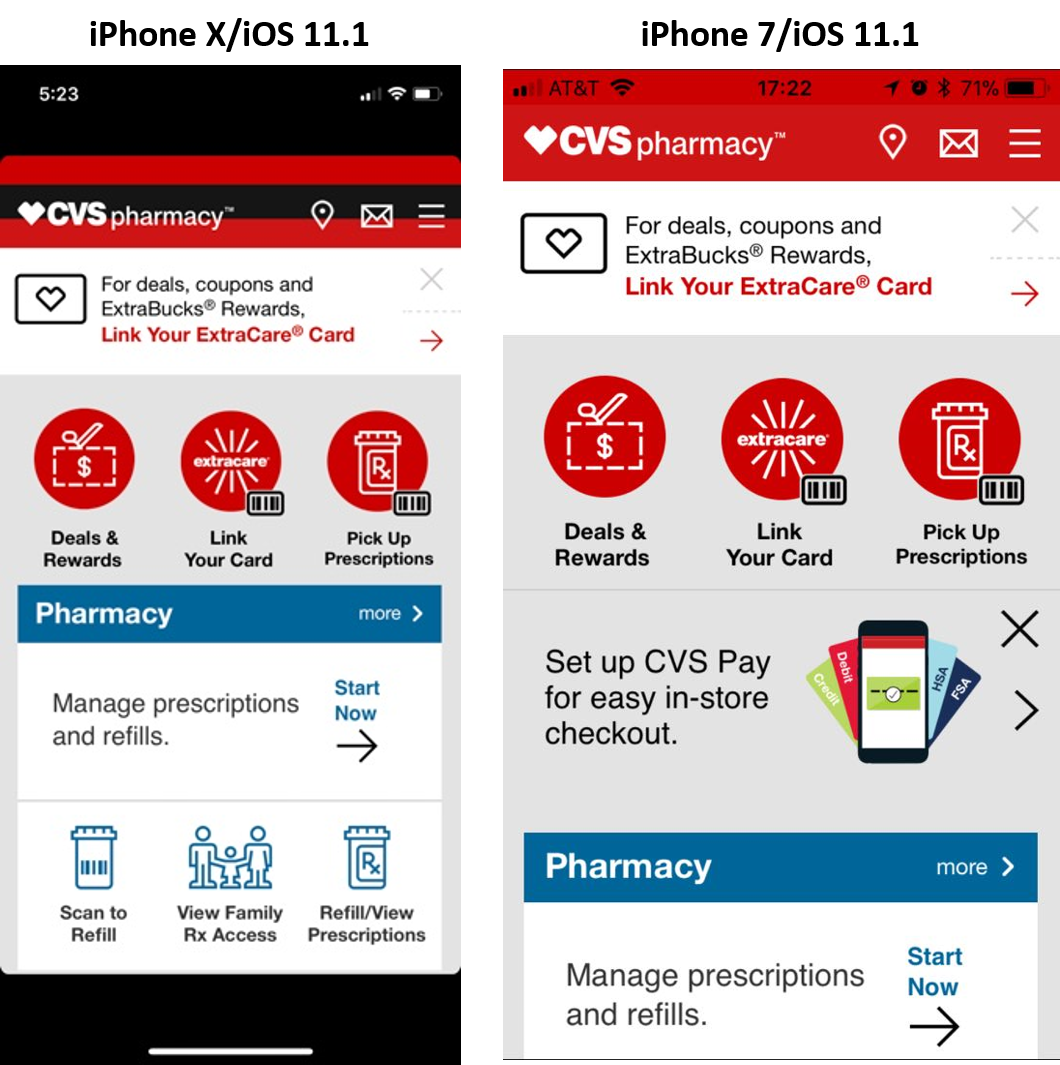
  • Display and Screen Size for iPhone X specifically changed, and this device has a 5.8” screen size that is different for all other iPhones. Testing UI elements, Responsive apps layouts and other graphics on this new device is obviously a must (below is an example taken from CVS native app showing UI issues already found by me while playing with the device). This device is also full screen similar to the Samsung S8/Note 8 devices. A lot of tables, text field, and other UI elements need to be iOS11/iPhopne X ready by the developers.

Image title

  • New gestures and engagement flow impact usability as well as test automation scripts. In iPhone X, unlike previous iPhones, the user has no HOME Button to work with. That means that in order for him to launch the task manager  (see below) and switch or kill a background running app, he needs to follow a different flow. What that means is that at first, the app testing teams need to make sure that this new flow is covered in testing, and more important, if these flows are part of a test automation scenario, the code needs to be adapted to match the new flow.

Image title

In addition to the removal of the Home button that causes the new way of engaging with background apps, the way for the user to return to the Home screen has also changed. Getting back to the Home screen is a common step in every test automation, therefore these steps need to account for the changes, and replace the button press with Swipe Up gesture.

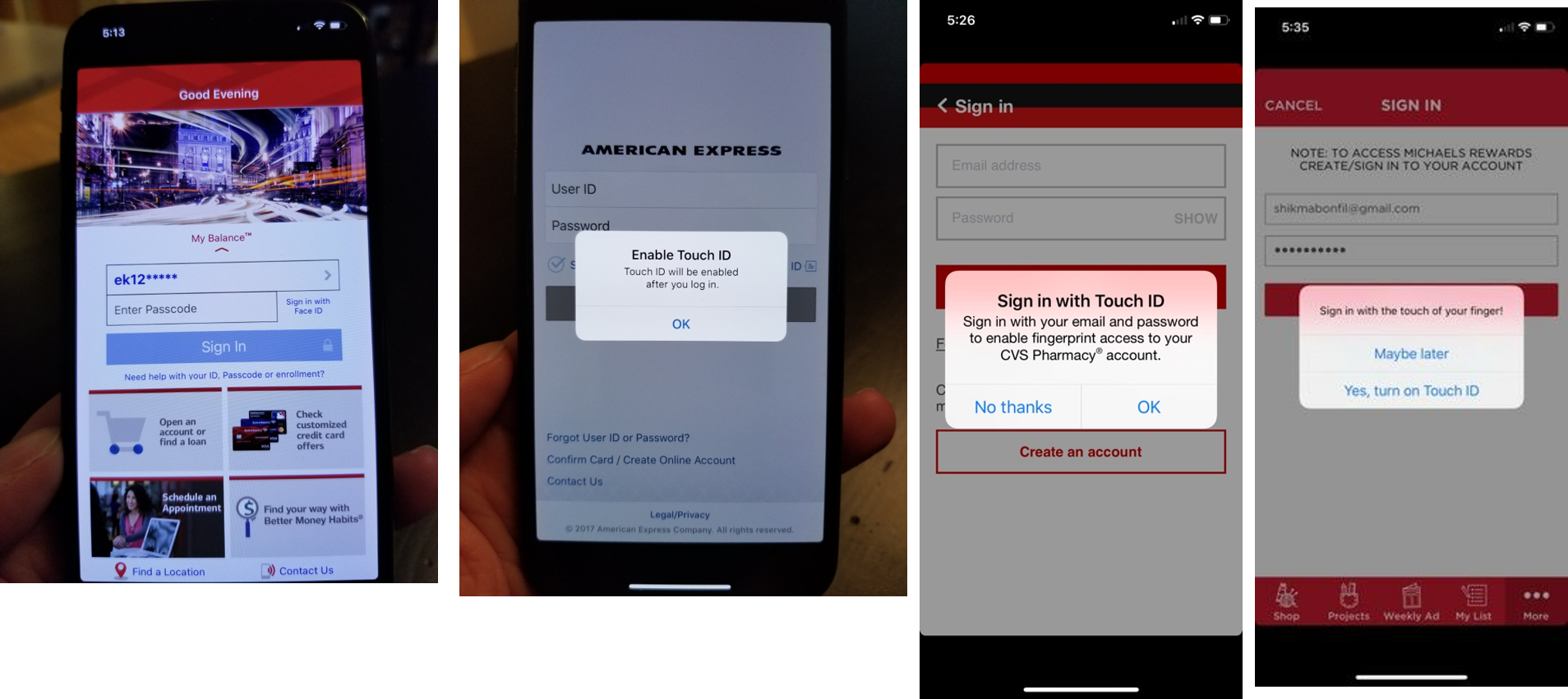
  • Authentication and payment scenarios also changed with the elimination of the Touch ID option, that was replaced with the Face ID. While iPhone X introduced an innovative digital engagement with the Face recognition technology, the de-facto today to log in into apps, make payments and more, is still the Fingerprint authentication. Testing both methods is now a quality and dev requirement. From a scan that I ran through the leading apps in the market (see examples below), there is a clear unpreparedness for iPhone X. Most apps will either show on their UI the option to log in via Touch ID or if they support Face ID, they will allow users to use it, while still showing on the UI and in the app settings the unsupported option.

Image title

  • Testing mobile web and responsive web apps in both landscape and portrait mode with the unique iPhone X display is also a clear and immediate requirement. I also found issues mostly around text truncation and wrong leverage of the entire screen to display the web content.

Image title


In addition, trying to work with Hulu.com website proved to also be a challenge. Most menu content is being thrown to the bottom of the screen under the user control, making it simply inaccessible. Obviously, the site is not ready for iPhone X/Safari Browser.

Mobile Apps Development

  • Optimize existing iOS apps from both UI as well as authentication perspective. As spotted above, there are clear compatibility issues around the removal of the Touch ID option, that needs to be modified on the UI side of the apps when launched on iPhone X. In addition, scaling UI elements on the new screen whether for RWD apps or mobile apps needs refactoring as well. Apple is offering app developers a ui guidlines to help make the changes fast.Image title
  • Leverage advanced capabilities in iOS11 that best suit the new chipset (AI11 Bionic) and the camera sensors, to introduce digital engagement capabilities around augmented reality (ARKit API’s) and others. Retail apps and games are surely the 1st most suitable segments to jump on these innovative capabilities and enrich their end users’ experiences.

Image title

Bottom Line

The new iPhone X might be paving the way together with the Android Note 8 for a new era of innovation that offers App developers new opportunities to better engage and increase business values. If quality will not be aligned with these innovative opportunities, as shown above, that transformation will be quite challenging, slow and frustrating for the end users’

It is highly recommended for iOS app vendors across verticals to get hands-on experience with the new platform, assess the gaps in quality and functionality, and make the required changes so they are not “left behind” when the innovative train moves on.