How To Adapt to Mobile Testing Complexity Increase Due to External App Context Features?

If you follow my blogs, white papers and webinars for the past years you are already familiar with the most known common challenges around mobile app testing such as:

  • Device/OS proliferation and market fragmentation
  • Ability to test the real end-user environment within and outside of the app
  • testing both visual aspects/UI as well as native elements of the app
  • Keeping up with the agile and release cadence while maintaining high app quality
  • Testing for a full digital experience for both mobile, web, IOT etc.


If the above is somehow addressed by various tools, techniques and guidelines there is a growing trend in the industry in both iOS and Android platforms that are adding another layer of complexity to testers and developers. With iOS 10 and Android 7 as the latest OS releases but also with earlier versions, we start to see more abilities to engage with the app outside of the app.
imessage-apps-2-800x525

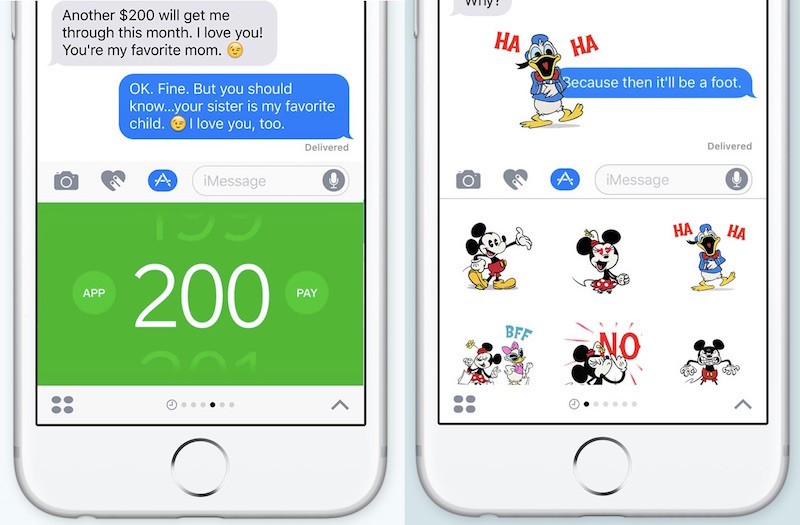
If we look at the recent change made in iOS 10 around iMessage, it is clear that Apple is trying to enable mobile app developers better engagement with their end-users’ even outside of the app itself.  Heavy messaging users can remain in the same app/screen that they’re using and respond quickly to external apps notifications in various ways.

This innovation is a clear continuation to the Force Touch (3D Touch) functionality that was introduced with iOS 9 and iPhone 6S/6S Plus that also allows users to click on the App icon without opening the full app and perform a quick action like writing a new facebook status, upload an image to facebook or other app related activities.

Add to the above capabilities the recent Android 7.1 App Shortcuts support which allow users to create relevant shortcuts on the device screen for app capabilities that they commonly use. More example that you can refer to is the Android 7.0 split window feature – allowing app to consume 1/2 or 1/3 of the device screen while the remaining screen is allocated to a different app that might compete with yours on HW/System resources etc.

So What Has Changed?

Quick answer – A lot 🙂

As I recently wrote in my blog around mobile test optimization, the testing plans for different mobile OS versions is becoming more and more complex and requires a solid methodology so teams can defer the right tests (manual/automation) to the right platforms based on supported features of the app and the capabilities of the devices – testing app shortcuts (see below an example)  is obviously irrelevant on Android 7.0 and below, so the test matrix/decision tree needs to accommodate this.

appshortcuts

To be able to test different app context you need to make sure that you have the following capabilities from a tool perspective in place and also to include the following test scenarios in your test plan.

  1. Testing tools now must support the App under test and also the full device system in order to engage with system popups, iMessage apps, device screen for force-touch based testing etc.
  2. The test plan in whatever tree or tool is being managed, ought to accommodate to the variance between platforms and devices and allow relevant testing of apps–>features–>devices (see my referenced blog above for more insights)
  3. New test scenarios to be considered if your app leverages such capabilities
    1. What happens when incoming events like calls or text messages occur while the app interacts within an iMessage/Split screen/shortcut etc. also what happens when these apps receive other notifications (lock screen or within the unlocked device screen)
    2. What happens to the app when there are degraded environment conditions like loss of network connection, flight mode is on etc. – note that apps like iMessage rely on network availability
    3. If your app engages with a 3rd party app – take into account that these apps are also exposed to defects that are not under your control – Facebook, iMessage, others. If they are not working well or crashes, you need to simulate early in your testing activities such scenario and understand the impact on your app and business
    4. Apps that work with iMessage as an example might require a different app submission process and also might be part of a separate binary build that needs to be tested properly – take this into account.
    5. Since the above complexities are all dependent on the market and OS releases, make sure that any Beta version that is released gets proper testing by your teams to ensure no regressions occur.

I hope these insights can help you plan for a new trend/future that I see growing in the mobile space that IMO does add an extra layer of challenges to existing test plans.

Comments are always welcomed.

Happy Testing!

Mobile Testing On Real Devices Vs. Emulators

Though it seems the debate over the importance of testing on real devices and basing a Go/No-Go release decision only on real devices is over i am still being asked – why it’s important to test on real devices? What are the emulators limitation?

In this blog i will try to summarize some key points and differences that might help address the above questions.

emulatorslimitations

End users Use Real Devices and Not Emulators

Developing and deploying a mobile app to the market isn’t intended to be used on desktops with mouse and keyboards but on real devices with small screens, limited hardware, RAM, storage and many other unique attributes. Testing on a different target then the end-users will use simply exposes organizations to quality risks, security, performance and others.

The end-users engage with the application with unique gestures like TouchID, Force Touch, Voice commands. End-users operate their mobile apps in conjunctions with many other background apps, system processes — These conditions are simply either hard to mimic on emulators or are unsupported by emulator.

As seen also in the above visual, Emulators don’t carry the real hardware as a real device would – this includes chip-set, screen, sensors and so forth.

Platform OS Differences

Mobile devices are running a different OS flavor than the one that runs on Emulators. Think about a Samsung device or other launched by Verizon, T-Mobile, AT&T and other large carriers – these platform versions that run on the devices are by far different than the ones that run on Emulators.

Thinking about devices and carriers, note that real devices receive plenty of notifications like push notification, location alerts, incoming text messages (whats app etc.), google play store/app store app updates and so forth –> these are not relevant in Emulators and by not testing in these real environment conditions, the test coverage is simply incomplete and wrong.

real_env_conditions

The above image was taken actually from my own device when i was travelling to New York last week – look at the amount of background pop-ups, notifications and real conditions like network, locations, battery while i simply use the Waze app. This is a very common scenario for most end users that consume any mobile app. There is no way to mimic all of the above scenarios on Emulators in real-time, real network conditions etc.

Think also on varying network condition simulation that transition from Wifi to real carrier network, than add lose of network connection at all that impact location, notifications and more.

Wasting a lot of time in testing against the wrong platforms costs money, exposes risks and is inefficient.

Innovative Use Cases Simulation

With the recent Mobile OS platforms that were recently released to the market including Android 7.1.1 and iOS 10.x we start to see a growing trend of apps that are being used in different contexts.

appshortcuts

With Android 7.1.1 we now see App-Shortcuts (above image) that allows developers to actually create a shortcut to a specific feature of the application. This is already achievable with iOS 9 force-touch capabilities. Add to these use cases like iMessage Apps that were introduced in iOS10, Split window in Android 7.0 and you understand that an app can be engaged by the user either through part of the screen or within a totally different app like iMessage.

With such complexities the test plans for once are getting more fragmented across devices and platforms but the gaps between what an Emulator can simply provide developers and testers and what a real device in a real environment can is growing.

Bottom Line

Developers might find at a given stage of the app value of using Emulators and i am not taking that away – testing on an Emulator within the native IDE’s in early stages is great, however when thinking about the complete SDLC, release criteria and test coverage there is no doubt that real devices are the only way to go.

Don’t believe me, ask Google – https://developer.android.com/studio/run/device.html

google

Happy And REAL Device Testing 🙂

Joe Colantonio’s Test Talk: Mobile Testing Coverage Optimization

How does a company nowadays put together a comprehensive test strategy for delivering high-quality experiences for their applications on any device? I think this is the question I get asked most frequently and it is the biggest challenge in today’s market, how to tackle mobile testing and responsive web testing. The solution can be the difference between an app rated 1 star or an app rated 5 stars.

Play Podcast

I had a lot of fun talking to Joe Colantonio from Test Talks about how to create a successful app starting with my Digital Test Coverage Optimizer. Listen to the full talk to hear my ideas on moving from manual testing to automation, tracking the mobile market, the difference between testing in simulators and emulators versus real devices and more.

https://joecolantonio.com/testtalks/110-mobile-testing-coverage-optimization-eran-kinsbruner/


JC

Responsive Web: The Importance of Getting Test Coverage Right

When building your test lab as part of a RWD site test plan, it is important to strategically define the right mobile devices and desktop browsers which will be your target for your manual and automated testing.

For mobile device testing you can leverage your own analytics together with market data to complement your coverage and be future ready, or leverage reports such the Digital Test Coverage Index Report.

For web testing you should also look into your web traffic analytics or based on your target markets understand which are the top desktop browsers and OS versions on which you should test against – alternatively, you can also use the digital test coverage index report referenced above.

Related Post: Set Your Digital Test Lab with Mobile and Web Calendars

Coverage is a cross organizational priority where both business, IT, Dev and QA ought to be consistently aligned. You can see a recommended web lab configuration for Q1 2016 below which is taken from the above mentioned Index – Note the inclusion of Beta browser versions in the recommended mix due to the nature silent updates of these versions deployment on end-user browsers.

WCReport
For ongoing RWD projects  – once defining the mobile and web test coverage using the above guidelines, the next steps are of course to try and achieve parallel side by side testing for high efficiency, as well as keep the lab up to date by revising the coverage once a quarter and assure that both the analytics as well as the market trends still matches your existing configuration.

As a best practice and recommendation, please review the below mobile device coverage model which is built out of the 3 layers of Essential, Enhanced and Extended where each of these layers includes a mix of device types such as legacy, new, market leaders and reference devices (like Nexus devices).

MobileCoverageLayers

To learn more, check out our new Responsive Web Testing Guide.

responsive web testing strategy

Tests to Include Within Automation Suite

When developing a mobile or desktop test automation plan organization often struggle with the right scope and coverage for the project.

In previous post, i covered the test coverage recommendations in a mobile project and now, i would like to also expand on the topic of which tests to automate.

Achieving release agility with high quality is fully dependent today more than ever on continuous testing which is gained through proper test automation, however automating every test scenario is not feasible and not necessary to meet this goal.

In the below table  we can see some very practical examples of test cases with various parameters with a Y/N recommendation whether to automate or no.

As shown below, and as a rule for both Mobile, Web and other projects the key tests by definition which should be added to an automation suite (from ROI perspective and TTM) are the ones who are:

  • Required to be executed against various data sets
  • Tests which ought to run against multiple environments (Devices, Browsers, Locations)
  • Complex test scenario’s (these are time consuming and error prone when done manually)
  • Tedious and repetitive test cases are a must to automate
  • Tests which are dependent on various aspects (can be other tests, other environments etc.)

Picture1

Bottom line: Automation is key in today’s digital world, but doing it right and wisely can shorten time to market, redundant resources and a lot of wasted R&D time chasing unimportant defects coming from irrelevant tests

Happy Testing!


Q1 2016 Calendar Overview

Q12016

The year just started but as you can see, the market is already busy and we can see as a continuation to 2015, that Apple is much more active on its bug fix releases compared to Android.

Sign up for my quarterly Digital Test Coverage index report to stay up to date with the market trends, top devices, OS versions and desktop browsers.

Digital Test Coverage Download Page

Happy Testing!