DevOps Outsourcing Guide: How It Works, Challenges & Strategy

Guest Blog by : Harikrishna Kundariya, eSparkBiz Technologies

In today’s fast world of digitalization, constant pressure is put upon businesses to produce quality products at the right time and in the most efficient manner. Adopting DevOps would bring together both sides: development and IT operations for improved collaboration, automation, and eventually, efficiency in software delivery. However, outsourcing these DevOps functions can work well for most companies, particularly those that lack resources. This DevOps outsourcing guide will define how it works, the challenges involved, and finally, the strategy for a successful outsourcing partnership.

What is DevOps Outsourcing?

DevOps outsourcing is an agreement where a part of the functions or processes related to DevOps is outsourced to other third-party service providers, who are usually DevOps companies or teams specialized in this kind of management. This is the outsourcing of DevOps by the company, which would make the companies focus mainly on their core business activity without keeping an in-house team for DevOps but attains the latest tools and technologies.

Why DevOps Outsourcing?

Outsourcing DevOps gives various advantages to a business. The main advantages are that:

Economically Efficient: House-built DevOps teams often have a high cost for recruitment and building up the staff. Outsourced arrangements allow businesses to pay only for the service that they need them to offer and avoid overhead costs altogether.

Specialized Knowledge Access: DevOps is a space that demands knowledge in various tools, technologies, and best practices. Outsourcing will make available a readymade team of experts who keep themselves updated on trends and the latest technology in the market.

Scalability and Flexibility: Outsourcing is a very easy way to upscale or downscale according to needs. Be it for some short-term or any long-term collaboration, firms can upscale resources.

Faster Time-to-Market: DevOps practices include continuous integration and continuous delivery, which enable faster cycles of development. Outsource these and it is possible to deliver software in a much quicker time frame and time-to-market.

Focus on core competencies: Organizations can concentrate on their core business competencies, such as developing products, providing customer services, or marketing, and sending the technical complexities to professionals.

How Does DevOps Outsourcing Work?

The outsourced DevOps may be a shared relationship between the business and the service provider of the third party. The engagement process includes:

1. Appraisal and Planning

Both parties have to analyze the present DevOps practices, infrastructure, and goals of the organization before they begin the outsourcing engagement. The business has to decide what it wants to outsource, like continuous integration, infrastructure management, cloud computing, etc., and then communicate its requirements to the DevOps provider clearly.

In this stage, the provider also examines the current development and operation processes of the organization to understand its pain points and bottlenecks. Once they have done that, they can create a strategy for the adoption of DevOps practices.

2. Tool and technology selection

Outsourcing DevOps refers to the choice of a set of tools and technologies selected to meet the organization’s needs. The third-party service provider will propose the relevant tools for automation, continuous integration, monitoring, version control, containerization, etc. The choice may depend upon the complexity of the project so that the third-party vendor may suggest open-source options, commercial tools, or a combination of both options.

3. Implementation and Integration

After selecting the right tools, the outsourcing team starts the implementation and integration of DevOps practices into the existing business infrastructure. This may include the implementation of the CI/CD pipeline as well as automating previously manual processes or cloud services management, thus creating smooth and continuous processes of development and deployment where the organization can release its software faster and more securely.

4. Monitoring and Continuous Improvement

DevOps is the process through which the outsourcing provider always keeps monitoring the software and the infrastructure for optimal performance post the initial implementation. This would include tracking application performance, server health, and so on with monitoring tools. The provider improves and optimizes the system based on the insights obtained through the metrics by making constant improvements.

5. Team and communication

Good communication and collaboration are the secret of any outsourcing relationship’s secret. Both business and provider should remain in touch, with regular updates with meetings and feedback loops over the DevOps outsourcing to help in addressing all problems that come up and that also ensures that the teams keep in line with the goals and timelines of the project.

Challenges of DevOps Outsourcing

While outsourcing DevOps brings several benefits, the same thing comes with a set of challenges. With outsourcing, some issues should be addressed before businesses seek the services of an outsourcing partner.

1. Quality Control and Accountability

The most critical issue with outsourcing DevOps is loss of quality control. Since the set of processes and tools is infinitely complex, it becomes too challenging to check if the outsourced team upholds the organization’s standards. A clear need for this exists, and then implementation should be done with consistent follow-through, like regular monitoring of the provider’s work, to uphold the quality.

2. Security Threats

Outsourcing DevOps means the third party gets sensitive data and systems, which raises serious security and data privacy issues. Thus, a good outsourcing partner who practices best security practices and complies with appropriate data-protection regulations, such as GDPR, HIPAA, etc., must be selected.

3. Cultural and Communication Barriers

An external team working from another time zone or region introduces cultural and communication barriers, which can influence the team’s collaboration on the project and delay timelines. Business needs to develop clear communication channels, have frequent check-ins, and ensure that both teams are on the same page concerning the project goals and timelines.

4. Loss of Control

Sometimes, the most obvious risk of outsourcing is loss of control over development. With the business now depending on an external team for most of its essential operations, it may get disoriented from the grass-roots work. As such, businesses should not only ensure open lines of communication and regular feedback, but the provider should be aligned with the organization’s vision as well.

5. Integration into existing systems

Integrating outsourced DevOps practices into the organization’s existing infrastructure is rather difficult when legacy systems are involved. Businesses have to collaborate closely with the provider to integrate them as seamlessly as possible and minimize disruption to existing workflows.

Strategies for Successful DevOps Outsourcing

Despite all such challenges, business companies should maximize DevOps outsourcing while at the same time taking full steps to minimize any difficulty involved.

1. Goals and expectations should be clearly defined

The first step of any outsourcing relationship is clear objectives. Businesses should define well what they expect to see from DevOps outsourcing or how fast the software delivery shall be, quality improvement, or cost reduction. These shall be communicated to the outsourced service provider to be matched with them.

2. Choosing the Ideal Partner

The right DevOps outsourcing partner can make or break a project. Ideally, choose a provider who has implemented DevOps solutions to other organizations and specializes in the industry where your business is present. A provider will be able to express better how they have handled technically proficient solutions that integrate DevOps practices as well as experience in similar business conditions.

3. Establish Strong Communication Networks 

One effective principal key into outsourcing is communication that remains opened through an update and by calls done within regular meetings shared by various parties. And here might be the route for exploitations through using services offered by Slack and even a Microsoft Team alongside many of the project apps in conducting communications from other time zones across continents leading to widespread connectivity.

4. Security and compliance based on principles

Outsourced DevOps should not compromise security issues. All the requirements related to security should be discussed with the outsourcing provider and the user, which will be established in advance. Outsourcing providers must have the industry best practices for the protection of data so should not breach data confidentiality and may face non-compliance cases.

5. Measure performance and set metrics tracking 

There would also be a monitoring requirement from the outsourced DevOps team to keep the project on track. There will be clear KPIs and metrics set to gauge the success of the engagement. The metrics would often be reviewed to establish any grounds of improvement and changes will thus be implemented. 

Conclusion

Outsourcing is a valuable option for any organization seeking to streamline its software development processes, reduce costs, and gain access to specialized expertise. As a result, this outsourced model enables organizations to hire DevOps engineers who are masters at automation, continuous integration, continuous delivery, infrastructure as code, monitoring, and other key DevOps practices. If one knows how it works, is aware of the challenges, and uses the right strategies, then businesses will successfully use DevOps outsourcing in the delivery of software faster and more efficiently. The key to success would be finding the right outsourcing partner, keeping clear communication, and keeping long-term goals and continuous improvement in mind.

Written By :  Harikrishna Kundariya 

Harikrishna Kundariya, a marketer, developer, IoT, Cloud & AWS savvy, co-founder, Director of eSparkBiz Technologies. His 14+ years of experience enables him to provide digital solutions to new start-ups based on IoT and SaaS applications.

Defect Detection and Security Prevention: How does Shift-Left Adoption Helps?

Dzuy Tran
Guest Blog by Dzuy Tran, Klocwork and Helix QAC Senior Sales Engineer, Perforce

Essentially, Shift-Left is the practice finding defects and preventing them early in software delivery process. This is done by shifting the scanning of defects to improve code quality process to the left of Software Development Life Cycle (SDLC), which is usually composed of four phases of activities:  design, develop, test, and release.

Shift-Left also applies to software security testing (SAST). The aspect of shifting left on security is one of a set of capabilities that is the result of higher software delivery and organization performance.  According to the 2020 state of DevOps Report published by Puppet Research, high-performing teams spend about 50% less time remediating the security issues than low-performing teams.  By better integrating information security (InfoSec) objectives into daily work, teams can achieve higher levels of software delivery performance and build more secure systems with approved compliance standard library and compliance scannable SCA tools.

Production Defects are Costly.

How Does Shift-Left Help Reduce Product Costs?

Production defects are costly, as an identified defect costs about 30 times more than the same defect fixed in development and takes about 5 times longer to resolve. What is more, certain industries — such as embedded software, medical devices, and high-value transactions — experience even higher costs and reputation damage from bugs.

In addition, fixing defects in testing costs about 10 times more than development and takes only about twice the time it would have taken before checking in the code. In waterfall development, it would not present a substantial difference. However, in the continuous integration assembly line methodology, defects found in testing still break the build.

Shifting Left Effectiveness

Shifting left defect detection — from testing and production to developers — is not a new concept. Rather, it becomes more and more critical as software is integrated into more mission-critical systems, IoT devices, and backend enterprise operations. As a result, the cost and impact of production defects increases as well.

When defects are discovered, developers must then find the contributing factors and fix them. In complex production systems, it is not usually caused by a single issue. Instead, it is often a series of factors that interact with one another to cause a defect. This goes for the defects that are found involving security, performance, and availability — all of which are expensive and time-consuming to remedy, and often require some architectural changes. The time required to find the defect, develop a solution, and fully test the fixes are unpredictable — causing delivery dates to be pushed back.

How Effective is Shift Left for Defect Detection and Prevention
The shift left process, optimizes continuous delivery workflows by reducing build pipeline

breakage. It also allows developers to spend less of their time on diagnosing problems and more time on preventing them during development. 

In addition, shift left should help enforce more discipline and create awareness of software quality. However, there are also other tools and techniques that can shift-left the defect detection responsibility to the individual developer:

  • Desktop Static Code Analysis (SCA)

Static code analysis automatically finds potential defects or security vulnerabilities in the source code prior to running the application. SCA tools — such as Klocwork or Helix QAC — can be light and look primarily at code syntax, or more sophisticated and examine the complex application execution paths. Industries such as automotive, healthcare, and aerospace mandate the use of such tools in the testing and validation phase.

Integrating SCA at the build or CI process improves quality and security. True shift-left requires wide adoption of SCA at the developer’s desktop, scanning and cleaning the code prior to checking in rather than waiting for the build to fail.

  • Use Code Frameworks

By using code frameworks, code components, or libraries, both commercial and open source reduces the volume of custom code developed and therefore eliminate defects making their way into the build. Standard “plumbing” tasks – such as complex UI elements, math and analytics algorithms, data mapping, networking, and so on – can be handled by code libraries while developers focus on true business logic code.  Properly tested frameworks that are supported commercially or by a vibrant community, proactively shift-left problem detection by not introducing “plumbing” code defects to begin with.

  • Developer Side Application Performance Management (APM)

Application performance management solutions provide production performance and failure alerting, which includes analytics designed primarily for production. It’s unusual not to have comprehensive monitoring in place for production applications. Plenty of commercial and open-source solutions are available for different cloud and on-premises environments.

However, they are not built with developers in mind. Lightweight APM tools designed specifically for developers shift-left performance problems and error detection to the developer desktop. Desktop APM — such as XRebel APM for Java and Zend Server developer edition or ZendPHP for PHP – allows developers to proactively optimize code before it enters the integration phase.

  • Standardize Environments

Adopting a standard, automatically generated application stack and virtualization or containerization that matches the production environments is another shift-left practice. It shifts a class of errors to the developers’ responsibility by not introducing them to begin with. In the cloud or on-premises, standard application stacks reduce chances of configuration and environment mismatch issues from making their way into the build.

Shifting-Left for Security Prevention

Security should be everyone’s responsibility. So, by shifting the security review process to the “left” or earlier in the SDLC phases requires several changes from traditional information security methods with additionally scanning for security vulnerability. However, that is not a significant deviation from traditional software development methods on closer inspection:

  • Get InfoSec Involved in Software Design

The InfoSec team should get involved in the design phase for all projects. When a project design begins, a security review can be added as a gating factor for releasing the design to the development stage. This review process might represent a fundamental change in the development process. However, this change may require developer training.

  • Develop Security-Approved Tools

Providing developers with preapproved libraries and toolchains that include input from the InfoSec team can help standardize developer code, and the tools should include a SCA tool — such as Klocwork or Helix QAC — to scan for any security vulnerabilities in the code, such as tainted-data, cross-site scripting, etc.

Using standard code makes it easier for the InfoSec team to help with reviewing it. Standard code also allows automated testing to check that developer is using preapproved libraries. This can help scale the input and influence from InfoSec teams.

  • Develop Automated Testing

Building security tests into the automated testing process means that code can be continuously tested at scale without requiring a manual review. Automated testing can identify common security vulnerabilities, and it can be applied uniformly as a part of a continuous integration pipeline or build process. Automated testing does require you to design and develop automated security tests (pre- and post-software releases), both initially and as an on-going effort as new security tests are identified.

Blending Quality and Security to Create DevSecOps

The traditionally separate relationship of development and security is long overdue for evolution, which has culminated into a cultural shift known as DevSecOps. The name suggests a blending of development, security, and operations. The DevSecOps methodology is built upon the “shift-left” philosophy of integrating cyber-risk management into the architecture and development process from inception. Built-in, not bolted-on, as they say.

With DevSecOps, security is baked into the code from the start, during the early stages of development. Security is part of the architecture, and the application of automated testing throughout the development process drives a higher level of both product quality and DevOps security. Security issues present earlier, making life easier for developers and less costly for management.

This blog was Created by Dzuy Tran, Senior Sales Engineer, Perforce Software

Dzuy Tran has over 30 years of experience in designing and development of Hardware and Software Embedded Systems, RTOS, Mobile Applications and Enterprise Systems. He helps customers when they have technical questions, assists with Proof of Concepts, and conducts demos of the Static Code Analysis tools and help guided customers on DevOps implementation processes and Continuous Integration deployment. Dzuy holds a master’s degree in Computer Science and Computer Engineering from National Technological University.

How to Achieve both Coding Standard and Security Coverage Together with Safety Compliance

Majority of organizations are already deep in their DevOps maturity. Most researches are showing over 40% that adopted the process, and are moving towards automated processes, shift-left, and fast delivery of value to customers.

With that in mind, these organizations that span across different verticals from automotive, financial industries, gaming industries, and many more, need to not only deliver high quality code, but also in many cases meet and comply with specific standards and regulations.

If to only focus on the above compliances, teams must bake into their CI/CD pipelines the scanning against such standards, and ensure that they keep up with modifications that are constantly happening across these.

In addition to the above, there are also very important and critical compliances like Autosar (automotive open system architecture), OWASP (top security vulnerabilities), CERT, CWE, PCI and others.

When dealing with smaller teams, managing the code safety and compliance might be easier, however, when you are 1 squad within a bigger DevOps organization, this requires better governance and control. Keeping up with code changes, merges into different branches, while running continuous testing suites, performing code reviews, and SCA (static code analysis) becomes quite challenging.

Building the Perfect Mix : Safety and Compliance together with Code Standards Adherence

To obtain the right mix, continuously, teams must strategically plan their pipeline in a way that democratizes both continuous functional testing, non-functional testing together with the entire sets of compliances and code standards quality assurance.

If to analyze the above famous DevOps lifecycle diagram, teams can put the proper activities in the right phases of their cycle to cover all of their required goals.

If to look into an example, using an open-source GPS tracing repository , this project has various modules, and quite a lot of Java classes. Ensuring that the code adheres to the proper Java coding standards, as well as does not violate any of the OWASP items, continuously and from CI is not an easy task.

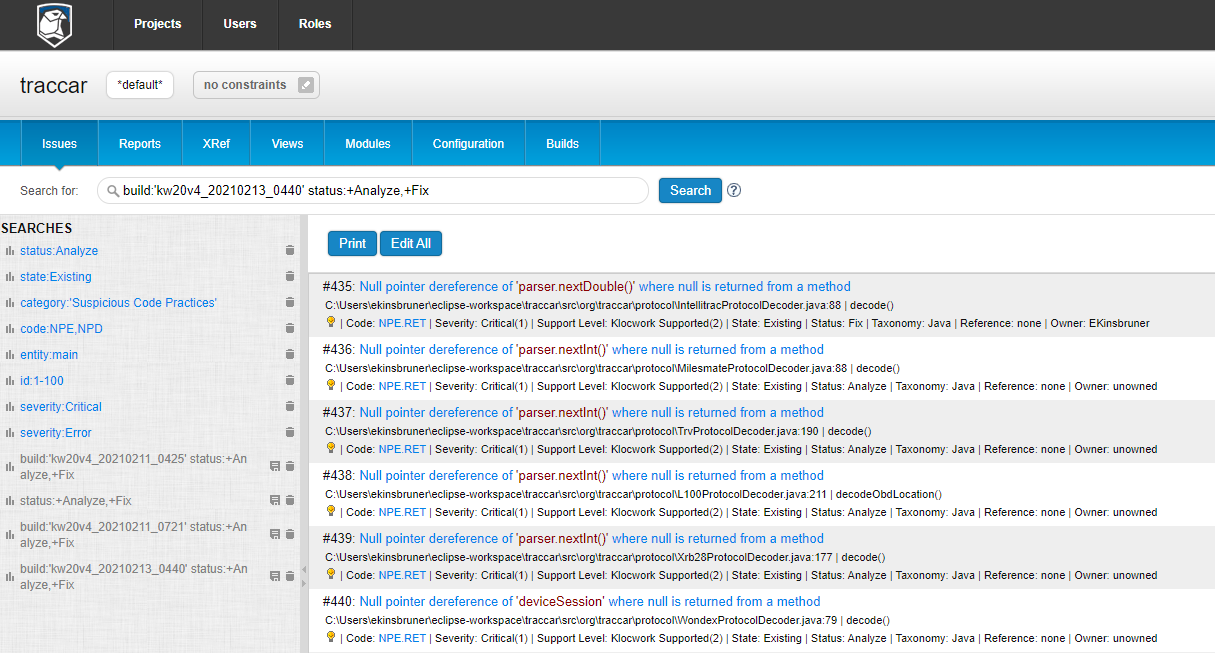
In the below screenshots, you can see that by running a simple Maven SCA job within CI as a batch project upon each code change, can easily generate a comprehensive report (In my case, I am using Klocwork SCA tool):

“kwmaven clean install compile -Dmaven.test.skip=true”

As soon as I run from the project folder the above command, a full build and scan are being performed on the entire code base, using specific compliance modules that I predefined. The developer receives at the end of his Jenkins job a detailed report and can also login to the KW dashboard to review each and every issue or violation (below is a snapshot of the post build report).

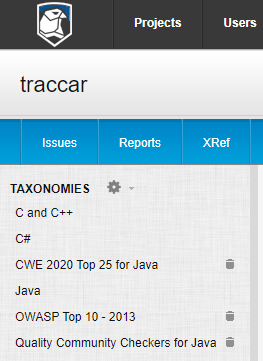
In the above case, I was using Java, and was configuring the below sets of compliance coverage to use for the scanning. Obviously, if I was to cover an app from the automotive or other embedded software industry, I could have added an additional taxonomy/ies.

From a process perspective, the developer should follow the process of per each code change, run a build (either using the team CI trigger, or his own local CI. Once he receives a clear report without critical issues surrounding safety, security, and other code quality standards, he can pass his changes toward the next phase of integration testing, functional regression testing and pre-production activities.

It is clear that such code scanning and quality activities, must be filtered properly to avoid redundant noise, false negatives, etc. This is why, relying on SCA tools that can grant the developers the option to filter by severity, modules, configurations and compliances, allows getting the job done while not overwhelming them with irrelevant feedback.

In the above Klocwork zone within Eclipse (or IntelliJ), users could filter through the relevant columns the issues by Severity and more.

To summarize this post: Teams especially within Agile and DevOps practices can enjoy both types of quality gates by employing SCA tools together with coding standards under the same source base, and once these activities generated Green lights, they can allow testing teams to run their jobs with higher confidence.

In most organizations, testing teams are requiring as a pre-requisite to starting their regression an SCA audit report showing that no major issues were detected within the build cycle.

Keep in mind that the above process and tools is 100% automated, and runs within CI which means, ever for large code bases, this is a few minutes of scanning to get to the quality gate with a peace of mind.

Resolving The Quality Visibility of Continuous Testing Across The DevOps Pipeline Environments

Guest Blog Post by: Tzvika Shahaf, Director of Product Management at Perfecto & A Digital Reporting and Analysis Expert

Intro

One of the DevOps challenges in today’s journey for high product release velocity and quality, is to keep track of the CI Jobs/Test stability and health over different environments.

Basically, this is one of the top reasons, bugs slips to production. In other words, lack of visibility into the DevOps delivery pipeline.

Real Life Example

Recently, I’ve met a director of DevOps in a big US-based enterprise who shared with me one of his challenge in this respect.

At the beginning of our meeting he indicated that his organization’s testing activity lacks a view for the feature branches that are under each team’s responsibility.  This gap creates blind spots, where even the release manager is struggling to assemble a reliable picture of the quality status.

The release manager and the QA lead are responsible to verify that after each and every build cycle execution, the failures that occurred are not critical and accordingly approve the merge to a master branch (while also issuing a defect in Jira for bugs/issues that weren’t fixed). The most relevant view for these personas is a suite level list report as the QA lead is still busy with drill down activity to the individual test report level as he is interested also in understanding the failure root cause analysis (RCA).

As part of the triage process, the team is looking to understand the trending history of a Job to see under each build what was the overall test result status. The team is mainly interested in understanding if the issue is an existing defect or a new one. In addition, they look for an option to comment during the triage process (think about it as an offline action taken post the execution).

Focusing on the Problem

So far so good, right? But here’s the problem: the work conducted by each team is not siloed in the teams CI view. There’s no data aggregation to display an holistic overview of the CI pipeline health/trend.

Each team is working on different CI branch and the other teams during the SDLC have no visibility to what happened before/happens now.

Even when there’s a bug, the teams will be required to issue the defect to a different Jira project – so the bug fixing process adding more inefficiency, hence time to the release process.

When the process is broken as identified above, each new functionality on the system test level  or stage, is being merged while not all failures are being inspected (lack of visibility from within the CI).

Jenkins will ignore the system test results and merge even if there’s a failure.

The Right Approach to Solving The problem

The desired visibility from a DevOps perspective is to cover the Jenkins Job/build directly form the testing Dashboard across all branches in order to understand what was changed in that specific build that failed the tests:  which changes in the source code were made? Etc.

What if these teams had a CI overview that capture all testing data that includes:

  1. Project name & version
  2. Job name /Build number
  3. Feature Branch name or Environment description (Dev, Staging, Production etc.)
  4. Scrum Team name  – Optional
  5. Product type – optional

Obviously, Items 1-3 are a MUST in such a solution, since when displayed in the dashboard UI, teams gain maximum visibility into the relevant module the user is referring to when a bug is found,  and this is also part of the standard DevOps process as well. Double clicking on the visibility and efficiency point,  such options can significantly narrow the view of the entire dashboard for each team lead/member , and help them focus only on their relevant feature branches.

When the QA lead reviews the CI dashboard he/she can mark a group of tests and name the actual failure reason, that can sometimes be a bug, a device/environment issue or other.

Feel free to reach out to me if you run into such issues, or have any insights or comment on this point of view – Tzvika’s Twitter Handle

Thank You

Tzvika Shahaf