Enabling Mobile Testing In a Fast Growing DevOps Reality

6 months ago I launched my 1st book called “The Digital Quality Handbook”.

The book aims to address the key challenges in assuring high mobile (as well as web) quality, by avoiding pitfalls that are commonly practiced in the industry.

I have also recently joined the working group of ISTQB to influence the material in the mobile certification course, where I plan to include insights from the book as well.

In this book, I am hosting top leaders from the industry touching the most important aspects in assuring DevOps.

The above image is taken from Amazon recommending my book close to the leading DevOps practitioner books, this is another strong validation of the book relevancy and value.

Few highlights from the book are below:

  1. Shifting quality left and right to cover as many tests automatically throughout the release pipeline is a key to move faster and identify issues earlier in the process (Angie Jones from Twitter, Manish Maturia from InfoStretch and others provide practitioner level insights and tips)
  2. Testing on the right platforms and OS’s is a key to assure high quality across different devices (new, legacy, popular) in various locations and environments
    1. I am referring to this magazine, that I author on a quarterly basis in the book, and highly recommend subscribing to receive this free asset upon each release: http://info.perfectomobile.com/factors-magazine.html 
  3. Robust automation is achieved through best practices such as building a page object model (POM) and using unique object locators rather than flaky XPATHs etc. I am referring to a free online tool that can help score your object as part of your test automation development http://xpathvalidator.projectquantum.io/
  4. Testing not only via the UI is another key for success, so complementing UI testing with API level testing can reduce the time of testing, provide faster feedback and other values. This chapter was actually developed by my twin brother Lior Kinbruner 🙂 – worth checking it out!
  5. Performance testing and UX is another challenge and key to success. A full section of the book is dedicated to wind tunnel testing, user experience testing (JeanAnn Harrison contributes a lot here together with Amir Rozenberg).

The book was #1 in the new best selling book on Amazon, and still rocking today after more than 6 months. It is #43 as of today in the overall Software Testing Book which is a great validation and honor for me and the contributors.


If you still haven’t got a copy of the book, i really encourage you to do so – I am already planning on my next journey so stay tuned 🙂
Mobile Testing Coverage Strategy: OS Families vs. Minor OS Versions?

As the author of the Factors coverage magazine, I am often asked about the operating system (OS) testing strategy.

Some teams would state that testing on the Latest, Latest – 1, and Latest -2 for Android is sufficient, and for iOS testing on the Latest and Latest -1 would satisfy their coverage risks. I actually say that it is not about covering the specific minor OS version, but covering sufficiently the representative OS families. In this post, i will explain my recommended strategy.

Mobile OS Versions Market Share

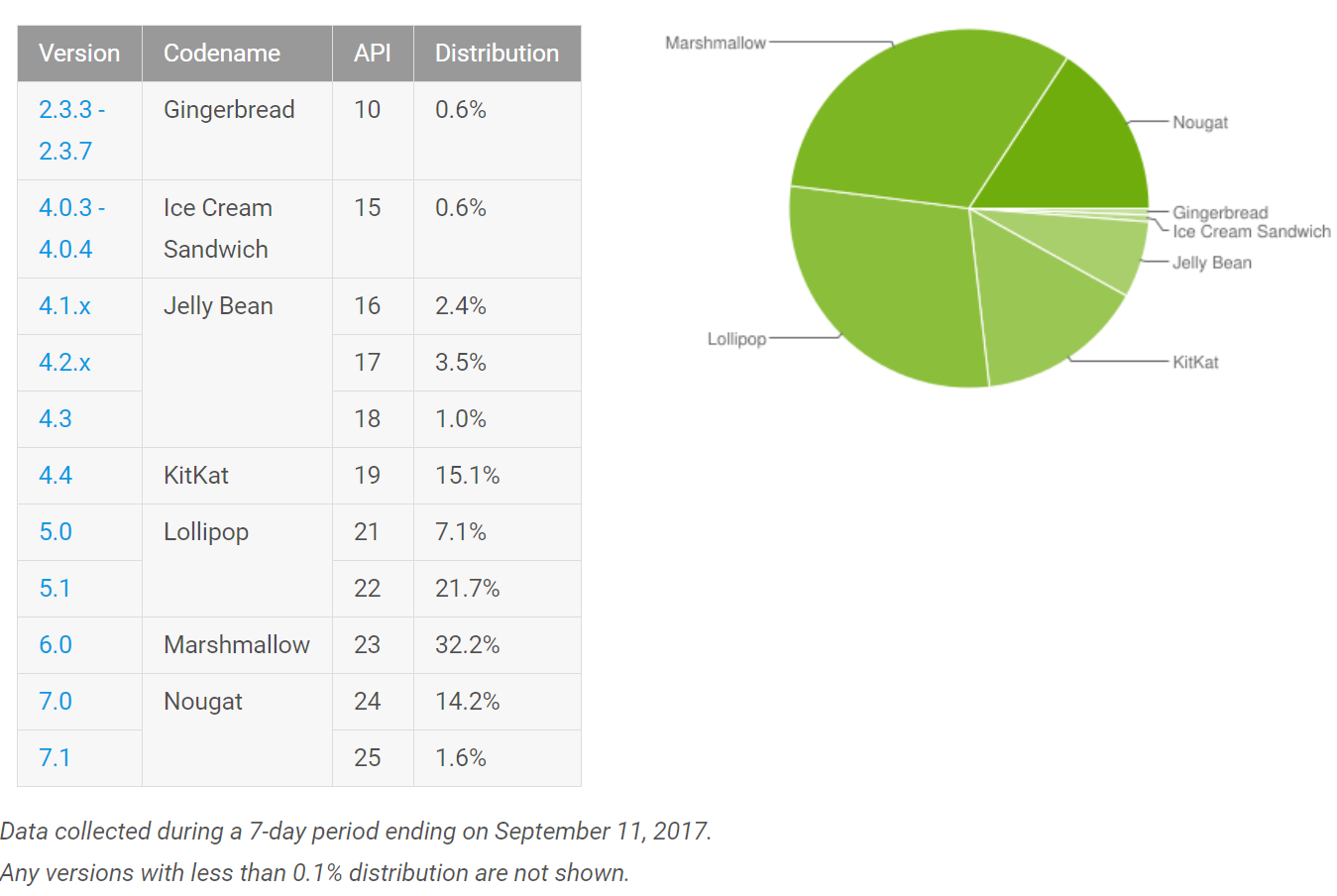
Late September 2017, Android platform is led by top 5 OS families (4.x, 5.x, 6.x, 7.x and latest 8.x).

In fact, Android 4.x includes 2 families – JellyBeans and KitKat, with the latest being more widely used and popular.

OEM’s are very late in updating their smartphones to the latest OS version, and when they do, they only update the most recent smartphone versions and not the legacy ones that in many cases, cover a large user base.

For Android, as we can see above, any app developer that supports the global market, cannot disregard a market share of 15.1% like the KitKat holds – KitKat is by far not a Latest -2 or even – 4 OS platform. Testing, therefore, an Android App needs to go quite far in the history of the Android OS versions to provide sufficient and risk-free testing.

iOS isn’t that simple either. This platform, especially after the recent iOS11 release, is now split into 3 major OS families that include iOS9.3.5, iOS 10.3.3 and iOS11.0. Each iOS family supports quite important devices that were left behind and did not receive the most up to date iOS update. As an example, iPhone 4S, iPad 2, iPad Mini 2 are stuck on iOS9.3.5, and iPhone 5C, iPhone 5 and iPad 4th Generation are stuck on iOS 10.3.3.


While the above market share still doesn’t reflect the iOS11 new market share, there is still 9% of iOS9.x users out there and there will be at least a similar number for iOS10.x once most users shift to iOS11. As in Android, here also we see 3 major OS families that need to be included in the testing strategies.

Beta Testing

Many organizations are being naive to the market innovation, and are not taking advantage of the public beta releases and developer previews coming from both Apple and Google. Android Oreo (8.0) and iOS11 were available for testing prior to their general availability release, however, many teams didn’t leverage this and are finding late in the game the defects, and in many cases, are hearing about them from their customers.

Above is the iOS11 GA bug that was reported, while below is an Android Oreo OS version specific defect that impacted many end-users.


Recommendations

Each customer has its unique user base, target geographies and in many cases also access to the user’s analytics.

Customers should follow the following guidelines

  • Monitor your user base and build a test lab that addresses the top user’s devices/OS permutations (use your own analytics)
  • Learn and monitor the market trends like the above so they do cover in addition to their analytics the major OS families (5-10% and above market share should be highly considered)
  • Testing on public OS beta’s is a must. Google Pixels, iOS Simulators as well as desktop web beta versions are always available for testing from day one
  • Mix device manufactures with the selected OS families to maximize the coverage (e.g. Samsung XX/Android 6.x, LG XX/Android 5.1.x, etc.)
  • Cover real environment testing to identify real-life glitches like mentioned above and as we see often in the market.


Happy Testing!


Optimizing Mobile Test Automation Across The Pipeline

With the massive innovation that drives the digital market these days, organizations are continuing to develop features, as well as new test code to cover these features.

What I’ve learned is that often, the test code developers would not always stop and look back into their existing test suites and validate whether the new tests that are being developed are somehow a superset to existing ones. In addition, legacy tests are a continuous load and overhead on your SDLC cycles length if they are not being maintained over time.

Oil Transport

Many Owners To The Same Problem

Since we live in an agile/DevQAOps world, test code development is not a QA only problem, but rather everyone3s. Tests are being executed throughout the pipeline from Dev to integration and pre/post production testing.

Use of smart tagging mechanism for your test scenarios (login), suites (App A) and types unit, regression) can be a good step towards gaining control over your tests.

Without some context, discipline, and continuous structured validation of the tests, it will become harder as you progress your SDLC to debug, analyze and solve defects (would be like finding the key in the below visual mess)

Find the Key in the Picture

Recommended Practices

  • Develop the tests with context, tags and proper annotations that would make sense to you and your team even 12 months from the development day. Make sure that in your execution reports you then have a way to filter using these annotations to only get the view of a given functional area, platform etc.
  • Match your device under tests capabilities to the test code and application under test. Make sure that you focus e.g. your fingerprint based tests only on the devices that support it (API XX and above).
  • Perform test code review every agreed upon time – in such review, group your feature specific test suites and try to optimize, merge, eliminate flakiness, identify missing coverage areas etc. It is harder to do it as the time progresses, so depending on your release cadence and test development maturity, set the right goals – more reviews would be better than less – it will also be shorter and more efficient that way since the delta between such review will be smaller.
  • Drive joint Dev, Test, Product, Marketing decisions based on data – When you have the ability to get quality analysis from your entire test suites, it is recommended to gather all counter parts and brainstorm on the findings. Which tests are most effective, can we shrink based on the data the release cycles, are we missing tests for specific areas, are there platforms that are more buggies than others, which tests takes longer than others to finish etc.
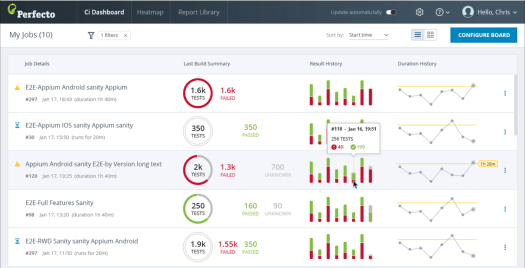
  • Optimize your CI and build-acceptance testing – based on the above intelligence, teams can reach data driven decision about what to include in their CI as well. Testing in the build cycle via CI should be fast, reliable with zero false positives. With quality insights on your tests, you can decide and certify the most valuable and fastest tests to get into this CI testing, and by that to shrink the overall process without risking coverage aspect.

CI_Dash1.png

Bottom Line

A test is code, and like you refactor, maintain, retire and improve your code, you should do the same to your tests. Make sure to always be in control over your tests, and by that, gain control over your quality of your app in a continuous manner.

Happy Testing!

Optimizing Android Test Automation Development

Now that we are a few weeks away from Google I/O, and we understand that the complex Android landscape is becoming, even more, complex let’s explore a way Android teams can optimize and plan their test automation across the different platforms and devices.

In the past, I’ve written about the need to connect the 3 layers:

  • Application under test
  • Test code itself
  • Device/OS under test

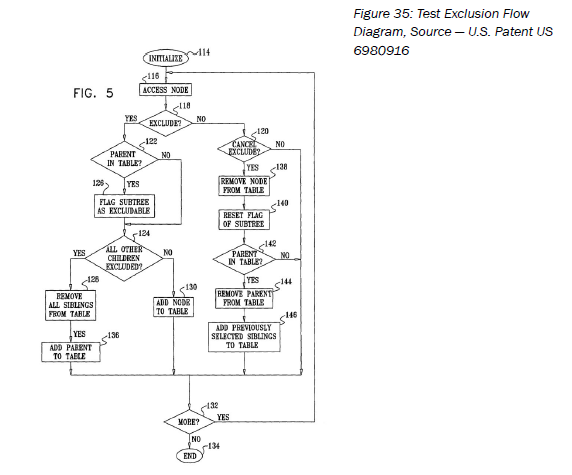
I related back to my old patent that I jointly submitted years ago in the days of J2ME and also wrote a chapter about it in my newly published book (The Digital Quality Handbook)

Problem Definition

Android OS families support different capabilities and the gap is growing from one Android SDK to the next. As an example, Android devices older than 6.0, cannot support Android Doze for battery usage optimization, or cannot support App Shortcuts (see below example from Google Photos app). These diffs introduce a challenge to Dev and test team that innovate and take advantage of these features since the test code that shall run against these features and devices needs to be turned only towards devices can actually support it.

How can teams sustain a test automation suite that runs specifically on the right devices per supported features?

Proposed Approach

While I don’t have a bulletproof, magic pill to address all challenges that may occur as a result of the above problem, I can surely recommend an approach as described below.

Important to note, that being aware of the problem, is a step toward resolving it 🙂

Assess Your App and DUT:

  • Map the different features that your app supports or requires the users to grant permissions for
  • Examine your device test lab and filter the devices that support and does not support these specific features

To manage the above, teams can leverage the following:

  • Use an existing ADB command that extracts from a connected device/s the supported feature
    • ADB SHELL
      • PM LIST FEATURES

After running the above command, you will get an output that looks like the below …

Compare The Outputs

Once you know your DUT’s capabilities, as well as your App, features to be tested, you can run a simple output comparison and see what can and can’t be tested – From that point, the optimization should be mostly manual – you will setup your test execution and CI in the lab accordingly. While it isn’t simple enough, it still offers a sustainable approach + awareness to both dev and test team that can be useful throughout the development, debugging and testing activities. In the below visual you can see a capabilities diff between a Samsung Note 5/Android 7.0 (left column) and an older  Samsung running Android 5.x device capabilities (right column). An immediate diff out of a larger list that I have shows the fingerprint functionality that is supported on the Note 5 but not on the other Samsung device. Such insight should be used when planning the feature testing across these 2 devices (this is just one example).

Bottom Line

As Google continues to innovate and add more features, the existing devices and test framework will find it hard to close the gaps and that’s a challenge that teams need to be aware of, plan for, and optimize so their release vehicles and velocity remain solid.

Happy Optimization!

Recent Web Browser Quality Related Innovations

Yea, I know that my blog title is mobiletestingblog, but that’s not a mistake in the title 🙂
There is no distinction anymore around which platform is used to consume content today, whether it’s a smartphone, tablet or a desktop browser when it comes to web apps.

If your company is developing a web app or responsive website, these sites ought to be tested thoroughly against all of the above platforms. The majority of web traffic BTW today is coming from mobile devices.

In general, it is good to know that from a desktop browser market share, there are less familiar players such as UC browser by Alli-baba and Samsung Internet browsers that hold a nice chunk of the market (globally) – so, avoiding them as  part of your test coverage matrix might not be a good strategy.

Sourcehttp://gs.statcounter.com/browser-market-share

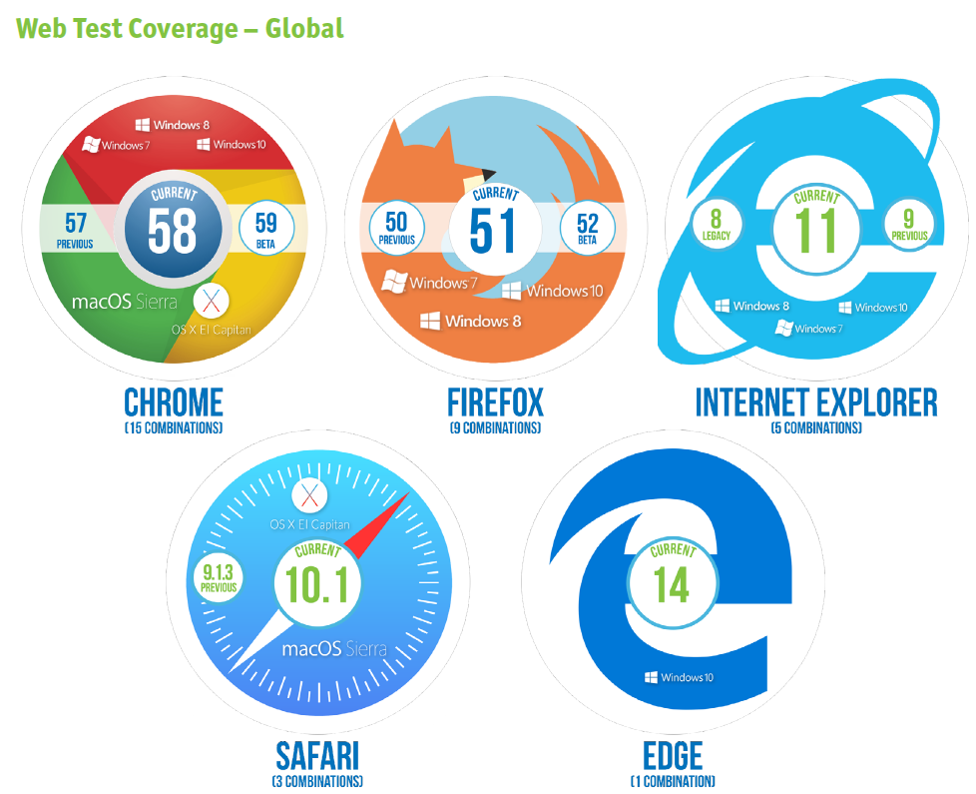
In general, the below would be the formula for web testing that I would recommend these days, however if from a web traffic analysis and supported geographies you have a requirement to target China, Europe, and others – then the above metrics should be added to the mix either in addition to the below, or as an adjustment.

With that in mind, I wanted to highlight in this post some recent web specific tools that are out there, free and can be extremely useful for both developers and testers.

In Google Chrome 59 (Beta is already available today!), Google is introducing new code coverage built-in tools that can allow both developers and testers to record the screen activities and report back in a nice dashboard how much of the site content (javascript, and more) was actually executed in an aim to optimize the website quality, performance and much more.

From a user perspective, they only need to enable the Code Coverage option from within the developer tools in Chrome, so it is added under the Sources menu option as seen in the below

Once that is done, simply start capturing the code coverage by clicking on the Record button to get an output like the below – simple, valuable, and unfortunately only available as free and built-in solution within this browser compared to FireFox/Safari and others 😦

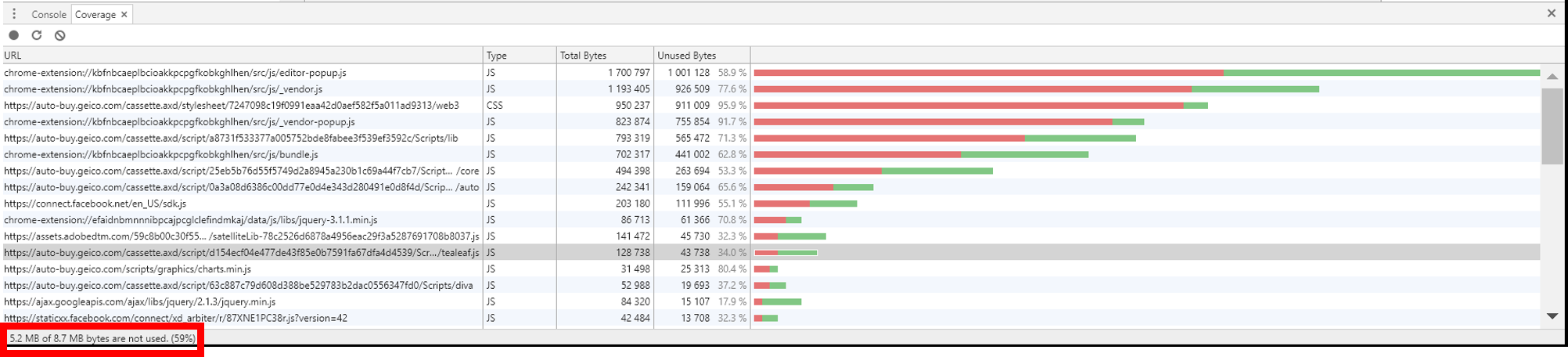
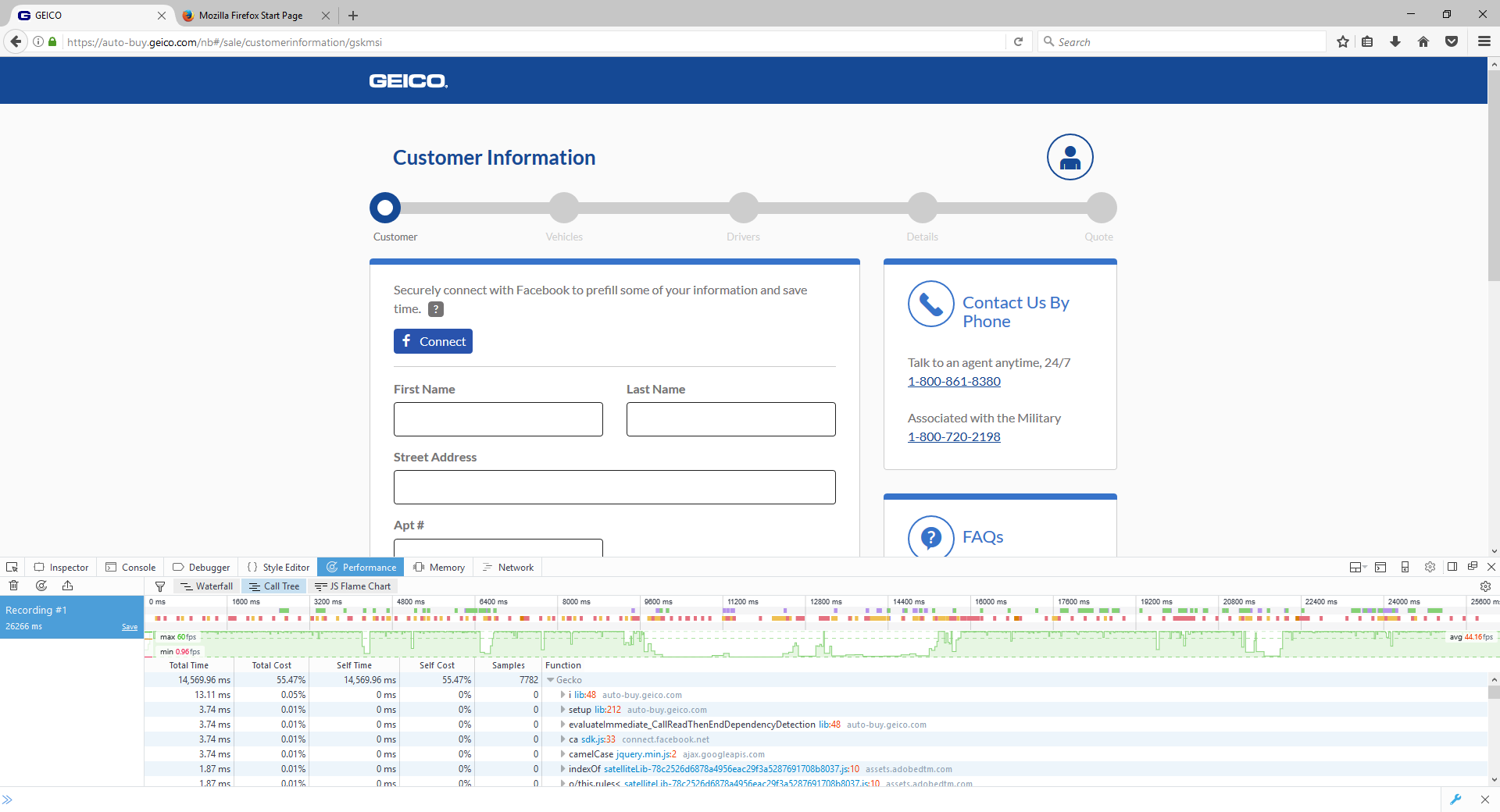
I went and used this new tool on Geico.com responsive site and nearly completed the most common transaction of querying for a new car insurance. At the end of the recording, i received the below chart that as you’ll see – shows a usage of only ~60% of the site JavaScript code in this journey.

When drilling down deeper to a specific .JS source file, you can see a highlighted source with Green/Red where it is actually used and unused – this is what your web developers need to see and optimize wisely.

Let’s see a key feature that was recently introduced in FireFox also, and cab be useful for both Dev and testers.

2 weeks ago, Mozilla released FireFox 53 that is their 1st step in a new project called Quantum, that aims to enhance performance, stability and more.

Among the innovations in that release are compact themes, usability features like reading time for the page, new permission model (see below), faster performance and few other bug fixes for stability.


Detailed release notes on FF 53 can be found here: https://www.mozilla.org/en-US/firefox/53.0/releasenotes/.

In addition to the newly introduced features, and if you’re not aware of – FireFox offer quite useful developer tools including object inspector, performance monitor, debugger and network monitor that can also enhance your overall web Dev and Test activities (see example below)

Performance Monitoring Tools From Within FireFox Developer Tools

Network Monitoring Options From Within FireFox Developer Tools

Bottom Line

With Chrome and FireFox being the leading Desktop and Mobile browsers, it is very important for web teams to continuously monitor the early releases from Google and Mozilla, and as the 1st Beta or Dev branches are available to validate – Do It. This can not only reveal earlier regressions but might also as mentioned in this blog, offer you some new productivity tools that can increase the value to your overall Dev and Test activities.

Android Privacy Policy May Break Your Test Automation Scripts

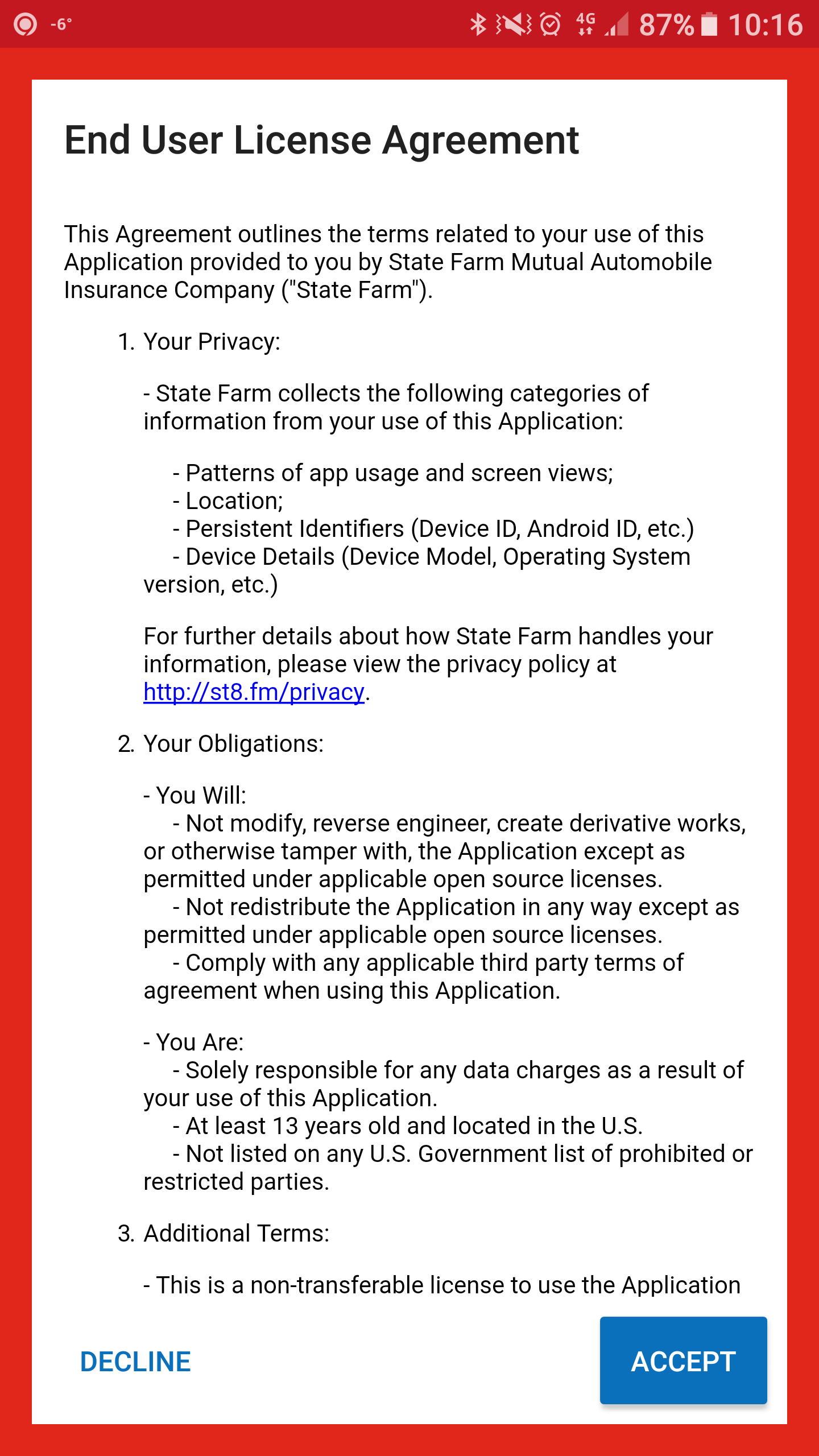
Last month, Google announced its plans to purge play store apps that do not include a privacy policy and the app required security permissions upon app installation.

Behind that requirement, Google is trying to provide its users maximum transparency on what the app is requiring, and what data it collects when users consume the apps.

An example for a native app that already implemented that requirement is StateFarm insurance, see below

So, with that simple request to mobile Android app developers, there are few quality implications.

Immediate Implications and Requirements

  1. Revise and continuously maintain your test code
    1. The above screen obviously was not planned for in the latest test automation cycle, which means that a new cycle will get stuck and fail since this is a new screen with a request for a user action – Teams ought to develop new test steps that upon initial app installation would test the following: When user Clicks Accept the app launches successfully, while when users Click Decline the app closes)
    2. Coverage matrix implications: Existing test suites should cover the above new scenario’s on the supported platforms – Device/OS combinations
  2. Varying permissions across platforms
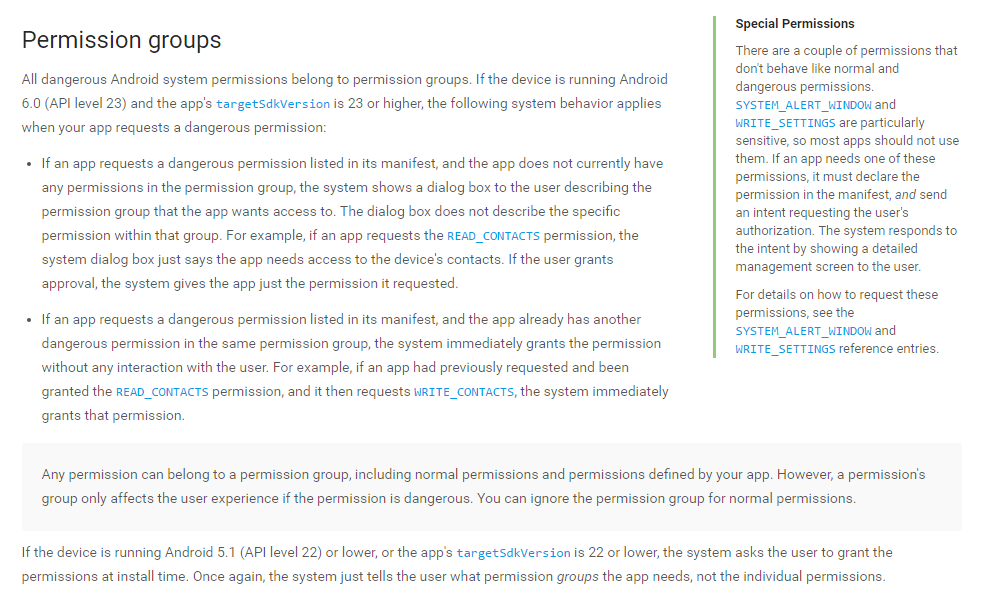
    1. Most apps will require unique permissions that are (hopefully!) being used and required by the app to functions (see below visual from iUbenda).
    2. Different OS versions of iOS and Android might behave differently and support different security features like in Android 6.0 and above (Doze, Permission groups etc.)
  3. Compatibility of device/OS features and permissions
    1. Wha happens in the above regards, once an app supports even a normal related permission e.g. USE_FINGERPRINT. This permission since it resides in the normal group, it will be automatically granted to the user, however, what if the DUT (device under test) does not support this feature? How are teams differentiating in an automated way the test execution with regards to the device capability? Matching the device features and the test case as part of a dynamic test execution can be a powerful agile capability especially in the growing mobile fragmented market.


As seen in the above, from a testing perspective, Android apps that support “Dangerous Permissions” would require the Dev/Test teams to develop and validate a varying use case or device/OS behavior test case when tested on Android 6.0 and above compared to Android 5.1 and below (e.g Android API level < version 23).


Google Mobile Friendly With Perfecto and Quantum

Guest Blog Post by Amir Rozenberg, Senior Director of Product Management, Perfecto

resize

Google recently announced “Mobile First Indexing”, from Google:

To make our results more useful, we’ve begun experiments to make our index mobile-first. Although our search index will continue to be a single index of websites and apps, our algorithms will eventually primarily use the mobile version of a site’s content to rank pages from that site, to understand structured data, and to show snippets from those pages in our results (Source).

screen-shot-2017-02-13-at-5-33-26-pm

More recently they made the Google Mobile-Friendly tool and guidelines available. A very nice interactive version is available here, and images at the bottom of the thread, while there’s also an API (which, thanks to Google, can allow users to exercise first before they code). Google also offers code snippets in several languages.

Notes:

  • Google takes a URL and renders it. If you run multiple executions in parallel there’s no point in sending the same URL from every execution because the result would be the same
  • Google returns basically “MOBILE_FRIENDLY” or not. Suggest to set the assert on that
  • The current API differs from the UI such that it only provides the results for Mobile friendly (and the UI gives also mobile and web page speed). Hopefully, Google adds that to the response 😉
  • This will probably not work for internal pages as Google probably doesn’t have a site-to-site secure connection with your network.


For developers and testers who do not have time, testing mobile friendliness repeatedly probably will simply not happen. That’s why I integrated Google Mobile-Friendly API into Quantum:

  • Added 2 Gherkin commands
// If you navigate directly to this page
Then I check mobileFriendly URL "http://www.nfl.com"
// If you got to this page through clicks
Then I check mobileFriendly current URL
  • Added the Gherkin command support (GoogleMobileFriendlyStepsDefs.java)
  • And the script example is pretty simple:
@Web
Feature: NFL validate

  @SimpleValidation
  Scenario: Validate NFL
    Given I open browser to webpage "http://www.nfl.com"
    Then I check mobileFriendly current URL
    Then I check mobileFriendly URL "http://www.nfl.com"
    Then I wait "5" seconds to see the text "video"


That’s it. Next steps:


Ideas for future improvement:

  • You can automate the validation such that every click would trigger a check with Google behind the scenes.

Just for fun, some more screenshots for detailed analysis for NFL.com:


screen-shot-2017-02-13-at-5-33-48-pm


screen-shot-2017-02-13-at-5-34-09-pm

screen-shot-2017-02-13-at-5-34-23-pm


Criteria’s for Choosing The Right Open-Source Test Automation Tools

I presented last night at a local Boston meetup hosted by BlazeMeter a session together with my colleague Amir Rozenberg.

The subject was the shift from legacy to open-source frameworks, the motivations behind and also the challenges of adopting open-source without a clear strategy especially in the digital space that includes 3 layers:

  1. Open source connectivity to a Lab
  2. Open-source and its test coverage capabilities (e.g. Can open-source framework support system level, visual analysis, real environment settings and more)
  3. open-source reporting and analysis capabilities.

During the session, Amir also presented an open-source BDD/Cucumber based test framework called Quantum (http://projectquantom.io)

Full presentation slides can be found here:

Happy Reading

Eran & Amir

Model-Based Testing and Test Impact Analysis

In my previous blogs and over the years, I already stated how complicated, demanding and challenging is the mobile space, therefore it seems obvious that there needs to be a structured method of building test automation and meeting test coverage goals for mobile apps.

While there are various tools and techniques, in this blog I would like to focus on a methodology that has been around for a while but was never adopted in a serious and scalable way by organizations due to the fact that it is extremely hard to accomplish, there are no sufficient tools out there that support it when it comes to non-proprietary open-source tools and more.

First things first, let’s define what is a Model-Based testing

Model-based testing (MBT) is an application for designing and optionally executing artifacts to perform software testing or system testing. Models can be used to represent the desired behavior of a System Under Test (SUT), or to represent testing strategies and a test environment.

mbt

Fig 1: MBT workflow example. Source: Wikipedia

In the context of mobile, if we think about an end-user workflow with an application it will usually start with a Login to the app, performing an action, going back, performing a secondary action and often even a 3rd action based on the previous output of the 2nd. Complex Ha

The importance of modeling a mobile application serves few business goals:

  1. App release velocity
  2. App testing coverage (use cases)
  3. App test automation coverage (%)
  4. Overall app quality
  5. Cross-team synchronization (Dev, Test, Business)


As already covered in an old blog  I wrote, mobile apps would behave differently, and support different functionality based on the platform they are running (E.g., not every iOS device support both Touch ID and/or 3D Touch gesture). Therefore, being able to not only model the app and generate the right test cases but also to match these tests across the different platforms can be a key to achieving many of the 1-5 goals above.

In the market, today there are various commercial tools that can assist in MBT like CA Agile Requirement Designer, Tricentis Tosca, and others.

Looking at an example provided by one of the commercial vendors in the market (Tricentis), it can show a common workflow around MBT. A team aims to test an application; therefore, they would scan it using the MBT tool to “learn” its use cases, capabilities, and other artifacts so they can stack these into a common repository that can serve the team to build test automation.

tosca

Fig 2: Tricentis Tosca MBTA tool

In Fig 2., Tricentis examines a web page to learn its entire options, objects, and other data related items. Once the app is scanned, it can be easily converted into a flow diagram that can serve as the basis for test automation scenarios.

With the above goals in mind, it is important to understand that having an MBT tool that serves the automation team is a good thing, but only if it increases the team efficiency, its release velocity, and the overall test automation coverage. If the output of such tool would be a long list of test cases that either does not cover the most important user flows, or it includes many duplicates than this wouldn’t serve the purpose of MBT but rather will delay existing processes, and add unnecessary work to teams that are already under pressure.

In addition to the above commercial tools, there is an older but free tool that allows Android MBT with robotium called MobiGuitar. This tool not just offers MBT capabilities but also code coverage driven by the generated test scripts.

A best practice in that regards would be to probably use an MBT tool that can generate all the application related artifacts that include the app object repository, the full set of use cases, and allow all of that to be exported to leading open-source test automation frameworks like Selenium, Appium, and others.

Mobile Specific MBT – Best Practices and Examples

Drilling down into a workflow that CA would recommend around MBT would look as follows – In reality, the below is easier said than done for a Mobile App compared to Web and Desktop:

  1. The business analysts will create the story using tools like CA Agile Requirement Designer or such (see below more examples)
  2. The story is then passed to an ALM tool (e.g.: CA Agile Central [formerly Rally], Jira, etc.) for project tracking
  3. Teams use the MBT tools to collaborate
    1. The automation engineer adds the automation code snippets to the nodes where needed or adds additional nodes for automation.
    2. The programmer updates the model for technical specs or more technical details.
    3. The Test Data engineer assigns test data to the model
  4. Changes to the story are synchronized with the ALM Tool
  5. Test cases are synchronized with the ALM Tool
  6. The programmer completes coding
  7. The code is promoted from Dev to QA
  8. Testing begins
    1. The tester uses the test cases with test data from MBT tools for manual test case execution
    2. The automation scripts with test data are executed for functional and regression testing

To learn more about efficient MBT solutions, practices please refer to these sources:

Introduction to Android Espresso Testing and Spoon

Espresso UI test automation framework is Google’s de-facto testing platform for Android app developers.

The way it is easily used from within Android Studio and IntelliJ IDEA IDE’s makes it a powerful tool that differentiates it from other open-source cross-platform solutions such as Appium and other commercial tools.

Before drilling into basic setup and execution of an Espresso simple test, let’s first understand some of the basics:

  • Espresso is an Android only test automation framework (not cross platform like Appium/Selenium)
  • Espresso requires a separate APK package running in parallel with the application under test
  • Espresso is not Dev-Language Free framework like Appium (that supports Java, JS, Python, C#, Perl)

Positive Motivations to Use Espresso

  • The Espresso framework is embedded into the entire dev workflow and IDE, and that makes the adoption and leverage higher
  • Espresso can be used to do a quick post-commit validation of a fix or new code implementation, and also as part of a larger test scale within the CI workflow.
  • Espresso provides fast feedback to its users which is a big advantage since it is running on the device/emulator side-by-side with the app
  • Espresso supports annotations to determine the test execution scope (small/medium/large) which organizes the overall testing cycle for both dev and test
  • Espresso has unique synchronization method in its core making the tests less flaky and more robust. It will pass to the next test step in the code only once the view is available on the device screen in opposed to other tools that can easily fail without having timers, validation points and more.

Basic Espresso Framework Methods:

Espresso framework allows the automation developer to manipulate the test using 3 concepts:

  1. View Matchers
  2. View Actions
  3. View Assertions

basicses

As seen in the above definition, onView(xxx) of a specific object on the app screen, an Action will be performed and an Assertion will be made to validate the end result.

Espresso Setup

The setup within Android studio is quite simple, and there is plenty of documentation in the google community around it.

The developer will edit his build.Gradle file for the application under test to include the Espresso framework dependency, the JUnit version, and the InstrumentationRunner (see below example)

gradlesample

Once the above is done, it is time to create for the corresponding app the test class.

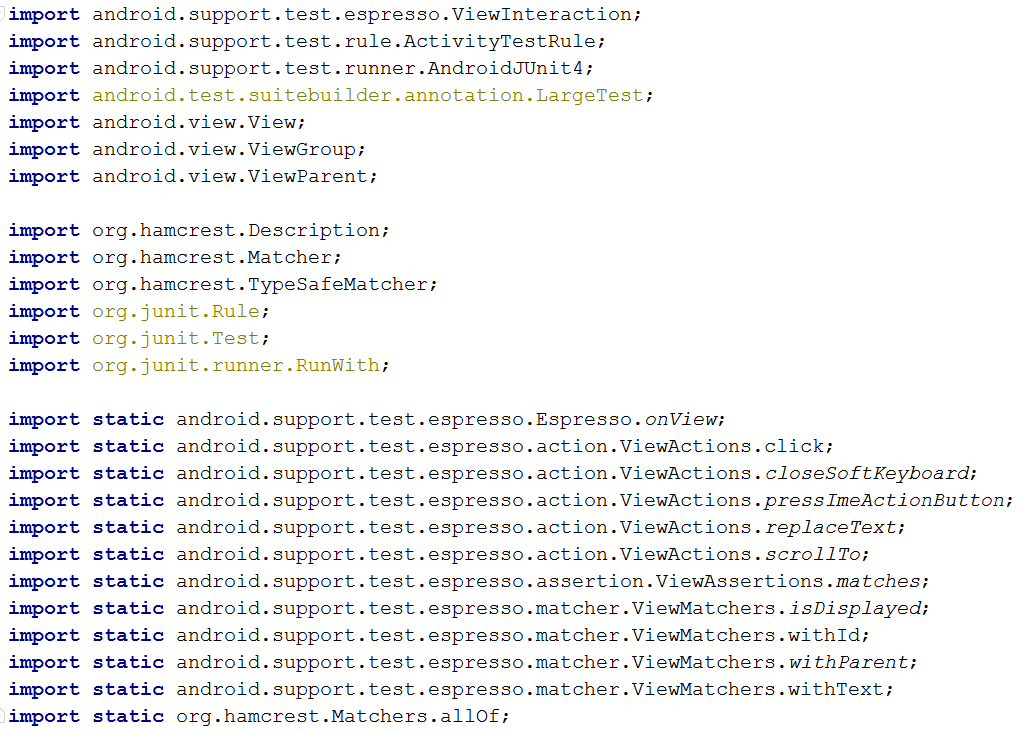
This class will need to include through Import, few libraries that are required by the Espresso test (below example)

import

Test Code Implementation

In order to develop an Espresso UI automation, the developer must have the unique object identifiers for the application under test.

To study the app objects (Hamcrest Matchers) the developer can use various methods:

  1. UIAutomation.bat tool that is built into the Android Studio SDK
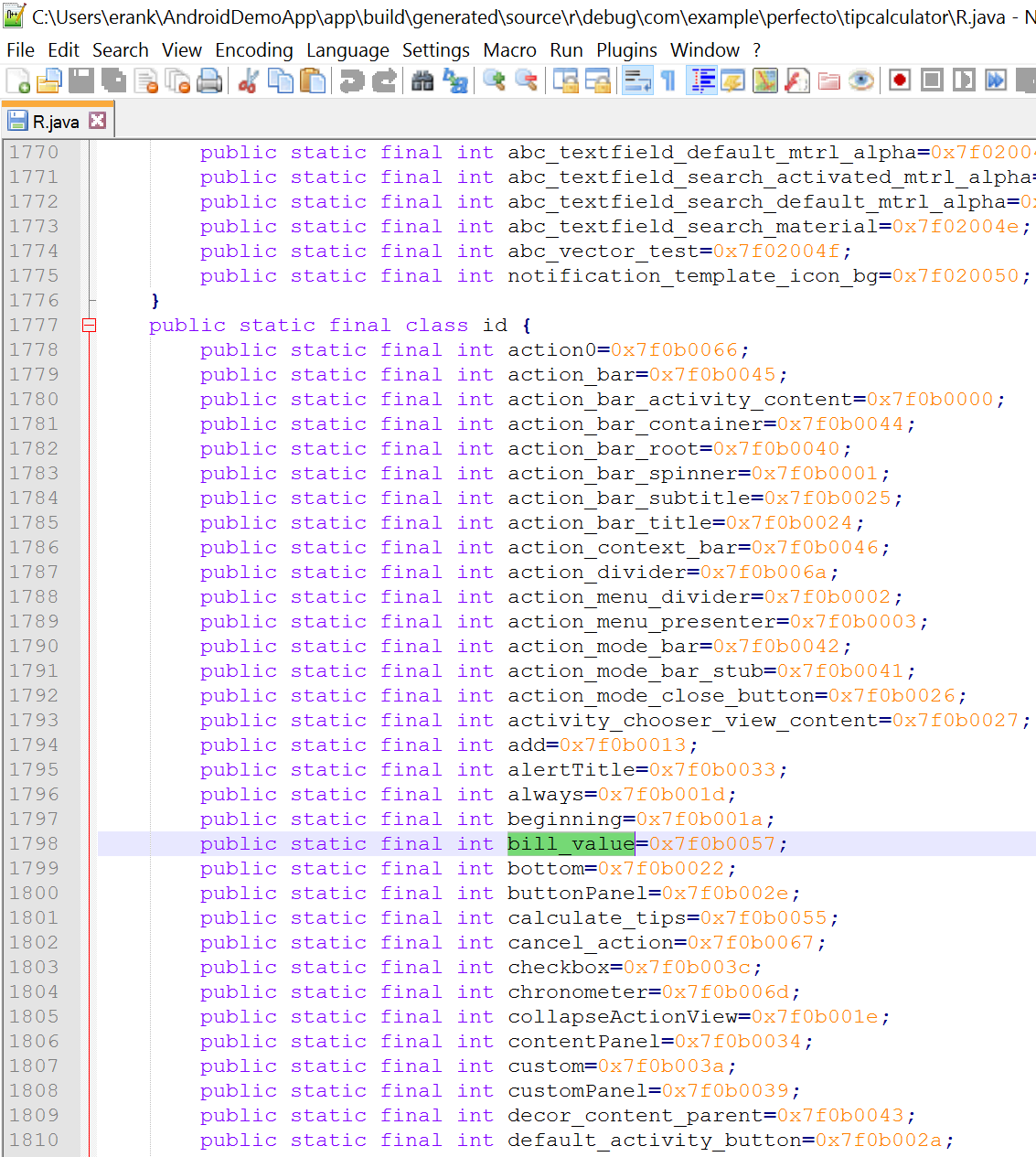
  2. All resource ID’s should be automatically be stored in a dynamically generated R.java file
  3. Object spy within tools that supports Espresso (Perfecto and others).

Looking at a simple TipCalculator application, you can see through the UIAutomator spy, that the text box object ID is named bill_value

uiautomator

In the R.java file, it will look like this (choose the best method you find comfortable)

rjava

When implementing the Espresso test code, we will leverage the ObjectID as part of the onView method to perform a Click prior to entering an input value to that text box.

code1

In order to perform a type of value into the above Total Bill text box, we will use the 2nd method provided by Espresso, that is. Perform:

code2

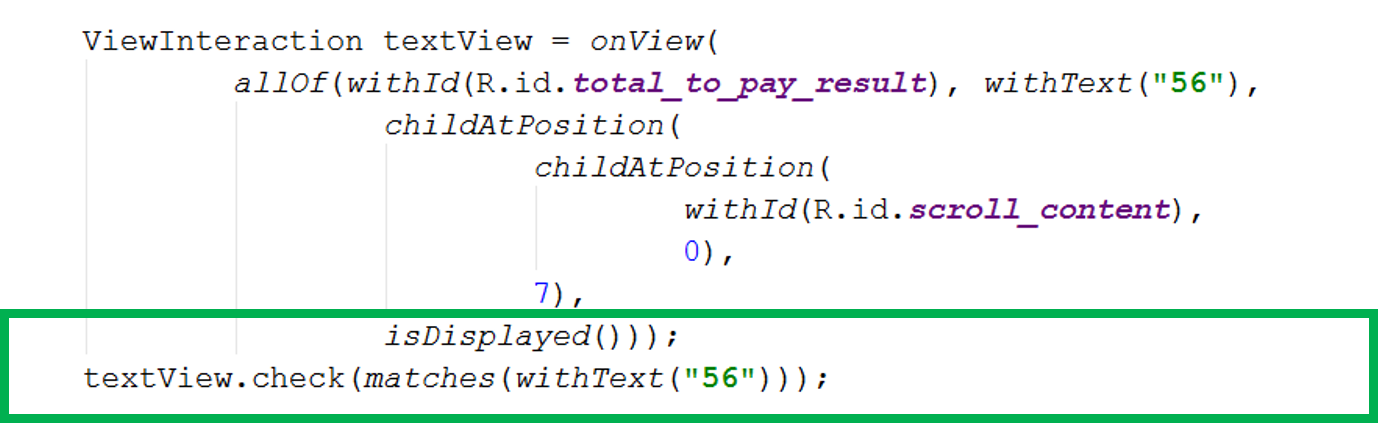
Once we are done with the action, we would like to assure that the result of that action is as expected, and this is when the developer will use the assertion method .Check

code3

Finally, once the entire test suite is implemented and ready – running the test from Android Studio is very simple.

Select the Test class from the Edit Configurations menu in Android studio and chose run. Select your target (ADB connected device, cloud devices, emulators).

code4

At the end of a test, a basic test report will be provided to the user.

Running Espresso Tests in Parallel – Using Spoon

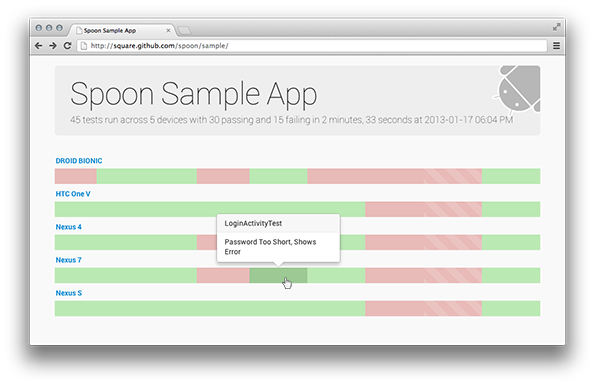
No test engineer or developer will be quite unless it validates the functionality of his app on multiple devices and emulators. For that, there is another widely used tool called Spoon (there are also cloud-based solutions as mentioned above that support parallel execution on real devices). This tool, will collect all the target devices (that are visible via adb devices) test results and aggregate them into one HTML view that can be easily investigated.

example_main

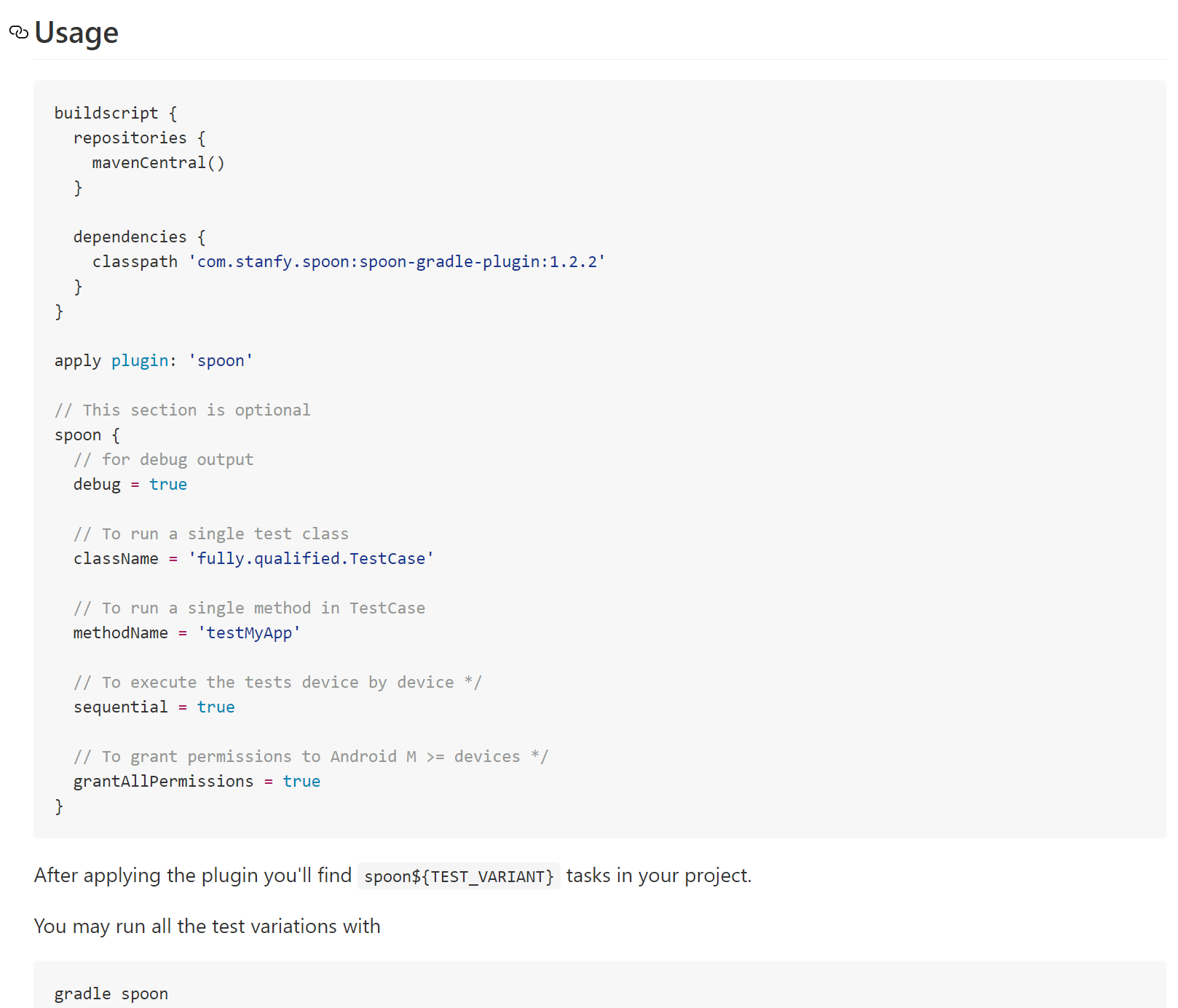
In order to leverage Spoon, please download the Gradle for spoon plugin and install it. Post installation, configure as follows

gradlespoon

By default, Spoon will run your tests on all ADB connected devices, however, if you want to run concrete devices and skip others in order to reproduce a specific defect on 1 device, you can configure spoon accordingly

spoon2

Good Luck!